Finding reliable scanners for retail arbitrage means matching fast, accurate barcode reading with flexible connectivity. This article highlights five top options suitable for busy stores, warehouses, and libraries, focusing on omnidirectional and hands-free designs that speed up checkouts and stock checks. Each pick supports 1D and 2D barcodes, adapts to damaged labels, and offers multiple connection modes such as USB, Bluetooth, or wireless 2.4G. Read on to compare features, scanning modes, and ergonomics to choose the right tool for your workflow.
| Product | Brand | Type | Connection |
|---|---|---|---|
| NetumScan Omnidirectional Desktop | NetumScan | Omnidirectional Desktop | USB |
| NetumScan Hands-Free Desktop | NetumScan | Hands-Free Desktop | USB |
| NETUM NT-M1 Laser Scanner | NETUM | Handheld Laser | USB |
| Eyoyo 2D Hands-Free | Eyoyo | 2D Hands-Free | USB |
| Volcora Wireless Bluetooth Scanner | Volcora | Bluetooth & USB | Bluetooth / USB |
NetumScan Omnidirectional Desktop Scanner

The NetumScan Omnidirectional Desktop Scanner reads 1D and 2D barcodes, including QR codes, on labels, paper, and digital displays. It is designed for high-volume environments like warehouses and retail stores, and it can reliably scan damaged or distorted barcodes. The device features automatic scanning without manual triggering, entering a sleep mode when idle and activating as soon as a movement is detected. Its non-slip base and anti-shock design help protect against drops, while IP54 dust protection suits busy storefronts and backrooms.
NetumScan Hands-Free Desktop Scanner
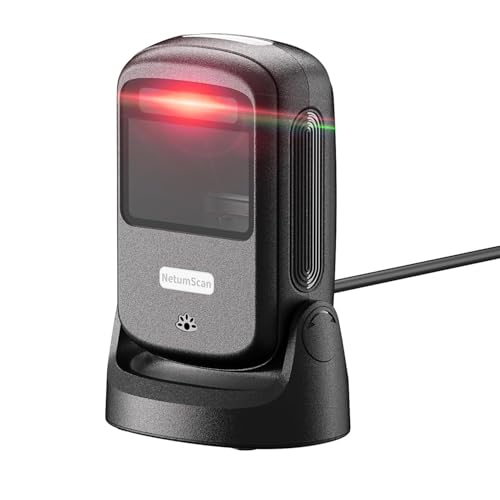
This hands-free, omnidirectional scanner is optimized for fast checkout and inventory tasks in retail, libraries, and warehouses. It supports automatic sensing to read barcodes as items move within the window, reducing the need to handle the device. It is compatible with Windows, Mac, and Linux, and its ergonomic design minimizes user fatigue during long shifts. The included stand keeps the scanner stable when not in use, making it ideal for cashier counters and stock rooms alike.
NETUM USB Laser Handheld Scanner NT-M1

The NETUM NT-M1 handheld laser scanner emphasizes plug-and-play setup with any USB port. Its trigger design supports comfortable, repeated use, and it’s compatible with Windows, Mac, and Linux. The decoder supports a wide range of barcode types, including UPC, EAN, Code 39, Code 128, and more, making it suitable for supermarkets, warehouses, libraries, and healthcare facilities. Its straightforward interface minimizes training time while delivering reliable scanning across diverse environments.
Eyoyo 2D Hands-Free Barcode Scanner
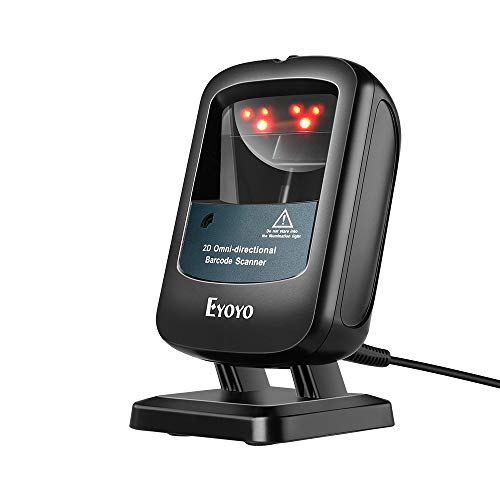
Eyoyo’s 2D hands-free scanner is designed for busy retail and commerce settings, capable of reading 1D and 2D codes from paper, labels, and screens, including PDF417 and Data Matrix. It offers manual sleep and wake controls to reduce glare and power consumption, which helps maintain comfort during long shifts. The device requires no additional software or drivers, enabling quick setup at POS stations and quick line movement in high-traffic environments.
Volcora Wireless Bluetooth Scanner

Volcora combines Bluetooth and USB connectivity with 1D and 2D decoding capabilities, making it versatile for tablets, smartphones, and PCs. The scanner supports 49-foot Bluetooth transmission and up to 328-foot wireless range, depending on the mode, enabling flexible scanning across warehouses or multiple checkout lanes. Its auto-detect and omnidirectional reading technologies ensure quick captures from various angles, reducing line wait times and improving inventory accuracy in multi-device ecosystems.
Buying Guide
- Scanning accuracy and omnidirectionality: Choose models that read damaged or misprinted barcodes and work from multiple angles to minimize re-scans.
- Connectivity options: USB is universal, but Bluetooth or 2.4G wireless can reduce cable clutter and fit larger retail or warehouse layouts.
- Desktop vs handheld: Hands-free scanners boost throughput at checkout, while handheld units excel in shelf auditing and inventory counts.
- Durability and design: Look for anti-slip bases, cushioned triggers, and IP-rated protection for dusty environments.
- Power and sleep modes: Auto-sensing and sleep functions save energy and speed up scanning when items move into view.
- Compatibility and software: Ensure compatibility with your POS, inventory, and ERP systems; driver requirements should align with your IT support.
- Memory and data handling: Some models offer internal storage for offline scanning; consider memory if you need to batch-scan before uploading.
- Price-to-performance: Balance upfront cost with long-term efficiency gains from faster checkout lines and accurate stock data.
When selecting a scanner for retail arbitrage, prioritize high reading speed, reliability with varied barcode quality, and flexible connectivity to integrate with existing devices and software. The options above cover a spectrum from compact handhelds to hands-free desktop units, all aimed at reducing checkout times and improving inventory workflows.