Digital preservation of old negatives, slides, and film offers a fast, affordable way to keep memories alive. This guide compares compact, standalone scanners and slide readers that convert 35mm and other formats into JPEGs without a computer. Each option aims to maximize image quality while staying simple to operate, so you can choose the best fit for family photos, school projects, or archival projects.
Summary of selected products
– ClearClick QuickConvert 2.0 Photo, Slide, and Negative Scanner
– Kodak SCANZA Digital Film & Slide Scanner
– DIGITNOW 22MP All-in-1 Film & Slide Scanner
– ClearClick Virtuoso 3.0 Film & Slide Scanner
– KLIM K2 Mobile Photo Digitizer
ClearClick QuickConvert 2.0: Fast Standalone Scanning
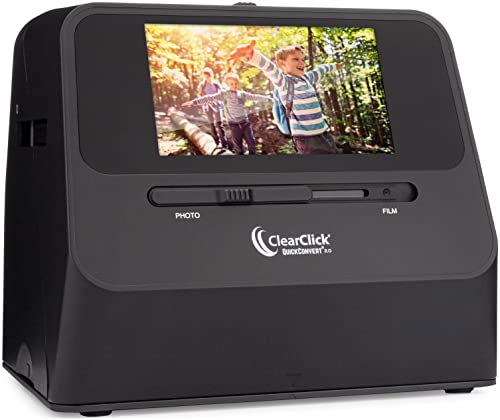
The QuickConvert 2.0 is a compact, standalone device designed for quick digitization of photos, slides, and negatives without a computer. It scans 4×6 photos and smaller, including 35mm, 110, and 126 formats, in 2–3 seconds per item. It saves images as JPEGs to an SD memory card and supports 14MP base resolution with up to 22MP interpolated quality. A built-in rechargeable battery and a 5-inch LCD screen enable cord-free operation and easy preview. This model is ideal for fast archiving of small batches and on-the-go digitization projects.
Key features: standalone operation, 14MP (22MP interpolated), SD card storage, 5″ LCD preview, battery powered, supports multiple film formats, size button adjusts scan area.
KODAK SCANZA Digital Film & Slide Scanner
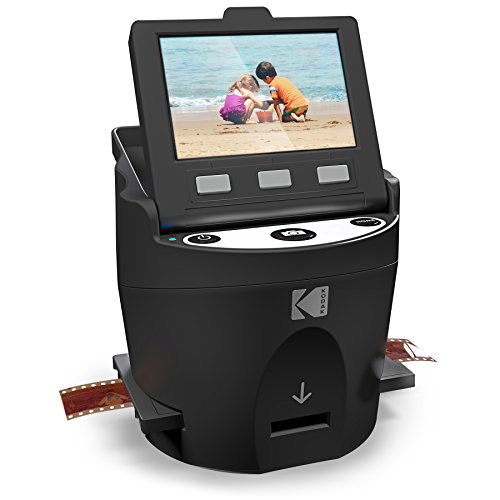
The Kodak SCANZA is a versatile film-to-digital scanner that handles 35mm, 126, 110, Super 8, and 8mm formats. It converts negatives and slides to JPEG in seconds and features a large 3.5-inch LCD for easy viewing. In addition to its fast one-step scanning, it ships with multiple film inserts and adapters for quick setup across formats. Note that the device focuses on film-based media rather than modern photo prints, and it emphasizes simple, one-touch operation for rapid digitization.
Key features: 14/22MP performance, built-in 3.5″ LCD, adapters for many formats, one-touch scan and save, standalone operation, simple layout for quick use.
DIGITNOW 22MP All-in-1 Film & Slide Scanner

The DIGITNOW scanner is a standalone unit capable of processing 35mm, 135, 110, 126, and Super 8 formats, both films and slides. It includes internal memory (128MB) and supports an SD card up to 32GB for expanded storage. Scans are produced in JPEG at up to 22MP quality with adjustable brightness and color. The device promises fast transfers and image edits via simple controls, making it a practical all-in-one solution for mixed media archives with minimal setup.
Key features: 2-second scans, standalone operation, 22MP interpolation, adjustable brightness/color, SD card storage, supports multiple film formats.
KLIM K2 Mobile Photo Digitizer

KLIM’s K2 is a portable, foldable film scanner designed for mobile use. It supports 35mm negatives and color positives, offering a smartphone-based workflow. The package includes batteries, a cleaning cloth, and a magnetic plate for larger phones, plus an app that enables digitization and simple editing. This option is best for travelers or those who want to digitize on a phone while avoiding traditional desktop scanning setups.
Key features: smartphone integration, portable design, 35mm support, free app, batteries included, easy setup.
ClearClick Virtuoso 3.0 Film & Slide Scanner

The Virtuoso 3.0 represents ClearClick’s third generation of film and slide scanners with a larger 7-inch LCD preview screen. It offers 14MP or 22MP interpolated resolution and works with 35mm, 110, and 126 formats, plus 50mm slides. Like other standalone ClearClick devices, it requires no computer or drivers and saves files directly to an SD card. The 7-inch display makes real-time review straightforward, which benefits careful archival work where viewing details matters.
Key features: 7″ LCD preview, 14/22MP interpolated, supports multiple film formats, no computer required, SD card storage, real-time preview.
ClearClick Digital Photo, Slide, and Film Scanner

This model provides a straightforward, portable solution for scanning photos, slides, and negatives to digital JPGs without a PC. It emphasizes speed with 10MP interpolated scans and claims 2–3 seconds per item. It includes a 4GB memory card and editing software; an excellent entry point for casual users who want quick digitization and simple editing without setup delays.
Key features: 10MP interpolation, standalone operation, included memory card, basic editing software, quick scans, portable.
Buying Guide: Choosing Your Negative-To-Digital Solution
- Format compatibility: If you primarily have 35mm negatives or color slides, look for a scanner that explicitly supports those formats. Some models also handle 126, 110, or Super 8, but not all do both negatives and prints well.
- Storage and power: Consider whether you prefer standalone units with SD card output or setups that require a computer. Standalone devices reduce workflow steps but may offer fewer editing options.
- Resolution and color fidelity: Look for MP (megapixels) and interpolated MP when evaluating image quality. A larger LCD screen helps preview results before saving, reducing wasted scans.
- Ease of use: One-touch scanning, adjustable brightness, and straightforward interfaces save time, especially for bulk archiving.
- Portability vs. screen size: Larger LCDs (7 inches) are helpful for detailed viewing, while compact units excel at travel or on-the-go digitization.
- Editing and software: Some models include built-in editing, color adjustments, or OCR capabilities. Check compatibility with your computer or mobile device if you plan to edit later.
- Memory and expandability: Internal memory is limiting; SD cards provide flexible capacity. If you plan large scans, ensure the max card size supports your needs.
- Price vs. value: Standalone devices save time and clutter but may compromise on advanced editing. If you already own a PC or tablet, a scanner with strong software integration could be a better long-term investment.
For archival projects, prioritize devices with robust format support, a clear preview interface, and reliable output quality. If convenience is the priority, a standalone unit with a large LCD and fast scan speeds can dramatically shorten the digitization process. For casual hobbyists, a budget model with easy setup and basic editing features often suffices.