Choosing the right desktop hard drive enclosure can streamline data backups, media libraries, and system expansions. This guide focuses on 3.5-inch and compatible SATA enclosures that work with USB interfaces, UASP acceleration, and robust cooling. Below you’ll find five solid options praised for speed, safety, and easy setup. A quick summary table follows to help you compare at a glance.
| Product | Brand | Interface | ||
|---|---|---|---|---|
| GODO USB 3.0 3.5″ Enclosure | GODO | USB 3.0 | 18 TB | Aluminum, UASP, Stand |
| SABRENT EC-DFLT | SABRENT | USB 3.0 | Unknown (2.5/3.5″ support) | Lay-flat dock, UASP |
| CLAVOOP 3.5 Enclosure | CLAVOOP | USB 3.0 | Up to 20 TB | ABS, LED, auto-sleep |
| ORICO 3588US3 | ORICO | USB 3.0 | Up to 20 TB | Tool-free, heat resistant |
| SSK 3.5 USB 3.0 Dock | SSK | USB 3.2 Gen 1 | Up to 20 TB | Lay-flat, UASP |
GODO USB 3.0 3.5″ Enclosure Review

The GODO 3.5-inch SATA hard drive enclosure emphasizes speed, safety, and heat management. It uses USB 3.0 with UASP to deliver up to 5 Gbps transfer rates, claiming significantly faster read speeds than older USB configurations. A dedicated 12V/2A power supply reduces power fluctuations, providing better stability for large drives during data transfers. The aluminum housing aids in heat dissipation and minimizes static buildup, while a vertical stand keeps the enclosure compact on desks or shelves. This model supports both hard drives and SSDs, offering plug-and-play convenience with no drivers required. An LED indicator provides at-a-glance status, useful for troubleshooting and monitoring activity.
Key considerations for this option include the robust power design and aluminum construction, which help prolong drive life under sustained workloads. While the dock is straightforward to use, users should ensure compatibility with larger 18TB-class drives and verify that the included power adapter is suitable for their region. Overall, it’s positioned as a reliable all-purpose enclosure for desktop storage expansion and backups.
SABRENT EC-DFLT External Docking Station

This SABRENT lay-flat docking station supports 2.5-inch and 3.5-inch SATA drives, with USB 3.0 connectivity and UASP support for optimized performance. It emphasizes versatility for drive swapping, backup tasks, and quick data transfers. Firmware updates are recommended for compatibility with larger capacity drives, and users can access these updates from SABRENT’s website. The layout allows easy access to drives without opening a PC, ideal for rapid cloning or offline backups. UASP support helps reduce CPU load and improve sustained transfer rates when paired with capable hosts.
Practical notes include ensuring firmware is current to maximize compatibility with large drives, and recognizing that performance hinges on the host computer’s USB 3.0 capabilities. This dock is especially suitable for users who frequently swap drives or perform backups across multiple drive types, providing a simple plug-and-play workflow.
CLAVOOP 3.5 Inch Enclosure

The CLAVOOP enclosure presents a sturdy ABS shell with a circular top design and ample ventilation. It supports USB 3.0 with UASP, delivering tested read speeds up to 336 MB/s, though actual speeds vary by drive and system. The enclosure incorporates shock-absorbent padding to help protect drives during handling and operation. An LED indicator shows working status, and an auto-sleep function reduces energy usage when idle. The design is plug-and-play, requiring no tools or drivers for setup, which makes it a practical option for quick storage expansion and routine backups.
Considerations include the emphasis on cooling and stability through its ventilation design and padding. The auto-sleep feature helps conserve energy for idle systems, while the tool-free approach simplifies installation. Its performance is best realized with modern SATA drives on compatible systems, making it a dependable choice for general desktop storage tasks.
ORICO 3.5/2.5 Inch Enclosure (3588US3)

ORICO’s 3588US3 external enclosure supports both 3.5-inch and 2.5-inch SATA drives up to 20 TB, making it a flexible option for large capacity storage. It touts broad OS compatibility, including Windows, MacOS, Linux, and Unix, with UASP acceleration and a tool-free installation process. The 3.0 USB interface delivers up to 5 Gbps transfer rates, and the rugged ABS shell provides heat resistance and impact resistance. A simple plug-and-play workflow minimizes setup time, while the 12V/2A power supply is standard for 3.5-inch drives, helping ensure reliable operation during sustained transfers.
Users should note that while the device is widely compatible, performance depends on drive speed and host capabilities. Its portability and capacity make it a strong candidate for archiving large media libraries or backing up entire systems without opening a computer case.
ORICO 24TB Lay-Flat Dock
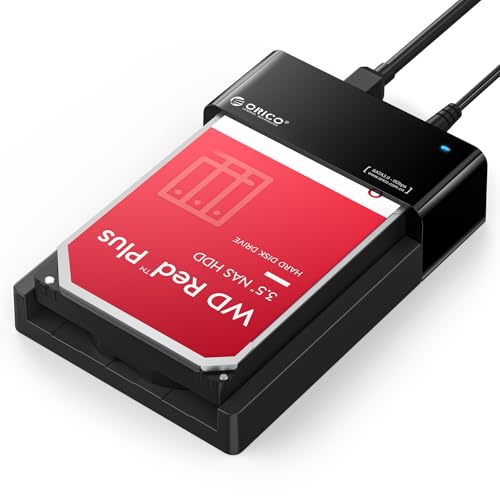
This ORICO dock emphasizes a lay-flat design for improved airflow and cooling, which is beneficial during long backup sessions or large file transfers. It supports both 2.5-inch and 3.5-inch SATA drives up to 24 TB, making it easy to clone or migrate data between drives without opening a PC. USB 3.0 with UASP provides fast transfer speeds and broad compatibility with most modern systems. The 24TB capacity ensures room for extensive media libraries and backups, while the lay-flat layout enhances heat dissipation during heavy workloads.
For users who need a high-capacity, simple-to-use solution with good cooling, this dock offers a balanced option. However, remember that performance depends on the drives used and the host computer’s USB controller.
SABRENT EC-HD2B Dual Bay Dock

The SABRENT EC-HD2B is a dual-bay external dock designed for flexible drive management and duplication tasks. It supports standard desktop 2.5″/3.5″ SATA drives and up to 10 TB per drive, with plug-and-play operation requiring no drivers. While this model focuses on cloning and larger storage configurations, the lack of explicit USB-C or higher-end acceleration means performance is tied to the host’s USB interface. It is ideal for users who regularly clone drives or need a straightforward, bulk-loading solution for multiple drives in a desktop setup.
Key considerations include whether a dual-bay layout suits your workflow and whether drive cloning features align with your backup strategy. For straightforward backups and data transfers, a single-bay enclosure with UASP may deliver higher sustained speeds, but for drive duplication tasks, this dual-bay dock has clear advantages.
Buying Guide: Key Purchase Considerations
- Drive compatibility and size: Ensure the enclosure supports 3.5-inch drives (and 2.5-inch if needed) and that your target capacities (e.g., 18–24 TB drives) are supported by the device and power supply.
- Interface and speed: USB 3.0 with UASP provides improved transfer speeds and CPU efficiency. Some devices offer USB 3.2 Gen 1 capability; check host compatibility to maximize performance.
- Power delivery: A dedicated 12V/2A or similar power supply is common for 3.5-inch drives. Verify regional voltage compatibility if used abroad, and consider devices with active cooling for sustained workloads.
- Build and cooling: Aluminum or robust ABS housings aid heat dissipation. Ventilation design and padding influence drive longevity under heavy use.
- Trayless vs. tool-free design: Tool-free enclosures simplify installation but ensure you understand the security of drives during use and whether a trayless design affects drive fitment.
- Advanced features: LED indicators, auto-sleep, and drive-detection reliability contribute to ease of use and energy savings. Docking stations may offer cloning or rapid-swapping features that fit specific workflows.
- Reliability and firmware: For docks or enclosures with mixed drive types, keep firmware up to date and confirm compatibility with larger capacity drives to avoid compatibility issues.
- Portability vs. capacity: Lay-flat designs typically improve cooling but may take more desk space. Consider your workspace needs and how often you move or transport the enclosure.
In summary, the five enclosures reviewed here provide a spectrum of choices—from standalone 3.5-inch USB 3.0 enclosures to versatile docking stations capable of 2.5/3.5-inch drives and high capacities. When selecting, weigh speed, compatibility, cooling, and your intended use (backup, archiving, cloning, or media storage). The right model will align with your drive sizes, typical data transfer workloads, and the computer systems you commonly connect to.