Old AV gear often relies on S-Video, RCA, or FireWire connections, while modern machines favor HDMI and USB. This guide highlights five reliable products that help bridge the gap between vintage video equipment and contemporary displays or computers. Each pick focuses on compatibility, ease of use, and clear signal transfer to maximize the value of aging camcorders, VCRs, and playback devices.
| Product | Brand | Connection Type | Best Use |
|---|---|---|---|
| HTDYOO S Video RCA to HDMI Converter with RCA Cable + Svideo Cable | HTDYOO | S-Video, RCA to HDMI | Convert legacy AV to HDMI displays |
| Firewire to USB Adapter Cable for 4 Pin IEEE 1394-a Devices | Herfair | FireWire 4-pin to USB 2.0 | View DV footage on PC (no capture) |
| HDMI to S Video RCA Converter | Generic | HDMI to S-Video/Composite | Display HDMI sources on older TVs |
| LBSC FireWire 800 to 400 9 Pin to 4 Pin Cable 6FT | LBSC | FireWire 800 to FireWire 400 | Connect modern FW800 to older FW400 devices |
| PASOW Firewire Cable 9 Pin to 4 Pin IEEE 1394 | PASOW | FireWire 9-pin to 4-pin | DV/camcorder to computer transfer |
The summarized picks above cover video signal conversion and legacy interface bridging, offering practical options for owners of VHS players, DV camcorders, and early digital devices. Each product is chosen for straightforward setup, broad compatibility, and dependable performance with older AV gear.
HTDYOO S Video to HDMI Converter

The HTDYOO S Video RCA to HDMI Converter connects devices with RCA or S-Video outputs to HDMI displays. It includes integrated RCA and S-Video cables plus a USB power cable, simplifying setup. Supported output resolutions include 720p and 480p with common aspect ratios of 16:9 and 4:3. This option is especially useful for reviving older VCRs or game consoles on modern screens that may lack legacy inputs.
Firewire to USB Adapter Cable for 4 Pin IEEE 1394-a

The Herfair FireWire to USB adapter is a simple plug-and-play solution designed to connect a Sony DV camera or other FireWire 4-pin devices to a USB-equipped computer. It is important to note that the adapter supports viewing only (no capture) and does not support bidirectional data transfer. The USB 2.0 interface supports data rates up to 400 Mbps, making it a practical choice for playback or archival viewing if capture is not required.
HDMI to S Video RCA Converter

This converter turns HDMI signals into S-Video or RCA outputs, enabling older TVs to display content from modern HDMI devices. It supports full HD up to 1080p input, but it is not compatible with 4K sources. It is suitable for use with DVD players, STBs, PS3/PS4, and similar devices when connected to legacy display hardware.
LBSC FireWire 800 to 400 9 Pin to 4 Pin Cable

The LBSC cable bridges FireWire 800 (9-pin) devices with FireWire 400 (4-pin) equipment, including older cameras and some iMacs or Mac Pros. It supports high-speed data transfer and is designed for Mac and PC environments. The 6-foot length provides flexibility for connecting devices that may be positioned away from a computer or display.
cablecc USB to 1394 Firewire Adapter
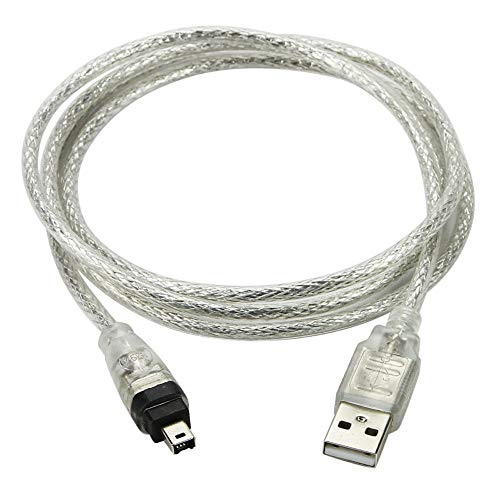
The cablecc adapter is a specialized custom cable designed for Sony DCR-TRV75E DV devices, with limitations: it is not compatible with universal USB-to-1394 or vice versa. It uses a 4-pin FireWire plug paired with USB-A and is intended for specific DV workflows. Users should verify device compatibility before reliance on this adapter for archival tasks.
PASOW Firewire Cable 4 Pin to 6 Pin iLink DV Cable
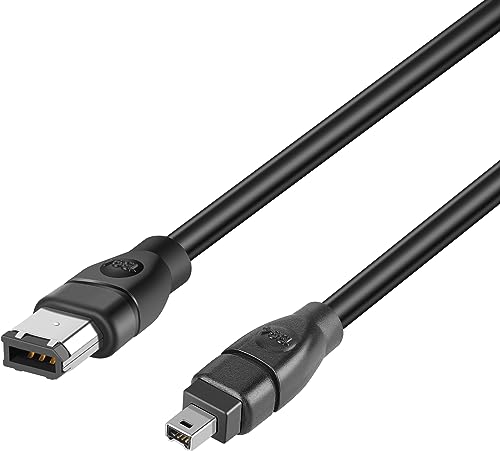
This PASOW cable connects a 4-pin DV device to a 6-pin FireWire port at up to 400 Mbps. It is suitable for camcorders and related gear that use the 6-pin interface on a computer or capture device. The cable’s dual ends support straightforward plug-and-play use in compatible systems, helping to maintain data flow between devices.
PASOW FireWire Cable 9 Pin to 4 Pin

This PASOW model provides a FireWire 800 (9-pin) to FireWire 400 (4-pin) connection, designed for bridging newer FireWire ports with older equipment. It supports data transfer up to 800 Mbps and emphasizes plug-and-play functionality. It is ideal for transferring legacy video or audio streams where FireWire compatibility is needed.
USB 2.0 to IEEE 1394 Mini Adapter

The USB 2.0 to IEEE 1394 Mini 4-pin FireWire adapter facilitates basic connectivity from USB to FireWire for select DV workflows. It supports data rates up to 480 Mbps and features a USB-A to 4-pin FireWire connection. This option is best for very specific DV camera setups that require a USB-based FireWire bridge.
Buying Guide: Key Purchase Considerations
- Signal compatibility: Match your source device’s output (S-Video, RCA, HDMI, or FireWire) with the input available on your display or capture device. Some adapters convert to HDMI, others convert HDMI to analog formats like S-Video or RCA.
- Power and reliability: Some converters and adapters require external power or USB power. Confirm power needs and ensure a stable power source to avoid signal dropouts.
- Capture vs. viewing: If archival transfer to a PC is a goal, prioritize devices and cables that explicitly support data capture; otherwise, simple viewing is often sufficient for playback on an external display.
- Cable length and build: Longer cables can add signal degradation for some analog connections. Choose cables with quality shielding for better performance over distance.
- Device compatibility: FireWire adaptors can have limited compatibility depending on host hardware and operating system. Verify driver support and compatibility with your computer or camera model before purchasing.
- Resolution and aspect: When converting to HDMI or displaying on modern TVs, consider whether the converter supports your target resolution (e.g., 720p or 1080p) and aspect ratio options (16:9 vs 4:3).
- Future-proofing: While these devices revive legacy gear, assess whether your needs might shift toward or away from FireWire or analog outputs in the future to avoid over-investment.