Choosing a router with reliable guest access helps keep your main network secure while giving visitors fast, controlled internet access. The following five models provide strong performance, easy setup, and flexible guest network features suitable for households and small offices alike. Each section includes quick details on coverage, speed, and parental or access controls to help you compare at a glance.
| Product | Brand | Key Guest Features |
|---|---|---|
| TP-Link AC1200 WiFi Router (Archer A54) | TP-Link | Guest WiFi; EasyMesh compatibility; IPv6; parental controls |
| TP-Link AC1900 Smart WiFi Router (Archer A8) | TP-Link | Guest WiFi; OneMesh compatibility; MU-MIMO |
| TP-Link AX5400 WiFi 6 Router (Archer AX72 Pro) | TP-Link | Guest Network; MU-MIMO; WPA3; USB 3.0 |
| Linksys E5400 WiFi 5 Dual Band Router | Linksys | Parental controls; Guest WiFi; up to 1.2 Gbps |
| ASUS ExpertWiFi EBR63 AX3000 | ASUS | Custom guest portal; multiple SSIDs; VLAN; SDN |
TP-Link Archer A54 — Dual-Band With Guest WiFi

The TP-Link Archer A54 delivers dual-band Wi-Fi with a total bandwidth of up to 1200 Mbps (867 Mbps on 5 GHz and 300 Mbps on 2.4 GHz). It supports a guest WiFi network to isolate visitors from the main network, making it suitable for small homes or offices. Four external antennas help maintain stable connections across rooms, while IPv6 support keeps the device current with modern networks. It also supports parental controls and IPTV optimization through VLAN tagging for smoother streaming and browsing.
TP-Link Archer A8 — High-Speed Guest WiFi

The Archer A8 offers MU-MIMO and OneMesh compatibility, enabling a seamless, scalable home network. It supports a guest WiFi network to separate guest devices from the main network, and it can form a single, extended network when paired with OneMesh extenders. With dual-band performance delivering up to 1300 Mbps on 5 GHz and 600 Mbps on 2.4 GHz, this router is suitable for mid-size homes with multiple devices, including smart home gadgets and streaming setups.
TP-Link AX5400 Archer AX72 Pro — WiFi 6 With Guest Network

The AX72 Pro is a WiFi 6 router that supports guest networks along with USB 3.0 for shared storage or printers. It features a 2.5 Gbps port, multiple gigabit ports, and six antennas to maximize coverage. The router’s MU-MIMO and beamforming technologies help ensure stable guest connections across larger homes or office spaces. WPA3 security and a robust feature set support modern, prioritized guest access without dongles or extra hardware.
Linksys E5400 — Simple Dual-Band With Guest Access
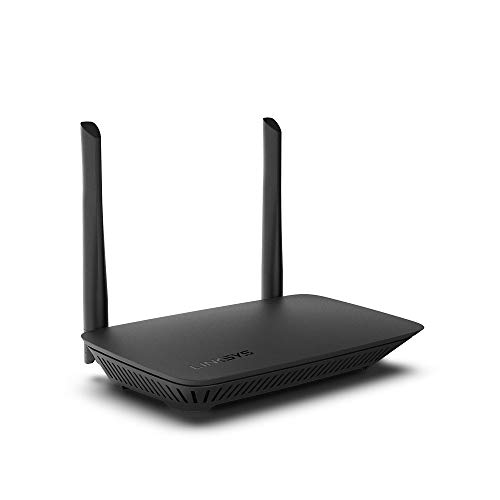
The Linksys E5400 is a budget-friendly option that delivers up to 1.2 Gbps total throughput with dual-band Wi-Fi. It includes guest network capabilities and parental controls, making it a practical choice for small apartments or offices where a simple, secure guest network is sufficient. Its compact design and straightforward setup help non-technical users deploy guest access quickly while maintaining family-safe browsing settings.
ASUS ExpertWiFi EBR63 AX3000 — Custom Guest Portal

The ASUS ExpertWiFi EBR63 AX3000 is designed for businesses or advanced home networks. It offers multiple SSIDs and a customizable guest portal, enabling a dedicated guest experience with branding, templates, and access controls. The device supports VLANs for network segmentation and SDN features for scalable management. A USB port can serve as a backup WAN, adding resilience to guest connectivity in small offices or high-traffic homes.
Buying Guide
- Guest network capabilities: Look for dedicated SSIDs, bandwidth controls, and access restrictions to keep guests separate from main devices.
- Wi-Fi standard and speed: Wi-Fi 5 or 6 (AC/AX) impact throughput and efficiency. Consider your internet plan and the number of guest devices.
- Coverage and walls: Antenna design and beamforming affect range. For larger homes, prioritize routers with stronger antennas or mesh compatibility.
- Security features: WPA2/WPA3, guest portal options, and parental controls help protect the main network and manage guest access.
- Management and setup: Remote management, app-based setup, and support for multiple SSIDs simplify ongoing administration.
- Advanced options: USB ports, VPN support, VLANs, and SDN-ready features cater to power users or small offices needing customization.
- Future-proofing: A router with guest portal customization, compatibility with extenders/mesh, and updated security protocols reduces future upgrade needs.
These options provide a range of guest-access capabilities—from simple, secure guest networks for homes to configurable portals suitable for small offices. Assess your space, the number of guest devices, and whether you need advanced management features or basic guest access when choosing the right router.