Discover reliable RJ45 1 to 2 Ethernet splitters that expand a single network port to two devices. This guide reviews top picks, highlights use cases, and compares features to help you choose the right splitter for Cat5 through Cat8 cables. Each option aims to minimize cable clutter while maintaining solid connectivity for two devices when needed.
| Product | Brand | Cable Compatibility | Key Benefit |
|---|---|---|---|
| AILVLVNG Ethernet Splitter 1 to 2 | AILVLVNG | Cat6/7/8 | High-speed dual connection with wide compatibility |
| ukiism Ethernet Splitter 1 to 2 | ukiism | Cat5–Cat7 | Stable two-device sharing without router |
| LIEZHUA Gigabit Ethernet Splitter 1 to 2 | LIEZHUA | Cat5–Cat8 | LED indicators for quick status checks |
| MVBOONE Ethernet Splitter 1 to 2 | MVBOONE | Cat5–Cat6 | Note: one device at a time; simple plug-and-play |
| VizGiz 4 Pack RJ45 Splitter | VizGiz | Cat5–Cat6 | Flexible 1-to-2 with compact design |
Note: This article evaluates products based on stated features, compatibility, and typical use cases. Real-world performance depends on connected devices, cabling quality, and network conditions.
AILVLVNG Ethernet Splitter 1 to 2 High Speed

The AILVLVNG splitter expands a single Gigabit Ethernet port to two outputs, enabling two devices to access the Internet simultaneously. It supports cascading to add more ports. For best stability, CAT6 cabling is recommended. The device works with Cat6/7/8 cables and is designed to minimize the need for frequent cable plugging and unplugging, helping protect connected equipment. Note that two devices can share the 1000 Mbps bandwidth, with the actual speed dependent on connected devices.
ukiism Ethernet Splitter 1 to 2

The ukiism RJ45 splitter converts one RJ45 connection into two sockets, allowing two computers to share high-speed DSL or Ethernet ports without a router. It supports Cat5 through Cat7, and a copper-plated gold needle design helps ensure stable transmission. The splitter is lightweight and can be wall-mounted using the screw hole panel for fixed installations. It is suitable for extending an RJ45 socket to two standard 8P8C designs.
LIEZHUA Gigabit Ethernet Splitter 1 to 2

The LIEZHUA Ethernet Splitter provides a high-speed expansion, enabling two devices to transfer data simultaneously at up to 1000 Mbps. It includes six LED indicators to quickly identify active connections and supports Cat5–Cat8 cables. USB power is included to assist with power delivery, enhancing stability in some setups. The device is compact and suitable for use with hubs, switches, routers, and other Ethernet-enabled devices.
MVBOONE Ethernet Splitter 1 to 2
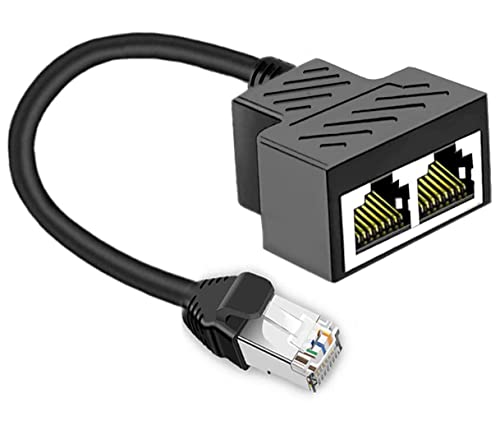
The MVBOONE RJ45 Ethernet Splitter is designed to convert one network line into two sockets for two devices sharing high-speed DSL or cable modem connections. Note that it supports only one active network at a time, making it a simple plug-and-play option for scenarios that don’t require simultaneous dual-device Internet access. The device relies on a 2mm thick PCB to protect conductors and extend service life.
VizGiz 4 Pack RJ45 Splitter

The VizGiz splitter set notes that each RJ45 1×2 splitter allows two computers to share a single Ethernet line one at a time. While not suitable for simultaneous primary Internet access on both devices, it offers a compact solution for expanding connections in scenarios where one device at a time is acceptable. The design supports Cat5 through Cat6 cables and emphasizes a small footprint for tight spaces.
Pushua Gigabit Ethernet Splitter 1 to 2

The Pushua Gigabit Ethernet Splitter is designed to share two devices over a single Ethernet line with USB-powered operation. It supports up to 1000 Mbps per cable set, and the dual outputs are designed to minimize crosstalk between channels. Attractive features include a sturdy aluminum shell, gold-plated contacts, and a compact, easy-to-use plug-and-play design suitable for Cat5–Cat8 cables.
AKWOR Ethernet Splitter 1 to 2

The AKWOR RJ45 Ethernet Splitter converts one RJ45 connection into two sockets, enabling two computers to share high-speed Internet access without a router. It supports Cat5e through Cat8 and uses pure copper gold-plated needles to improve connection stability and shield interference. The wall-panel mounting option via screw holes helps with tidier installations.
ukiism Ethernet Splitter 1 to 2 (Second Listing)
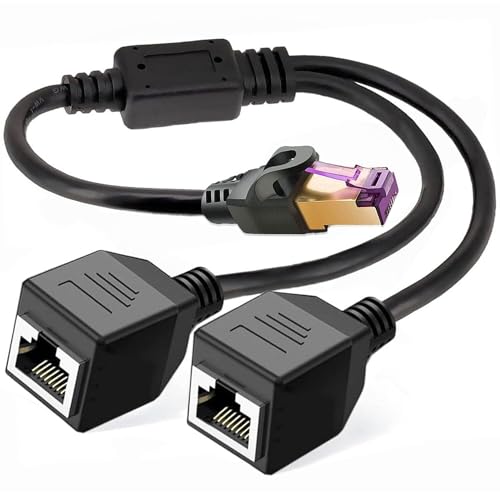
This second ukiism option reiterates that it converts one RJ45 connection into two sockets, compatible with Cat5–Cat7 cables. It emphasizes a durable PCB and gold-plated contacts for stable transmission, with a wall-panel mounting capability for neat installation. It remains a practical choice for bridging two devices when a router is not used.
Buying Guide: Key RJ45 1 to 2 Splitter Considerations
- Simultaneous usage: Some splitters support two devices online at once, while others restrict to one active connection. If you need both devices online at the same time, prioritize devices that explicitly support dual simultaneous connections with clear bandwidth sharing notes.
- Cable compatibility: Most splitters support Cat5 through Cat8 cables. For best stability on higher-speed networks (1000 Mbps), use Cat6 or Cat6a cables and short, quality runs to reduce signal degradation.
- Power requirements: A few models use USB power or require an external power source to maintain stable performance. If your setup lacks spare power options, choose a self-powered or USB-powered unit.
- Indicator visibility: LEDs can help diagnose which port is active. Consider models with LED indicators if quick status checks are important in your environment.
- Form factor and installation: Wall-mountable designs and compact housings help in space-constrained areas. Look for screw-holes or panels if you plan to fix the splitter in place for a tidy setup.
- Durability: Copper conductors, gold-plated contacts, and robust housings reduce wear and electromagnetic interference. These features matter in environments with multiple devices or frequent cable movement.
- Use case fit: If you require two devices to access the Internet simultaneously, verify the product’s stated capability and any caveats about bandwidth sharing. For temporary setups or simple extensions, a basic 1-to-2 splitter can be sufficient.
As network needs vary, choose a splitter that aligns with your planned use—whether it’s simple port expansion, fixed installations, or devices requiring constant online access. Always verify compatibility with your existing cabling and network equipment to ensure stable, reliable performance.