Whether you’re giving a presentation, controlling media from the couch, or boosting productivity on a laptop, the right remote can streamline your setup. This guide highlights five top Amazon picks that work well with laptops and other devices, featuring air mouse, presenter, and backlit options. Each product supports 2.4 GHz wireless connections, some with USB-C or USB-A receivers, and many offer voice input or gyroscopic control for precise navigation.
Summary Of Chosen Products
- EASYTONE Air Mouse Remote Control — 3-in-1 air mouse, voice remote, IR learning
- DinoFire USB Type C Wireless Presenter Remote — USB-A & USB-C, long-range presenter
- BL Air Mouse Remote Control — 2.4G RF, 6-axis gyroscope, voice input
- DinoFire Wireless Presenter Remote with Air Mouse — 2.4GZ RF, rechargeable, multifunction
- Rii Mini i25 — 3-in-1 keyboard, remote, fly mouse, rechargeable
EASYTONE Air Mouse Remote: 3-in-1 Control For PCs And TVs

The EASYTONE remote blends 2.4 GHz air mouse functionality with a voice remote and IR learning, offering a compact 17-key layout for quick navigation through documents, videos, and slides. It supports mouse movement via a built-in gyroscope, enabling intuitive direction and speed control. Designed for laptops, PCs, and Android TV boxes, it helps users stay productive from the couch or desk without swapping between devices. The included USB receiver ensures stable wireless performance across compatible platforms.
Key features include 3-in-1 versatility, built-in voice input, and intuitive controls. Voice input can simplify searching within apps, though it notes that voice search may be limited to built-in search boxes or specific apps. The device’s body is optimized for comfortable handling during long sessions, with easy access to volume and navigation controls. This makes it a practical all-in-one remote for media centers and laptops alike.
DinoFire USB Type C Wireless Presenter Remote

The DinoFire presenter remote supports both USB-A and USB-C connections, making it compatible with MacBooks, Windows laptops, and PCs. Its presentation-focused features include page forward/backward, volume control, full/black screen toggling, and hyperlink launching. Plug-and-play setup requires no drivers, and Mac users may need a simple initial configuration. With a long-control range, this device helps presenters move freely while controlling slides, ideal for classrooms, conferences, or remote work setups on a laptop.
Users benefit from practical presentation functions in a compact form. The package emphasizes reliability with a straightforward plug-and-play experience. The Red Pointer helps draw attention to key points during a slide deck, enhancing audience engagement. While it targets presentations, the device can also function as a compact remote for navigating a laptop in meetings or home offices.
BL Air Mouse Remote Control: Precise Gyro And Voice

The BL air mouse pairs precise 6-axis gyroscope control with a 2.4 GHz wireless connection for stable operation up to about 10 meters. It includes voice input functionality to chat or input words, benefiting users who prefer quick voice search within apps or built-in search boxes. Setup involves using the included USB receiver, making it a practical option for smart TVs, laptops, and media centers. The remote’s ergonomic design supports comfortable handheld use during extended sessions or presentations.
This model highlights the balance between voice capabilities and accurate pointer control. Voice input is convenient but note that its effectiveness depends on app compatibility. The 2.4G RF connection provides reliable performance in typical living rooms or classrooms, while the gyroscope helps with accurate cursor movement on a laptop connected to a display for slide navigation or media control.
DinoFire Wireless Presenter Remote With Air Mouse

This DinoFire model blends an RF 2.4 GHz presenter remote with an air mouse, enabling slide control and cursor navigation in one device. It features a rechargeable battery, enabling weeks of use between charges, and includes a sleep mode to conserve power when idle. The device supports common presenter actions like black/white screen, start/pause video, and hyperlink launching, making it suitable for remote teaching, corporate meetings, and live demonstrations. The long-range capability lets users move freely around a room while controlling their slides.
Design-wise, it emphasizes compact ergonomics and quick access to page navigation and media controls. The rechargeable battery reduces waste and maintenance, while the built-in air mouse functions help presenters transition seamlessly between pointer tasks and slide management during a live session.
Rii Mini i25: 3-in-1 Wireless Keyboard, Fly Mouse, Remote
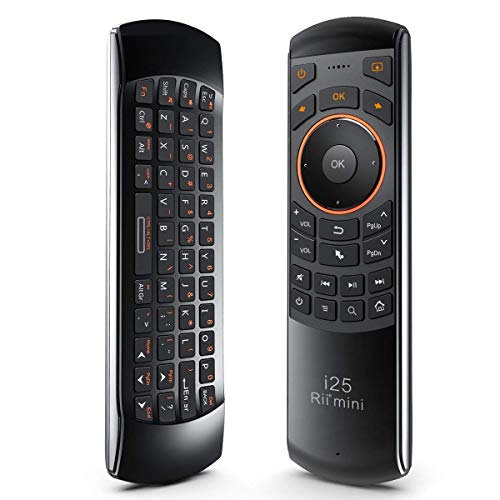
The Rii Mini i25 combines a compact 3-in-1 design: a wireless mini QWERTY keyboard, an IR remote, and a fly mouse. It operates with a USB receiver and is compatible with PCs, laptops, Android TV boxes, and HTPC setups. While it’s advertised for smart TVs, its small footprint and multi-function design make it a practical travel companion for laptop users who want quick typing, browsing, and navigation in one device. Battery life and USB charging support add to its everyday utility for mobile workplaces or home theater setups connected to laptops.
Compatibility notes warn about possible limitations with certain smart TVs, particularly some Samsung models. Pros include portability and a versatile control scheme, while considerations include verifying system compatibility with your laptop or media center before purchase. The built-in rechargeable battery improves convenience for frequent presenters and remote workers who travel with their laptops.
Buying Guide: Key Purchase Considerations For Laptop Remote Use
- Connection Type: USB-A vs USB-C receivers; some models offer dual USB-A/USB-C compatibility. Consider your laptop’s ports and whether a Type-C dongle is needed.
- Input Versatility: Choose between air mouse, presenter, keyboard, or a hybrid (3-in-1) device based on your typical tasks—slides, browsing, or media control.
- Power And Battery: Rechargeable batteries reduce waste; check expected battery life for your use case and whether sleep modes are available to conserve energy.
- Voice And Gyro Features: Voice input is convenient for search but may be limited by app support. Gyroscope-based cursor control enhances navigation on large screens.
- Range And Reliability: A longer operation range enables freedom of movement in classrooms or living rooms. Ensure the device uses a stable 2.4 GHz connection with a reliable receiver.
- Platform Compatibility: Verify compatibility with Windows, macOS, Android, or smart TVs if you intend to use the device across devices.
- Ergonomics And Build: A comfortable grip and well-placed buttons improve usability during long sessions or presentations.
- Software Requirements: Many devices are plug-and-play, but some Mac users may need a quick setup; check if drivers are needed.
- Portability: If you travel or present remotely, size and weight matter. A compact 3-in-1 device can reduce carry-on clutter.
Additional Tips For Using Remote Devices With A Laptop
To maximize productivity, map essential functions to the most accessible buttons on your chosen remote. For example, assign page up/down, mute, or play/pause for quick slide navigation and media control. If you frequently switch between devices, consider a model with both USB-A and USB-C compatibility to minimize adapters. Testing the remote with your laptop and any connected displays before an important meeting can prevent last-minute issues. Finally, keep spare batteries or ensure a full charge for uninterrupted operation during longer sessions.