Preserving memories from VHS, Hi8, Mini DV, and camcorder tapes is easier than ever with modern VHS-to-digital converters. The right device converts analog video and audio into widely compatible digital formats, often with built-in screens for quick previews. This guide highlights five reliable options, explaining how each one handles input types, storage options, and playback quality. Whether you’re new to digitizing or upgrading an older setup, these picks balance ease of use with solid performance for American households.
| Product | Brand | Input Type | Output Format | Storage |
|---|---|---|---|---|
| Portta VHS to Digital Converter | Portta | AV/RCA, S-Video, AUX | MP4, MP3 | USB/TF Card |
| DigitPro VHS to Digital Converter 2.0 | DigitPro | AV/RCA, S-Video | MP4/MP3/WAV | USB/TF up to 512GB |
| ClearClick Video to Digital Converter 2.0 | ClearClick | VHS, VHS-C, AV | SD/MP4 | USB Flash Drive or SD Card |
| VIXLW USB Video Capture Card | VIXLW | RCA to USB | 720P USB | USB connection to PC |
| Portta VD22P VHS to Digital Converter | Portta | VHS/Hi8/DVR | MP4 | Built-in screen, USB/SD optional |
Choosing a converter depends on whether you want a quick stand-alone capture with internal storage, or a PC-connected workflow for editing. Look for devices that support NTSC/PAL formats, offer a clear recording interface, and provide reliable storage options. The five selections below represent a range of features—from standalone recorders with built-in displays to PC-friendly capture solutions—helping you decide what best fits your tapes, budget, and preferred playback quality.
Portta VHS To Digital Converter

The Portta converter functions as a compact all-in-one capture box that digitizes analog video and audio. It supports CVBS+R/L (AV), S-Video, and AUX inputs and records at up to 1080P/30Hz. A built-in 3.0″ LCD preview screen allows immediate playback and on-device viewing, while a USB drive or TF card provides direct storage without a PC. This model emphasizes plug-and-play operation and does not require software or drivers, making it a straightforward option for preserving old tapes. Note that it cannot play tapes independently; it only records from connected sources.
Storage is flexible with USB or TF cards, but capacity depends on the drive’s size. The device outputs MP4 video and MP3 audio, and supports common television formats NTSC and PAL variants. For optimal results, ensure the selected input is properly connected and unmuted before recording. This unit suits households that want a portable, screen-equipped capture box without needing a computer for digitization.
DigitPro VHS To Digital Converter 2.0

The DigitPro 2.0 emphasizes one-tap digital conversion from a wide range of analog sources, including VHS, VCR, DVD players, Hi8, and camcorders. It records up to 1080P/30Hz and supports MP4, MP3, and WAV formats, with storage via USB or TF cards up to 512GB. A 3.5-inch HD preview screen helps verify capture in real time, and built-in speakers let you listen without external gear. The device is plug-and-play with simple controls, avoiding PC software in the basic workflow.
Smart features include auto pause/resume on signal loss, a time watermark, and scheduling for future recordings. It also offers adjustable video resolution and automatic NTSC/PAL format detection for versatile use. This model is ideal for users who want an all-in-one unit with a built-in screen and straightforward operation, plus flexible storage capacity for long sessions of digitization.
ClearClick Video To Digital Converter 2.0
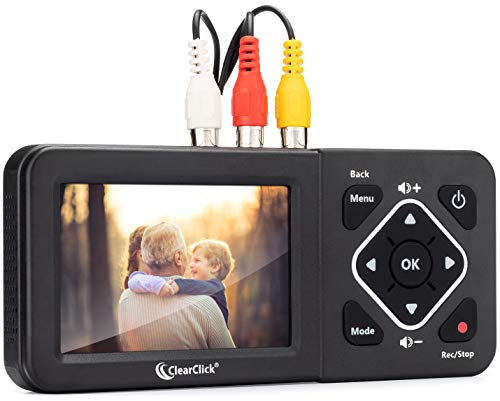
The ClearClick 2.0 focuses on a simple, driverless setup to convert video from VHS, VCRs, DVD players, DVRs, Hi8, and camcorders. It supports SD or MP4 outputs and requires a working VCR/camcorder with tapes to function. Recording can be saved directly to a USB flash drive or SD card (not included, up to 512GB). The device emphasizes ease of use for users who want to avoid computers entirely, though it relies on existing playback hardware to generate tapes.
Important considerations include the need for a functioning source tape and player; the unit does not play tapes independently. Resolution tops at SD (640×480 or 720×480), which is sufficient for archival purposes but not HD upscaling. For those prioritizing a simple, standalone capture solution, ClearClick’s streamlined approach can be attractive, especially for retro collectors with multiple media types.
VIXLW USB Video Capture Card

The VIXLW capture card offers a PC-centric approach, converting analog video from RCA inputs into digital USB output at up to 720p. It captures both video and audio without a sound card, leveraging USB for direct PC recording. The unit is plug-and-play on many systems, requiring driver installation only in some configurations. This option is well-suited for users who plan to edit or share footage on a computer, using familiar software for further processing and enhancement.
Because this device is primarily a capture interface rather than a standalone recorder, performance depends on the host computer’s capabilities. It’s a good fit for hobbyists who want to digitize a subset of tapes and then work with the footage in video editing software, rather than relying on onboard storage. If you already have a computer setup for editing, this is a flexible choice.
Portta VD22P VHS To Digital Converter

The Portta VD22P emphasizes a 5-inch HD LCD preview screen, allowing real-time monitoring while converting VHS, Hi8, Mini DV, DVD, or camcorder footage to MP4. It supports recording in Full HD 1080p at 60fps, with customizable image settings for brightness, contrast, and saturation. This model aims to balance easy viewing with higher-fidelity captures, making it suitable for users who want on-device quality adjustments without connecting to a computer.
Storage options include USB or SD cards to store captured files, and the built-in display helps ensure correct framing and focus during capture. The VD22P’s design suits households that value a larger screening area during digitization and seek a straightforward, standalone workflow with on-device control over image parameters for better-looking results.
Buying Guide: Key Purchase Considerations
Input and Output: Confirm supported inputs (RCA, S-Video, AUX) and whether the device records to MP4, MP3, WAV, or other formats. If you plan to edit videotapes later, MP4 with a higher bitrate preserves more detail.
Standalone vs PC-Based: Decide if you want a standalone recorder with a built-in display or a PC-based capture card. Standalones are convenient but may have limited editing capabilities; PC-based options provide greater editing flexibility but require a computer.
Storage Options: Look for USB/TF storage compatibility and capacity limits. Larger drives are helpful for long sessions, especially when recording at higher resolutions. Check whether storage is internal or external and if power is required for USB drives.
Format and Standards: Ensure the device supports NTSC, PAL, and PAL/60, as relevant in your region. Cross-compatibility reduces format issues during playback on different displays.
Quality and Resolution: If archival quality matters, prioritize devices that offer 1080P/30Hz or 1080P/60fps output, with options to adjust brightness, contrast, and color saturation. SD outputs are acceptable for basic preservation but not ideal for long-term viewing on modern devices.
Ease of Use: Consider the learning curve, presence of a preview screen, and whether the device is truly plug-and-play. Some models require components like a working VCR/camcorder and tapes to function properly.
Reliability and Support: Check customer reviews for reliability, troubleshooting support, and warranty. A device with accessible help resources saves time when issues arise during digitization projects.
Future-Proofing: If you anticipate digitizing more tapes later, a model with expandable storage and versatile input options may offer better long-term value than a more basic unit.