Preserving cherished memories from VCRs, camcorders, and analog tapes is easier than ever with dedicated video-to-DVD converters. This guide highlights reliable devices that convert video and audio to digital formats and burn or store them on DVDs, USB drives, or SD cards. Learn what each option offers, from simple plug-and-play reliability to advanced features like real-time previews and smart recording controls. The following selections focus on converting and archiving, not standalone playback.
| Product | Brand | Key Benefit | Storage Options |
|---|---|---|---|
| Portta VHS To Digital Converter | Portta | 1080P capture, AV/S-Video, easy plug-and-play | USB Drive / TF Card |
| ClearClick Video To Digital Converter 2.0 | ClearClick | Direct-to-USB/SD, simple one-button capture | USB Drive / SD Card |
| DigitPro VHS To Digital Converter 2.0 | DigitPro | 1080p capture, 3.5″ preview, NTSC/PAL support | USB / TF Card |
| Roxio Easy VHS To DVD 3 Plus | Corel | Burn to DVD, capture from VCR, edit features | DVDs / Digital formats |
| ClearClick Video To Digital Converter 3.0 | ClearClick | HD 720×480 or 640×480, records from cassette turntables too | USB Drive / MicroSD |
Product Descriptions
Portta VHS To Digital Converter

The Portta device functions as a converter, recorder, and capture box. It supports AV/RCA (CVBS+R/L), S-Video, and AUX inputs, delivering recording resolution up to 1080P at 30Hz. The unit is designed for easy plug-and-play use without a PC, software, or drivers. It records to USB drives or TF cards and includes a 3.0″ preview LCD with built-in speakers. Users should note that it cannot play tapes independently; it captures from connected sources only. Output formats include MP4 video and MP3 audio, with NTSC and PAL format compatibility.
Key features: direct digital conversion, built-in display for immediate playback, and compatibility with a wide range of legacy inputs. This option is best for users seeking a compact, self-contained capture solution without a computer.
ClearClick Video To Digital Converter 2.0
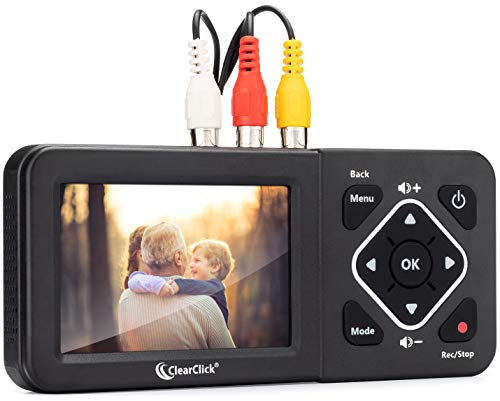
This second-generation ClearClick model enables one-button recording to USB flash drives or SD cards, turning VHS, VCRs, DVD players, DVRs, Hi8, and camcorders into digital files. It requires a working VCR/camcorder and tapes, and does not upscale to HD. Supported recording resolutions include SD 640×480 or 720×480, with MP4 and MP3/WAV outputs. No computer or software is needed, making it a straightforward option for direct-to-storage capture.
Pros include simplicity and direct USB/SD storage, though it depends on a functional playback source. This is suited for users who want a reliable, no-frills capture workflow from legacy tapes.
VHS To Digital Converter 2.0 (DigitPro)

DigitPro’s 2.0 model provides one-touch digital conversion from VHS, VCR, DVD, Hi8, and camcorders into MP4/MP3/WAV formats, with up to 1080P 30Hz capture. It supports NTSC/PAL formats and storage options up to 512GB on USB drives or TF cards. The unit includes a 3.5-inch HD preview screen with built-in speakers for real-time playback and easy setup. It also supports auto-detection of video resolution and offers flexible options for long-term archiving.
Its plug-and-play design and real-time preview are strong benefits for users who want immediate confirmation of capture quality as they record.
Roxio Easy VHS To DVD 3 Plus

Roxio Easy VHS To DVD 3 Plus offers straightforward capture from VHS, Hi8, V8, and other analog sources and adds the ability to burn directly to DVD or convert to digital formats. Included editing features allow trimming, color enhancement, transitions, and noise reduction to improve older footage before sharing. The software-centric approach can be beneficial for users who want post-capture editing and disc creation within one package.
This option emphasizes ease of use with a balance of basic editing tools and DVD authoring, making it a solid choice for home video preservation projects that require a bit more polish.
ClearClick Video To Digital Converter 3.0

The third-generation ClearClick model expands capabilities to include audio from cassette tapes and vinyl records, alongside video from VHS, VCRs, and camcorders. Output options include MP4 for video and WAV/MP3 for audio, with no HD upscaling. It records directly onto USB flash drives or MicroSD cards (up to 512 GB). Like earlier ClearClick models, it requires a working VCR/camcorder and tapes and does not play tapes on its own. This bundle emphasizes multi-source digitization with a simple setup.
Key strengths are broad source compatibility and an all-in-one capture solution for mixed-media archiving projects, plus clear audio recording options for cassette and vinyl sources.
VHS To DVD Recorder

This VHS to DVD Recorder focuses on direct AV input recording without a PC, enabling capture to DVD, USB drives, or SD cards. It supports legacy AV devices and provides an app-assisted option for wireless transfers via a companion smartphone app. The device is designed for straightforward preservation of tapes, with HDMI output to a TV for monitoring. It includes the promise of a user-friendly workflow for those who want a standalone recorder with additional value through wireless media sharing.
Consider this option if you value a compact, all-in-one solution that emphasizes PC-free recording and convenient media transfer through an accompanying app.
Capture Card USB Video Capture Card

The Capture Card provides RCA-to-USB video capture for PCs, enabling digitization of VHS, VCR, Hi8, DV tapes, and more. It delivers HD 720p USB output and can capture audio without a separate sound card, offering plug-and-play operation with driver installation. This option is ideal for users who plan to edit or archive footage on a computer and want a dedicated capture device to feed video directly into editing software.
Strengths include flexible PC-based workflows and reliable analog-to-digital capture, though it relies on a computer for full use.
ClearClick Video To Digital Converter 3.0 Bundle

This bundle extends the 3.0 generation with additional support for cassette tapes and vinyl records, alongside video from VHS, VCRs, DVD players, and camcorders. It records to USB Flash Drives or MicroSD Cards (up to 512 GB). It requires a working VCR/camcorder and tapes and does not play tapes directly. The bundle approach simplifies multi-source digitization in one package, offering a comprehensive solution for mixed-media archiving.
Consider this option if your library includes audio-only media plus video and you want an integrated device for both tasks.
Buying Guide
Key purchase considerations for record-to-DVD projects include compatibility, ease of use, and storage flexibility. Here are the main factors to compare:
- Source compatibility: Look for devices that handle AV/RCA, S-Video, and AUX inputs to cover VHS, VCRs, Hi8, and camcorders. Some models also support audio-only sources like cassette tapes and vinyl records.
- Output formats: Choose hardware that records to common formats such as MP4, AVI, WAV, or MP3, and offers direct DVD burning if you want physical discs.
- Storage options: USB drives and SD/TF cards are common; check supported capacities and any power requirements for high-capacity devices.
- Ease of use: Systems with built-in preview screens and simple one-button recording suit beginners, while PC-based capture cards appeal to users who plan editing after digitization.
- HD and upscaling: Most converters do not upscale to HD. If you need higher resolution, look for models that offer 1080p capture but expect actual playback to depend on original tape quality.
- All-in-one vs modular: All-in-one recorders simplify setup but may limit advanced editing. PC-based workflows offer more after-capture options but require software and a computer.
- Reliability and maintenance: Since many projects involve aging tapes, ensure the device tolerates longer recordings and offers stable power to storage devices.
- Editing and burning features: Some models include basic editing (trim, color correction) and DVD authoring, which helps produce finished discs without a computer.
- Future-proofing: Consider acquiring a device with ongoing updates or accessories that support newer storage formats while preserving compatibility with legacy media.