Enhancing PC audio often starts with a dedicated sound card. This guide highlights five solid choices that expand your connections, improve surround sound, and deliver clearer music and games. Whether you need PCIe for desktop rigs or USB for laptop setups, these options cover a range of budgets and features. Explore each product’s strengths, then check the buying guide for key considerations to match your setup and listening preferences.
Summary of Selected Products
| Product | Connection | Channels | Key Benefit |
|---|---|---|---|
| GODSHARK 5.1 Internal PCIe Sound Card | PCIe (Internal) | 5.1 | 5.1 surround via PCIe with low-profile bracket |
| Creative Labs Sound Blaster Play! 3 | USB External | 2.0 / 2.1 upgradable via software | Plug-and-play external DAC for Windows/macOS |
| StarTech ICUSBAUDIO7D | USB External | 7.1 / 5.1 / 2 | Versatile 7.1 desktop upgrade with SPDIF |
| Creative Sound Blaster Z SE PCI-e | PCIe Internal | 5.1 / 7.1 (virtual) | High-fidelity PCIe sound with DAC and ASIO support |
| Cubilux 7.1 USB Surround Sound Card | USB External | 7.1 | Durable aluminum housing with 7.1/5.1 support |
GODSHARK 5.1 Internal PCIe Sound Card
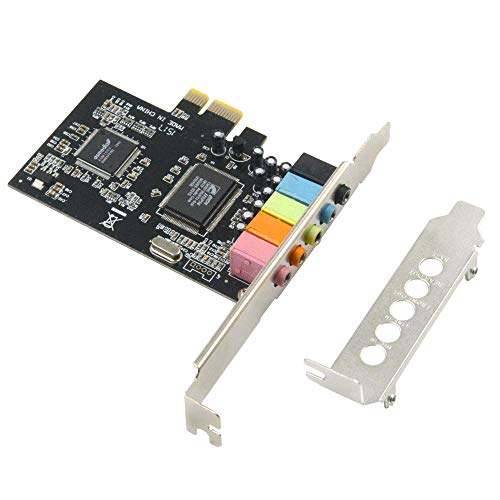
The GODSHARK PCIe sound card targets desktop configurations with a low-profile bracket for compact cases and a 5.1 stereo setup. Built around a CMI8738 core, this PCI Express adapter aims to deliver multi-channel surround sound, expanding 2U and standard chassis capabilities. It supports standard PCIe audio paths and is designed to convert a PC into a cinematic entertainment system with enhanced front-to-rear channel separation. This option suits users seeking a dedicated internal solution for theater-like experiences on a desktop PC.
Creative Labs Sound Blaster Play! 3 External USB Sound Adapter

Creative’s Sound Blaster Play! 3 is a compact USB DAC that upgrades on-board audio without drivers. It’s compatible with Windows and macOS, delivering 24-bit/96 kHz playback for improved clarity over built-in sound. Its plug-and-play design makes it a convenient choice for laptops, desktops, and gaming consoles that support USB audio. This option focuses on simplicity and portability while offering meaningful enhancements for movies, music, and casual gaming.
StarTech 7.1 USB Sound Card
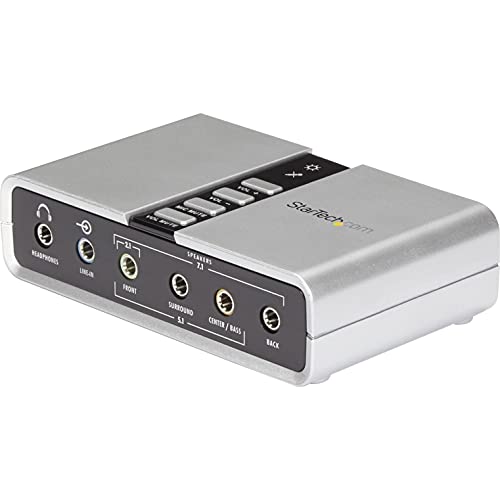
This external USB sound card from StarTech adds up to 7.1 channel audio through a single USB connection. It supports analog and digital outputs, including SPDIF, and provides 44.1 kHz and 48 kHz sampling for both playback and recording. It’s a strong option for laptops or desktops needing an upgrade to include surround capabilities without opening the computer. The built-in mic and line-in inputs also support basic streaming and voice work with compatible software.
Creative Sound Blaster Z SE Internal PCI-e
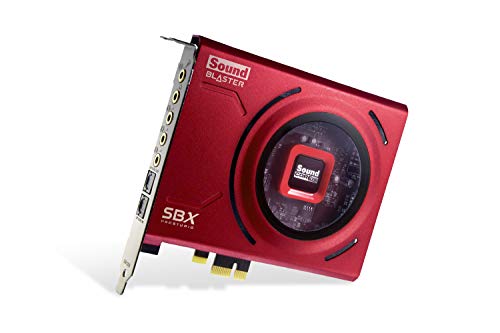
The Sound Blaster Z SE offers premium PCIe-based audio with up to 24-bit/192 kHz playback and 116 dB SNR. It includes ASIO support for low-latency audio and advanced features like a discrete 5.1/virtual 7.1 setup, microphone equalization, and Dolby Digital Live/DTS Encoding for game and movie immersion. This card targets gamers and audio enthusiasts who want high fidelity, detailed sound profiles, and software-driven customization through the Sound Blaster Command suite.
Cubilux 7.1 USB Surround Sound Card

Cubilux presents a robust USB 7.1 surround sound option with support for 44.1 kHz to 384 kHz sampling rates, plus 16- to 24-bit depth for high-resolution audio. A full aluminum housing minimizes interference and noise, improving signal integrity in busy setups. This external sound card is suitable for gaming and media playback where solid channel separation and durable construction matter in a portable form factor.
Buying Guide
- Connection type: Choose PCIe for a fixed desktop build with minimal latency or USB for flexibility and compatibility with laptops and small form factors.
- Channel configuration: 5.1/7.1 surround is ideal for home theaters or immersive gaming; 2.0/2.1 may suffice for basic upgrades.
- Sampling rates and bit depth: Look for devices supporting at least 24-bit/96 kHz for clear highs and controlled dynamic range; higher rates (up to 192 kHz) benefit music and gaming with better detail.
- Software and drivers: Some devices are plug-and-play; others offer software suites (ASIO support, EQ profiles, and DSP effects) that tailor sound for games, movies, or music.
- Build quality and shielding: Aluminum or metal housings reduce interference; consider low-profile designs for compact cases if using PCIe.
- Input/output options: Ensure the device provides the required connectors (SPDIF, mic input, line-in, and headphone out) for your setup.
- Use case: Gaming, music production, home theater, or everyday listening—pick a model whose features align with your primary use.
- Portability vs. performance: USB devices excel for mobility; PCIe options can offer slightly lower latency and higher stability for desktop gaming and recording.
When selecting a card, balance the desire for high-fidelity audio with practical needs such as case size, port availability, and software controls. For theater-like sound with minimal setup, consider PCIe options that provide clear multi-channel output. If you value portability or a simple upgrade to existing speakers or headsets, USB solutions with strong DAC performance offer compelling results without internal installation.