The market offers a wide range of RCA female to HDMI converters, helping older devices like VCRs, DVD players, and classic consoles connect to modern large screens. This guide highlights top options, explains how they work, and compares key features to help you choose the right model for your setup.
Summary of selected products:
| Product | Brand | Output | Notes |
|---|---|---|---|
| Tengchi RCA to HDMI Converter | Tengchi | HDMI 1.3 1080p | |
| Viagkiki RCA to HDMI Adapter | Viagkiki | HDMI 1080p | |
| Myuiao HDMI to RCA Adapter | Myuiao | RCA outputs (3 ports) | |
| ABLEWE RCA to HDMI | ABLEWE | HDMI 720p/1080p | |
| Chodwe RCA to HDMI Converter | Chodwe | HDMI 720p/1080p |
Tengchi RCA to HDMI Converter
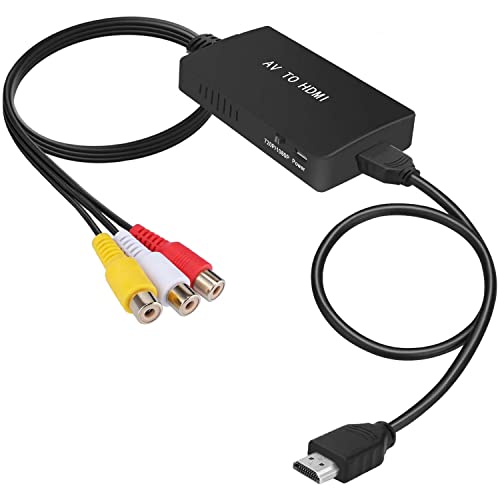
The Tengchi device converts analog composite input to HDMI 1080p output, suitable for connecting older gear to a modern HDTV or monitor. It uses a single RCA female input (yellow for video, white and red for audio) and provides an HDMI 1.3 output at up to 1080p. This model is plug-and-play and requires USB power (5V 1A) to operate; the power cable is included but a power adapter is not. It does not support 3D or 4K, and it is not a bidirectional converter.
Key features include simple setup, an external USB power requirement, and compatibility with PS systems, VHS/VCR players, Blu-ray players, and set-top boxes. The compact form factor makes it easy to place near your TV. If you need legacy device support without 4K, this option provides reliable 1080p output with straightforward operation.
Pros: Quick setup, broad compatibility with classic AV devices, compact design. Cons: Limited to 1080p; requires USB power; not bidirectional.
Viagkiki RCA to HDMI Adapter

The Viagkiki adapter converts analog RCA composite input to HDMI 1080p (60Hz) output. It comes with a long RCA cable and a longer HDMI cable, reducing the need for extra accessories. The kit emphasizes a plug-and-play experience; connect a USB power cable to a 5V source to power the converter. This model is designed for older sources like PS1/PS2/PS3, VHS/VCR, STB, and older Blu-ray players.
Highlights include included cables, no-driver setup, and a straightforward path from retro gear to a modern display. The device supports classic AV devices but keep in mind that some TVs or devices might require power for stable operation. If you value convenience and an all-in-one package, this Viagkiki option is a solid pick.
Pros: Comes with cables, easy setup, reliable 1080p output. Cons: May require USB power; not ideal for 4K or high-end modern sources.
Myuiao HDMI To RCA Adapter

Myuiao provides a way to convert HDMI input into analog RCA (AV) outputs via three female RCA ports (video and stereo audio). This is useful for syncing newer devices to older televisions that only accept RCA connections. The adapter is designed for plug-and-play use with an HDMI male input and three RCA outputs (red, white, yellow). It is ideal for users who want to connect modern HDMI devices to legacy displays without rearranging wiring or buying new AV receivers.
Key considerations include compatibility with standard HDMI sources and proper cabling. It’s a straightforward solution for those who need HDMI-to-AV conversion, though it is not suitable for reverse directions or high-end gaming setups that demand low latency or high fidelity. It serves as a practical bridge between generations of gear.
ABLEWE RCA to HDMI Converter

ABLEWE’s compact RCA to HDMI converter handles standard composite input (yellow video and red/white audio) and outputs HDMI at 720p or 1080p, depending on source and display capabilities. This unit is designed with a plug-and-play approach and requires USB power (5V) to function. It supports a range of analog formats, including PAL and NTSC variants, making it a versatile choice for various older devices like PS3, VCRs, and DVD players.
Advantages include broad format compatibility and a simple setup process. The device is well-suited for users who want a dependable, no-frills bridge from analog to digital displays. Its ability to handle multiple standard formats adds to its practicality for families with mixed-age components.
Chodwe RCA to HDMI Converter
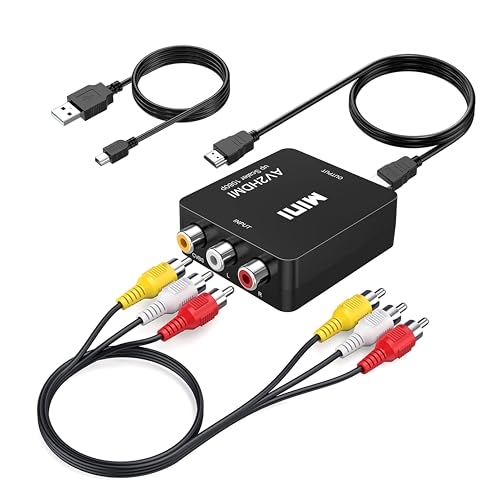
Chodwe’s RCA to HDMI Converter translates analog AV input to HDMI at 720p or 1080p. It’s designed for classic systems and emphasizes an easy, driver-free setup. The converter requires a USB power source and an HDMI-capable display. It is explicitly noted as not bidirectional, meaning it only transmits signal from AV to HDMI, not HDMI to AV. This makes it suitable for connecting older consoles or VCRs to modern screens without requiring a full AV receiver.
Considerations include the note on unidirectional functionality and the need for HDMI inputs on the display. Users seeking a simple, affordable option for legacy gear to a modern TV will likely find this model adequate, especially if they already own the right cables and power source.
Buying Guide: Key Purchase Considerations and Comparisons
- Directionality: Most of these devices are unidirectional (AV to HDMI). Confirm the direction you need—HDMI input to AV output is not common in consumer models.
- Resolution: If you want 1080p output, verify that the model supports 1080p rather than only 720p. Some devices cap at 720p, which may be sufficient for older content but not for modern displays.
- Power Requirements: Many converters require USB power. Ensure you have a powered USB port or a wall adapter available near the setup area.
- Input Formats: Check that the device accepts standard RCA composite (yellow video; red and white audio). Some models also support NTSC/PAL variations.
- Cable Inclusions: Some packages include RCA and HDMI cables, reducing the need to purchase extras. If not included, budget for those cables separately.
- Latency and Image Quality: Analog-to-digital conversion can introduce slight latency or color differences. Look for user reviews discussing color accuracy and stabilization on your specific TV model.
- Device Compatibility: Consider which legacy devices you plan to connect (VHS, PS2, N64, DVD players) and ensure the converter can handle their output signals.
- Portability vs. Durability: If you plan to move setups between rooms, choose a compact, durable option with minimal cables.
- Bidirectionality: If you need HDMI-to-AV in addition to AV-to-HDMI, you will likely require a different class of converter or an AV receiver with appropriate inputs.
- Customer Support and Firmware: Some brands offer firmware updates or troubleshooting guides; evaluate after-sales support in case you encounter compatibility issues.
In summary, the best choice depends on your exact setup: the type of legacy device you connect, the display you use, and whether you prefer a kit with included cables. For most users seeking a straightforward bridge from analog to digital without fuss, models from Viagkiki, Tengchi, and ABLEWE provide reliable, easy-to-use options with clear power requirements and compatibility notes. For HDMI-to-AV needs, Myuiao, Chodwe, and GINGIN-inspired products can be considered, provided you understand directionality and cable configurations.