For professionals and enthusiasts who need expansive screen real estate, quad port video cards offer a straightforward way to drive four displays from a single PCIe card. This guide highlights five solid options, detailing their memory, display outputs, and suitable use cases—from office productivity to digital signage and home theater deployments. Read on to compare capabilities and find the right quad-monitor GPU for your needs.
| Product | Memory | Outputs | |
|---|---|---|---|
| ARDIYES GT 740 4GB | 4GB GDDR5 | 4x HDMI | Office multitasking, digital signage |
| NVIDIA NVS 510 | Not specified in listing | 4x DisplayPort / HDMI mix | Professional multi-display setups |
| maxsun GT 730 4GB | 4GB GDDR3 | 4x HDMI | ITX builds, quad-monitor workstations |
| SRhonyra GT 730 2GB | 2GB DDR3 | 4x HDMI | Quad-monitor productivity, entry-level displays |
| ARDIYES GT 730 4GB DDR3 | 4GB DDR3 | 4x HDMI | Multi-monitor trading and digital signage |
ARDIYES GT 740 4GB Quad HDMI GPU
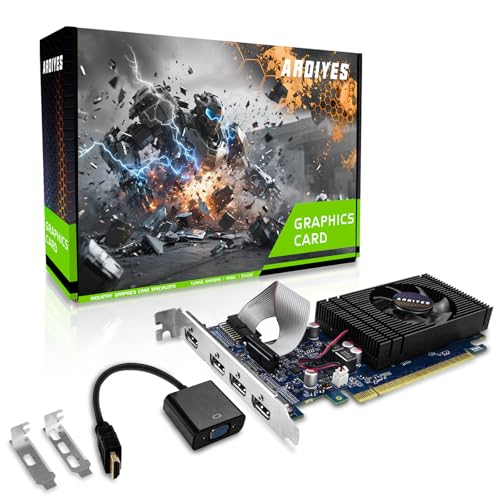
The ARDIYES GT 740 is designed for quad-monitor productivity with four built-in HDMI ports. Equipped with 4GB of fast GDDR5 memory, it targets multi-monitor tasks common in offices or control rooms. Its PCI Express 3.0 x16 interface ensures broad compatibility with modern desktops. The card emphasizes a quiet cooling solution and a compact, low-profile form factor, making it suitable for both compact ITX builds and larger towers. This model is a plug-and-play option with drivers that support Windows and Linux systems, offering stable operation for 4-display workflows.
NVIDIA NVS 510 Graphics Card
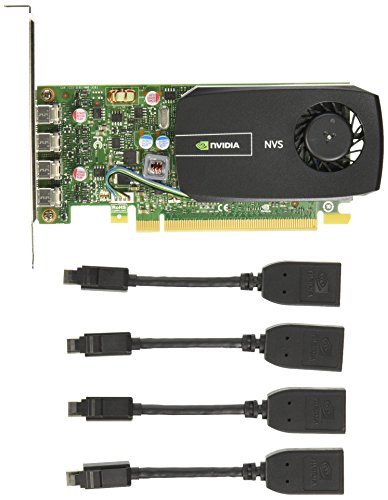
The NVIDIA NVS 510 is positioned for professional multi-display deployments. It supports multiple screens via DisplayPort 1.2 and includes efficient power management features. While the listing emphasizes DisplayPort connectivity and NVIDIA FXAA/TXAA, the card is commonly valued for reliability in business environments and complex desk setups. This option is suitable for users who prioritize easy management of several high-resolution displays, often in corporate or signage contexts, with strong driver support across Windows environments.
maxsun GT 730 4GB Quad HDMI ITX Card

The maxsun GT 730 4GB card targets compact builds with quadruple HDMI outputs. Featuring a 4GB GDDR3 memory pool and an ITX-friendly PCIe 2.0 x16 interface, it supports four simultaneous displays at up to 3840 x 2160 at 30Hz. The low-profile design and PCIe compatibility make it a practical choice for small form factor PCs used in offices, cafes, or small kiosks where space is at a premium.
SRhonyra GT 730 2GB Quad HDMI Card

The SRhonyra GT 730 2GB offers four native HDMI outputs, making it an accessible option for building a quad-monitor setup without extra adapters. Its lower 2GB memory configuration is suited to lighter multi-monitor workloads, such as productivity dashboards, basic digital signage, or home theater tasks. The card emphasizes a compact, low-profile design and easy plug-and-play setup, which helps reduce setup time in space-constrained PC builds.
ARDIYES GT 730 4GB GDDR3 Quad HDMI

This ARDIYES GT 730 card brings four independent HDMI outputs with 4GB of DDR3 memory. It is designed for multi-monitor setups in ITX or compact PC builds, emphasizing straightforward plug-and-play installation. The 64-bit DDR3 memory and quad-port design make it a reasonable option for expanding screen real estate in small workstations, digital signage kiosks, or education-focused displays where quiet operation and space efficiency matter.
ARDIYES GT 730 4GB DDR3 Quad HDMI
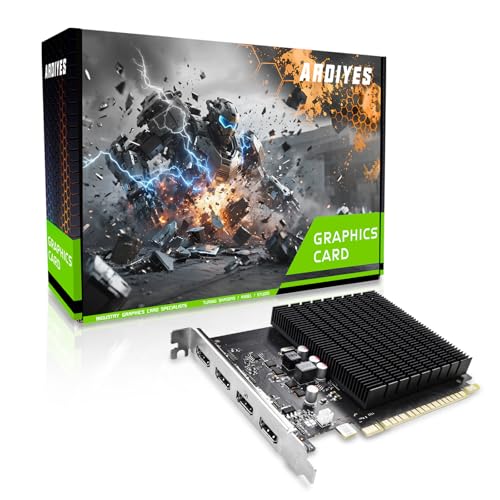
The ARDIYES GT 730 4GB DDR3 variant focuses on four independent HDMI outputs for a quad-monitor setup. With 4GB of DDR3 memory, it is engineered for multi-screen workloads that benefit from ample display bandwidth. The product highlights the ease of plug-and-play installation, aiming to deliver a cost-effective, scalable solution for expanding screen real estate in office or digital signage environments while maintaining a compact footprint.
Buying Guide: Quad Port Video Cards
Key considerations help determine which quad-port card best fits your setup. First, decide on display outputs: HDMI is common, but DisplayPort variants may offer higher refresh rates or resolutions. Check compatibility with your motherboard and power supply, and whether a low-profile form factor is needed for ITX builds. Memory type and size affect performance with multiple displays; DDR5 generally handles more demanding layouts better than DDR3, though price and availability vary. Consider cooling design—quiet operation matters for office or home theater usage. Finally, verify driver support for your operating system and ensure the card supports your intended software, whether it’s trading platforms, digital signage, or productivity suites.
Comparing the five options above shows a range of memory types and form factors. For maximum multi-monitor density in compact cases, ARDIYES GT 740 and similar low-profile cards are strong choices. For professionals requiring robust driver support in business environments, NVIDIA NVS 510 is a solid pick. If budget and space are primary concerns, SRhonyra GT 730 or Vandossy variants deliver quad HDMI output with lower power draws. When you need stable four-monitor outputs with straightforward setup, prioritize cards explicitly marketed for quadruple display capability and verify the number and type of connectors you can use without adapters.