Gamers who want to use PS4 or other controllers on a PC often seek adapters that minimize lag, maximize compatibility, and simplify setup. The following picks are distinct options designed to connect various controllers to Windows PCs or other platforms with Plug & Play convenience, low latency, and broad support. This guide compares top adapters, highlighting key features to help you choose the right one for your setup.
| Product | Connector Type | Key Benefit | Platform(s) |
|---|---|---|---|
| TP-Link UB500 | USB Bluetooth | Bluetooth 5.4 with EDR; fast data transfer and extended range | PC, Windows |
| GuliKit Hyperlink 2 | USB Wireless | 2.95 ms latency; wide controller and platform compatibility | PC, Switch, PS5/PS4, Android, SteamOS |
| JZW-Shop Wireless Adapter | USB Bluetooth/Proprietary | Plug‑and‑play with multiple console/controller types | Switch, PC, PS3/PS4/PS5 (limited) |
| 8Bitdo Adapter Switch Controller Adapter 2 | USB Wireless | Broad compatibility with 8BitDo and major controllers | Windows, Mac, Raspberry Pi |
| USB Bluetooth | Memory pairing; wide compatibility with P4/P5/Switch and more | PC, Switch, Android TV Box, Steam |
Note: Each product listed supports different combinations of controllers and platforms. Always verify compatibility with your exact device and firmware version before purchasing.
TP-Link USB Bluetooth Adapter UB500

TP-Link UB500 is a Bluetooth 5.4 dongle designed for desktops and laptops. It provides backward compatibility with older Bluetooth versions and supports EDR for improved data transfer. The device promises faster speeds and extended range, making it suitable for seamless audio streaming and stable connections with keyboards, mice, headphones, and other peripherals. It is a plug-and-play solution for Windows environments, reducing setup steps and driver requirements for modern systems.
GuliKit Hyperlink 2 Wireless Adapter

GuliKit Hyperlink 2 offers a fast, low-latency wireless connection designed to minimize input lag in fast-paced games. It supports a broad array of controllers across multiple platforms, including Xbox, PS, Switch, and PC. The adapter emphasizes plug-and-play practicality—no software installation required—allowing instant compatibility with supported devices. This makes it a strong choice for gamers who play across consoles and PC with minimal setup.
JZW-Shop Wireless Adapter
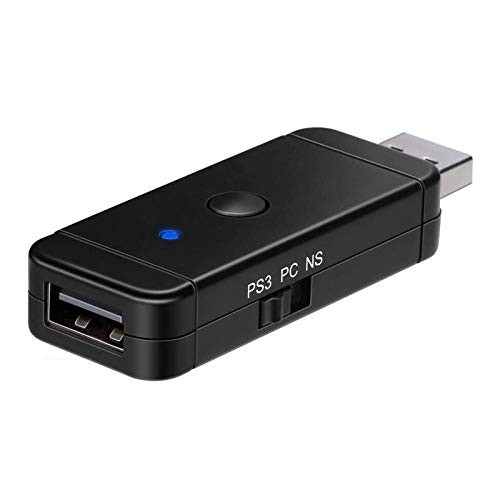
JZW-Shop’s adapter supports use of various controllers on multiple devices, including Switch and PC, with compatibility aimed at PS4/PS3 and Xbox ecosystems. It features a compact design and a straightforward status indicator. While it claims broad compatibility, users should verify whether their specific controller and console combination is supported, as some combinations may face limitations or require specific modes for pairing.
8Bitdo Adapter Switch Controller Adapter 2

8Bitdo’s second-generation switch-style adapter supports a wide array of controllers, including Xbox Series X/S, PS5/PS4, Switch Pro, and more. It’s designed for Windows, Mac, and Raspberry Pi, with firmware updates recommended to maintain compatibility. The adapter provides multiple modes (X-input, D-input, Mac, Switch) to adapt to different gaming ecosystems, and it supports features like six-axis motion on Switch mode and vibration in X-input mode, enabling a versatile cross‑platform experience.
AOJAKI Bluetooth Adapter for P4/P5 Controllers

AOJAKI’s adapter emphasizes wide compatibility, including PS4/PS5 controllers, Switch Pro, Switch Lite, Windows PC, Android TV Box, and Steam. It couples memory pairing to remember the last connected controller for quicker setups and includes a Type-C OTG cable to simplify connectivity. Bluetooth 5.0 with aptX low latency helps reduce input delay and improve data transfer speeds for smoother gaming sessions across platforms.
AOLION Bluetooth Adapter

AOLION’s adapter targets broad cross‑platform compatibility, working with official P4, P5, Switch Pro controllers, and more. It supports multiple devices including Windows PC, Switch, Android TV Box, and Steam. It features memory pairing and a Type-C OTG cable for quick setup, along with Bluetooth 5.0 and aptX low latency to minimize input delay and maintain stable connections during competitive gaming.
Buying Guide: Key Considerations for PS4/PC Adapters
- Controller compatibility: Verify which controllers are supported (PS4, PS5, Switch Pro, Xbox, 8BitDo, etc.) and whether the adapter supports the specific model you own.
- Latency and performance: Look for low-latency claims (milliseconds) and features like aptX or low-latency modes to ensure responsive input handling.
- Platform reach: Consider whether you plan to use the adapter on PC only or across Switch, Android, SteamOS, or other devices. Some adapters offer broad universal support, others are more limited.
- Connectivity type: USB Bluetooth dongles are common for wireless controllers, while some adapters use proprietary wireless signals. Choose based on your preferred connection and USB port availability.
- Memory and pairing experience: Some adapters remember the last connected controller, reducing setup time in future sessions; this can be a practical benefit for multi‑controller setups.
- Firmware and updates: Ensure the option to update firmware is available, and check whether updates improve compatibility or latency.
- Driver requirements: Some adapters are plug-and-play on Windows 10/11, while others may require drivers on older Windows versions or alternative operating systems.
- Physical design: A compact, discreet dongle reduces desk clutter and makes travel easier; consider the inclusion of a USB-C/OTG cable when applicable.
- Vendor support and documentation: Strong customer support and clear setup guides help troubleshoot issues quickly, especially for complex cross‑platform configurations.
In short, the best PS4-to-PC adapters balance broad controller compatibility, minimal latency, and simple setup. Your choice depends on which controllers you own, which platforms you want to support, and how much you value quick pairing and firmware updates.