The PS2 to PC adapter market offers a range of adapters that let you use classic PS2 or PS1 controllers on modern PCs or PS3 consoles without drivers. This guide highlights five standout options, explains how they work, and compares key features to help you pick the right one for your setup. Each product has been evaluated for compatibility, ease of use, and overall value for American gamers who want reliable retro play with current hardware.
Summary of Selected Products
- PS2 Controller to USB Adapter Converter (2 Pack) — vieton: Easy setup, no driver requirement, works with PS3/PC.
- Xahpower PS2 Controller to USB Adapter (Single) — Xahpower: Broad compatibility, no drivers, supports vibration on supported games.
- OSTENT Dual USB Adapter — OSTENT: Simple switch between digital/analog, compatible with PS1/PS2/PSX wired controllers.
- PS2 Controller to USB Controller Adapter (JeanAnte) — JeanAnte: Broad PC compatibility with classic Windows versions and DirectX support.
- DHSKZRMJ 2-in-1 USB Controller Converter (Blue/Black) — DHSKZRMJ: Real vibration support, DDR compatibility, dual controllers supported.
Best Value 2-Pack PS2 To USB Adapter For PC
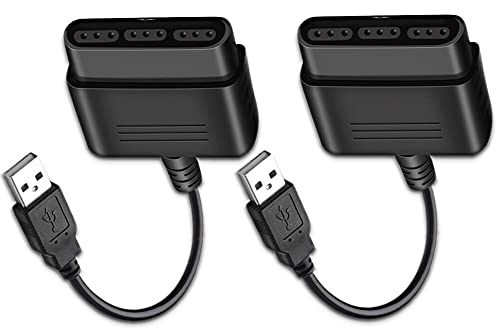
The vieton PS2 to PS3/PC USB Converter comes as a two-pack, designed to connect PS2 or PS1 controllers to PS3 consoles or a PC/laptop via USB. It requires no driver installation, making it a straightforward plug-and-play solution for users who want to reclaim their old controllers. It supports vibration-enabled play on compatible games and is described as a universal fit for most PS2 and PS1 controllers when used on PC or PS3. The setup emphasizes simplicity and immediate usability, with a focus on broad compatibility across titles and operating systems.
Broad Compatibility PS2 To USB Adapter For PC
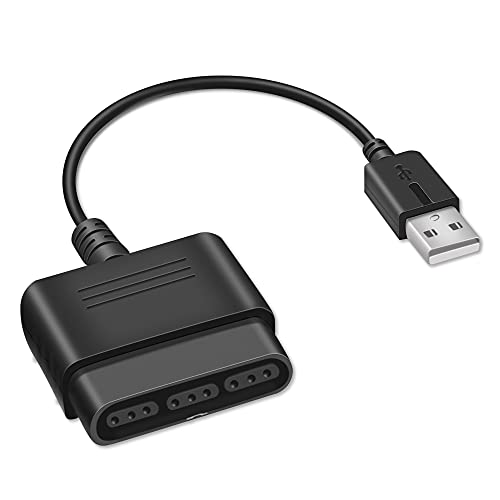
The Xahpower PS2 Controller to USB Adapter Cable offers compatibility with Sony PS1/PS2 controllers for PS3/PC use. It reports broad operating system support, including legacy Windows versions, with a claim that Windows 10 recognizes the adapter automatically and does not require driver installation. The adapter emphasizes ease of use and vibration support on games that support the feature, making it a strong choice for players who want minimal setup and dependable performance on PC or PS3.
OSTENT 2-in-1 USB Controller Converter For PS1/PS2

The OSTENT dual USB adapter is designed to work with wired PS1, PS2, PS One, and PSX controllers. It notes that it does not support real vibration for Dual Shock variants, but allows switching between digital and analog modes via a dedicated analog button. This makes it a suitable option for players using classic, non-rumble PS controllers who want reliable PC or PS3 compatibility without extra drivers or power requirements.
Consolidated PS1/PS2 To PS3/PC Adapter (JeanAnte)

The JeanAnte PS2/PS1/PSX to PS3/PC controller converter emphasizes broad compatibility with Windows versions from Win98 to Windows XP and beyond, including DirectX support. The device is promoted as enabling both digital and analog play, with dual-shock vibration compatibility on supported titles. It’s positioned as a versatile option for users who maintain older game libraries across PC and PS3 platforms.
DHSKZRMJ 2-in-1 PSX/PS2 To PC USB Adapter (Blue)

The DHSKZRMJ blue model positions itself as a 2-in-1 USB converter that supports both PSX and PS2 controllers on PC or laptops. It highlights real vibration support for compatible games and claims to handle both digital and analog modes, including compatibility with DDR-style controllers. While not supporting Dual Shock vibration for some variants, it targets users who want to maximize compatibility with older controllers across two wired inputs.
DHSKZRMJ Black 2-in-1 USB Adapter For PSX/PS2

This DHSKZRMJ black variant reiterates the two-in-one design for PSX/PS1/PS2 to PS3/PC use. It stresses support for real vibration across compatible games, dual-player setups, and a wide range of Windows versions (from early 2000s through XP). It also notes that vibration may not be available for Dual Shock and Dual Shock 2 controllers, making it important to verify controller type before purchase.
Buying Guide: Key Considerations For PS2/PS1 To PC Adapters
- Compatibility: Check that the adapter supports your exact controller model (PS1, PS2, PSX) and your target device (PC or PS3). Some products specify compatibility with Windows 98 through XP, while others claim broader Windows 10 support.
- Vibration Support: If you rely on vibration feedback, confirm which controllers and games offer this feature with the adapter. Some units note real vibration only for certain games or controller types.
- Driver Requirement: Most listed options advertise driver-free operation. If you’re using a newer PC or non-standard hardware, verify driver compatibility before purchasing.
- Mode Switching: Certain adapters provide digital/analog mode or require manual switching. Consider how often you switch control schemes in your games to choose a model with an intuitive toggle.
- Cable Length and Build: Longer cables can improve placement flexibility on a desk, while build quality affects durability for regular play sessions and transport.
- Multiple Controllers: If you plan to run multiplayer on PC, a two-in-one adapter or multi-port support may be beneficial. Confirm whether the device supports two wired controllers simultaneously.
- Platform Nuances: Some adapters advertise PS3 compatibility alongside PC, while others are PC-centric. If you primarily game on PC, prioritize those with strong PC support and verified Windows recognition.
- Future-Proofing: While these adapters target legacy accessories, consider devices that explicitly support updates, broad DirectX compatibility, and consistent recognition across future Windows builds.
- Price vs. Features: Compare multi-pack offers against single adapters to determine whether savings align with your controller collection and gaming plans.
Overall, these adapters aim to extend the life of classic PS1/PS2 hardware by linking them to PC or PS3 ecosystems. For retro gamers on Windows, drivers are rarely required, and most devices emphasize straightforward plug-and-play usage with older controllers. If your setup includes DDR dance pads or other specialized peripherals, verify the listed features to ensure the adapter supports those devices as well.
Usage Scenarios And Considerations
- Classic PC Gaming: If you have a library of PS2-era titles, these adapters let you use original controllers without the need for adapters that rely on modern gamepads.
- Retro Console Play: Some adapters are marketed as PS3 compatible, enabling cross-use with console titles that support USB inputs.
- Two-Player Experiences: For co-op games, ensure your chosen model supports multiple wired controllers if you plan to play locally with friends or family.
- Ergonomic And Comfort: The feel of the original PS2 controllers often matters; using them with a PC can improve comfort and precision in platformers and fighters.
In summary, these PS2/PS1 to PC adapters provide practical ways to preserve classic controllers for modern gaming on Windows or PS3. The decision hinges on compatibility with your specific controller model, vibration expectations, and whether you value a driver-free setup. The chosen options balance ease of use with broad compatibility and reasonable feature sets for a dependable retro-gaming experience.