When you need a compact, mobile typing solution, projection keyboards offer a sleek, screen-free experience that pairs with most Bluetooth devices. This guide examines top projection keyboards compatible with phones and tablets, highlighting how they work, where they shine, and what to consider before you buy. The selections below focus on performance, battery life, portability, and cross-device compatibility to help you choose the right model for daily use, travel, or remote work.
| Product | Brand | Key Insight |
|---|---|---|
| MOJO Bluetooth Wireless Laser Projection Virtual Keyboard Portable Full-Size Keypad | MOJO-HOME | Strong universal compatibility; solid battery life |
| AGS Wireless Laser Projection Bluetooth Virtual Keyboard for Iphone, Ipad, Smartphone and Tablets | AGS Design | Broad OS support; easy pairing |
| VirtualLaserKeyboard Laser Keyboard, Virtual Wireless Bluetooth Portable Projection Keyboard for Smart Phone PC Tablet Laptop | VirtualLaserKeyboard | Upgraded projection clarity; versatile usage |
| AGS Laser Projection Bluetooth Virtual Keyboard & Mouse for iPhone, Ipad, Smartphone and Tablets | AGS | Keyboard and mouse combo; multi-device |
| ProtoArc Foldable Compact Keyboard, XK04 Portable Bluetooth Keyboard | ProtoArc | Ultra-compact folding design; multi-device |
Projection keyboards use a laser or infrared display to create a virtual keyboard surface on any flat, opaque area. They are designed to connect with Bluetooth-enabled devices like iPhones, Android phones, tablets, laptops, and desktops. Typical performance features include a rechargeable battery, language layouts (often English QWERTY), and compatibility across multiple operating systems. While not a replacement for all typing tasks, they offer a lightweight solution for travelers, students, and professionals who need to type on the go without carrying a conventional keyboard.
MOJO Bluetooth Wireless Laser Projection Keyboard

The MOJO-HOME projection keyboard delivers a laser-typed surface on any flat, non-reflective plane. It supports a wide range of devices, including iPhone, Samsung, Sony, HTC, LG, iPad, Nexus, tablets, laptops, and desktops with Bluetooth. A built-in 1000mAh Li-polymer battery provides up to about 200 minutes of continuous work time. The device emphasizes universal compatibility and portability, making it a practical option for quick emails, notes, or chats when a traditional keyboard isn’t convenient.
AGS Design Wireless Laser Projection Keyboard

The AGS Design laser projection keyboard is built for devices with Bluetooth and supports Windows, iOS, Android, and Mac OS. It enables easy pairing with iPhones, iPads, smartphones, laptops, and tablets, offering an English QWERTY layout. This model emphasizes straightforward cross-platform compatibility, appealing to users who juggle multiple devices and prefer a simple setup without fiddling with drivers or complicated software.
VirtualLaserKeyboard Projection Keyboard
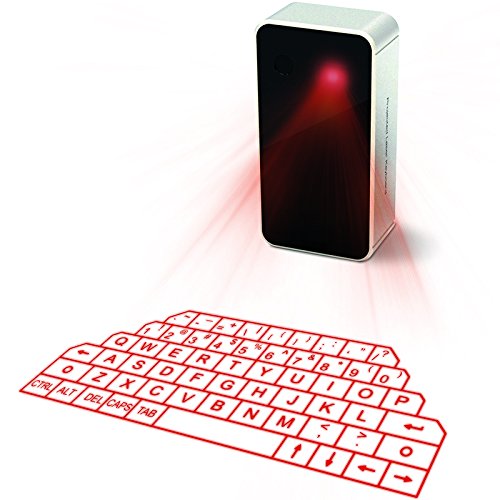
The VirtualLaserKeyboard product provides an upgraded virtual laser projection experience with an English QWERTY layout. It notes that the surface must be flat, clean, opaque, and non-reflective for optimal clarity. The package supports easy pairing with iPhone, iPad, smartphones, laptops, and tablets. It’s designed to maximize projection stability and minimize typing lag, which is a common concern for laser projection keyboards in bright environments or on reflective surfaces.
AGS Laser Projection Keyboard & Mouse

AGS returns with a Laser Projection Keyboard featuring an English QWERTY layout and the added convenience of a mouse. It’s designed for devices with Bluetooth and supports Windows, iOS, Android, and Mac OS. This model is ideal for users who want a compact typing solution with cursor control for more precise navigation on mobile and tablet workspaces, blending keyboard and mouse control in a single portable package.
Geyes Foldable Bluetooth Keyboard

The Geyes folding Bluetooth keyboard is designed for portability, offering tri-folding capability with dual Bluetooth channels and a built-in kickstand. The aluminum alloy shell projects a premium feel and supports easy viewing angles for tablets and phones. It emphasizes battery efficiency with smart sleep modes and automatic on/off features to conserve power, making it a solid choice for commuters and students who need a compact, durable travel keyboard with stand support.
ProtoArc Foldable Compact Keyboard XK04

The ProtoArc XK04 folds into a palm-sized form and weighs about 7.8 ounces, making it highly portable. It uses a PU leather cover for protection and a smooth texture. It supports multi-device Bluetooth pairing and offers up to three devices connection, enabling quick switching between devices like an iPad, smartphone, tablet, or laptop. The compact design is ideal for travelers who want a practical keyboard that can slip into a bag or pocket for quick responses and travel notes.
Buying Guide: Key Purchase Considerations
- Connectivity compatibility: Ensure the keyboard supports your devices (iOS, Android, Windows, Mac OS) and Bluetooth version for reliable pairing.
- Projection surface and environment: Laser projection keyboards perform best on flat, non-reflective surfaces and in environments with manageable ambient light. Bright sun or highly reflective surfaces can reduce clarity.
- Battery life and charging: Look for models with longer work times per charge and a convenient charging method, such as micro USB or USB-C. Consider whether you need wireless operation for extended travel.
- Typing experience: Projection keyboards offer a different tactile feel than physical keyboards. Some users appreciate the minimal setup, while others may require time to adapt to key locations and latency.
- Multi-device support: If you frequently switch between devices, choose keyboards with multi-device Bluetooth pairing and a simple method to switch between them.
- Portability and durability: Foldable or compact designs save space for travel. Aluminum shells tend to be more durable than plastic enclosures.
- Additional features: Some models include built-in speakers, mouse functionality, or kickstands for comfortable viewing angles on tablets or phones.
- Privacy and security: Projection keyboards do not require a traditional keyboard to be physically connected, which can be advantageous in public spaces, but ensure the device’s firmware is up to date and sourced from reputable brands.
In selecting a projection keyboard for phone use, consider your primary environment (travel, home, office), your device ecosystem (iOS, Android, Windows, Mac), and whether you value a lightweight, ultra-portable solution or a more robust, feature-rich model with a stand or mouse functions. While these keyboards provide a space-saving alternative to a physical keyboard, they are best suited for light typing tasks, quick messages, and on-the-go productivity rather than long-form typing sessions.