Selecting a reliable presentation pointer for Mac computers helps you deliver smooth, engaging slides without tethering yourself to the laptop. This guide highlights five versatile wireless presenters that work well with Mac, Keynote, PowerPoint, and Google Slides. Each option offers features like laser pointers, long-range RF, plug-and-play setup, and ergonomic grips to suit classrooms, meetings, or conferences.
Summary of chosen products
| Product | Brand | Highlights |
|---|---|---|
| DinoFire USB Type C Wireless Presenter | DinoFire | USB-A & USB-C, red pointer, long range |
| Logitech Wireless Presenter R500s | Logitech | Class 1 red laser, intuitive keys |
| Wireless Presenter by DinoFire | DinoFire | Plug & play, bright red pointer, 100 ft range |
| Logitech Wireless Presenter R400 | Logitech | Laser pointer, 50 ft range |
| VILNIU USB-A/USB-C Presentation Clicker | VILNIU | 2-in-1 USB-A & USB-C, long range |
DinoFire USB Type C Wireless Presenter Remote

The DinoFire USB Type C Wireless Presenter Remote combines USB-A and USB-C connections, supporting MacBooks, laptops, and PCs. It integrates page forward/backward controls, volume adjustment, a hyperlink feature, and full/black screen toggling. It is plug-and-play and does not require drivers, though Mac users may need a brief setup. A bright red pointer helps emphasize key points, with a long operational range of 98–165 feet and a red-light range around a typical room lighting level. Ideal for classrooms and conferences where mobility matters.
Logitech Wireless Presenter R500s
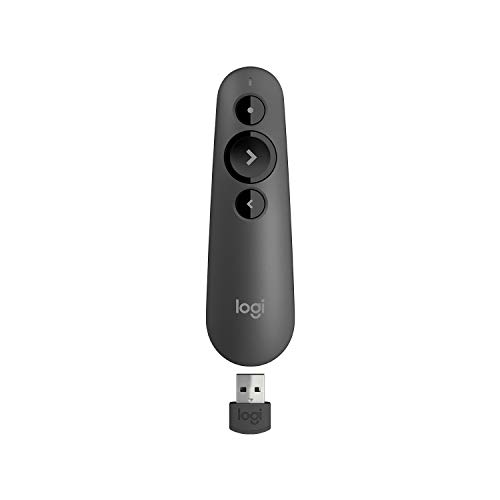
The Logitech R500s offers a presenter mode with a built-in Class 1 red laser pointer and intuitive touch-keys for slideshow control. It uses AAA batteries and provides up to a 20-meter wireless range, enabling comfortable movement around a room while managing slides in PowerPoint or Keynote. The device is widely compatible with Mac and Windows ecosystems, supporting smooth transitions between slides and on-screen cues for audience engagement.
Wireless Presenter, DinoFire (Black)

This DinoFire model emphasizes plug-and-play usability, with functions including Page Forward/Backward, Volume Control, Hyperlink, and Switch Windows. It supports a red pointer and provides a long wireless range of up to 100 feet. It is designed as a practical tool for daily presentations in classrooms or meetings, emphasizing ease of use and straightforward operation without software installation.
VILNIU USB-A/USB-C Presentation Clicker

The VILNIU clicker supports USB-A and USB-C receivers in one device, enabling quick connection to both older and newer Macs and PCs. It features a red pointer with a range of about 98 feet (30 meters) and a longer laser pointer range. The ergonomic design prioritizes comfortable handling, reducing the likelihood of accidental button taps during high-pressure moments. It’s suitable for presenters needing cross-device compatibility and reliable performance.
Wireless Presentation Clicker With Red Laser Pointer (VILNIU)

This Wireless Presenter Clicker by VILNIU features a red laser pointer with a wide range (98 feet / 30 meters) and a 328-foot/100-meter laser pointer range for emphasis from more distant seating. Its ergonomic design makes it comfortable to grip, with large, well-spaced buttons to reduce misclicks. The USB A and USB C 2-in-1 receiver setup provides flexible plug-and-play compatibility with Mac, Windows, and other devices, making it a strong all-around option for Mac users who value portability and connectivity.
UBUYONE Wireless Presenter Remote

The UBUYONE wireless presenter blends a hyperlink, window-switch, page navigation, and full/black screen features in a plug-and-play package. It supports a long 100-foot wireless control range and a 656-foot red light range for visibility in large rooms. Compatible with Windows, Mac OS, Linux, and Android, it supports PowerPoint, Keynote, Prezi, and other popular software, making it versatile for varied presentation workflows.
DINOSTRIKE Wireless Presenter Remote

DINOSTRIKE’s wireless presenter combines air mouse control with a red laser pointer and USB 2.4 GHz RF. It supports PowerPoint and Keynote along with other apps and offers an 82-foot air-mouse range and 164-foot wireless control range. A built-in 300 mAh rechargeable battery allows weeks of use per charge, with a sleep mode to conserve power. The remote is compatible with multiple platforms and tools, expanding its utility beyond standard slide control.
Buying Guide: Key Purchase Considerations
- Compatibility: Check whether the presenter supports Mac, Keynote, PowerPoint, Google Slides, and other software you use. Look for USB-A and USB-C compatibility if you rely on newer Mac models.
- Connectivity: Decide between USB dongle (2.4 GHz) or Bluetooth. USB dongles typically offer plug-and-play simplicity and stable connections in rooms with Wi-Fi interference; Bluetooth enables direct pairing with some devices but may require setup.
- Pointer Type and Range: Red laser pointers are common; ensure the range suits your room size. Longer ranges allow more freedom to move around without losing control.
- Ergonomics and Button Layout: A comfortable grip and clearly labeled buttons reduce mis-clicks during important moments. Larger buttons can help in high-pressure environments.
- Battery and Power: Consider whether the device uses replaceable batteries or a rechargeable battery. Sleep modes help extend battery life during long sessions.
- Multi-Device Support: If you switch between devices, a 2-in-1 USB-A/USB-C receiver can be advantageous for Mac and PC compatibility.
- Screen Suitability: Some red pointers are not recommended for use with LED or LCD screens; verify compatibility with your display type to avoid glare or inaccurate pointing.
- Additional Features: Hyperlinks, full/black screen, and in-pointer volume control can streamline presentations without needing on-screen adjustments.
When selecting a presentation pointer for Mac, prioritize plug-and-play usability, reliable range, and ergonomic design. If you frequently move around large rooms, models with longer wireless ranges and rechargeable batteries can minimize interruptions. For Mac users, ensure quick setup steps are documented in the user guide to avoid delays before key moments in your presentation.