In today’s tech-enabled spaces, a power tower with USB ports can simplify charging multiple devices while keeping outlets organized. This guide reviews five top options, focusing on surge protection, USB-C fast charging, and space-saving design. Each product is evaluated for overload protection, total USB output, and suitability for dorm rooms, offices, and home setups.
Product Snapshot:
| Product | Brand | Key USB/Outlets | Protection | Best For |
|---|---|---|---|---|
| Mifaso 16-in-1 Charging Station Tower | Mifaso | 12 AC / 4 USB (2 USB-C) | 1080J surge, overload protection | Powering many devices at once in a desk setup |
| kakyanill 17-in-1 Tower | kakyanill | 9 AC / 8 USB (4 USB-C) | 1875W/15A circuit breaker | Compact dorm or office with heavy device use |
| TenTrend 14-in-1 USB-C Tower | TenTrend | 6 AC / 8 USB (including USB-C) | 2000J surge protector | Heavy USB charging with mixed devices |
| SMALLRT 16-in-1 Power Strip Tower | SMALLRT | 12 AC / 4 USB (1 USB-C) | 1200J protection | Budget-friendly multi-device charging |
| UWIWUTEI 16-in-1 Tower | UWIWUTEI | 12 AC / 4 USB (2 USB-C) | Emergency surge protection; safety design | Slim footprint behind furniture |
Mifaso 16-in-1 Charging Station Tower

This tower features 12 AC outlets (1875W/15A) and 4 USB ports, including 2 USB-C, enabling simultaneous power for up to 16 devices. It includes an integrated circuit breaker and 1080 Joules of protection, guarding equipment against surges and overloads. Smart USB charging detects connected devices and adjusts speed automatically, with USB-A at 5V/2.4A and USB-C at 5V/3A. A resettable switch offers overload protection for all outlets.
kakyanill Surge Protector Tower

With 17 total outlets (9 AC and 8 USB, including 4 USB-C), this tower saves desk space via a slim profile and a retractable 6-foot cord. The design supports fast USB charging up to 4.8A total and includes an 1875W/15A circuit breaker for high-wattage devices. A 0.35-inch flat plug and 45-degree outlets help prevent port blocking, making it suitable behind desks, beds, or entertainment setups.
TenTrend 14-in-1 Power Strip Tower
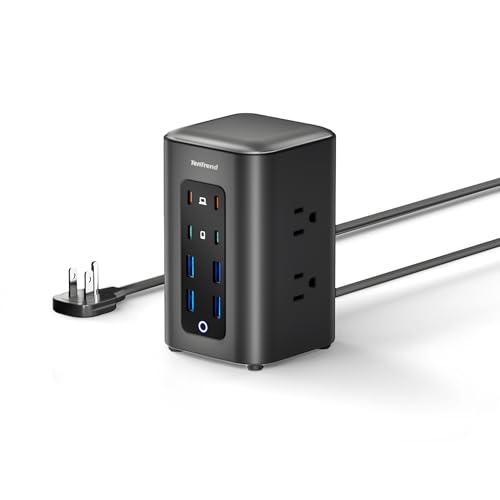
Offering 6 AC outlets and 8 USB ports, this tower accommodates a wide range of devices. USB-C ports provide fast charging with up to 65W for compatible devices, while other USB ports cover standard charging speeds. The 2000J surge protector helps shield electronics from spikes, making it a solid choice for home offices and dorm rooms that rely on multiple gadgets.
SMALLRT 16-in-1 Power Strip Tower

This extension tower offers 12 AC outlets and 4 USB ports (including USB-C), with a 1200 Joule rating for surge protection. The 6.5-foot upgraded extension cord uses pure copper wiring and a flame-resistant PC shell for safety. Its USB-C port supports fast charging, and the overall design emphasizes a cleaner desk with a vertical footprint.
UWIWUTEI Power Strip Tower

Featuring 12 AC outlets and 4 USB ports (2 USB-C), this tower maximizes power availability while maintaining a slim profile. The 6-foot cord adds flexibility for room layouts, with 45-degree outlet design to reduce blockage. USB-C charging is optimized to speed up device refresh rates, offering a practical solution for dorms and small offices.
Buying Guide: Key Purchase Considerations
- Total outlets and USB ports: Match device counts to your space. Towers with 12+ AC outlets and multiple USB ports are ideal for multi-device setups.
- USB-C performance: Look for USB-C ports with higher wattage (30W+ when possible) for faster charging of modern devices.
- Surge and overload protection: Prioritize models with high joule ratings and automatic circuit breakers to protect equipment during spikes.
- Cord length and plug design: Longer cords offer flexibility; flat plugs and 45-degree outlets help in tight spaces behind furniture.
- Space and layout: Consider vertical towers for desks, dorms, or behind couches, where space is at a premium.
- Safety certifications: UL, FCC, CE certifications indicate adherence to safety standards; check for UL-listed power strips.
- Independent switches: Some towers feature individual switches for groups of outlets, aiding energy management.
- Build quality: A flame-retardant shell and reinforced joints reduce wear and ensure durability over time.
- Cost vs. features: Balance price against surge protection, USB speed, and the number of usable outlets for your needs.
- Usage context: Dorm rooms often benefit from compact, space-saving designs; home offices may prioritize higher-weme USB-C outputs and organized cable management.
These considerations help compare options across the highlighted models. When selecting, align features with your device mix, space constraints, and safety preferences to optimize charging efficiency and protection.