Shopers looking for dependable pos wireless barcode scanners have many solid choices today. This guide highlights five top options that blend wireless freedom with fast decoding, cross‑device compatibility, and durable design. Each product below includes essential specs and how it fits typical retail, warehouse, or hospitality workflows. Use the buying guide at the end to compare key features and pick the right fit for your setup.
| Product | Connectivity | Best for |
|---|---|---|
| Tera Barcode Scanner Wireless with 2.4G/USB | 2.4G wireless, USB | Long sessions, rugged use |
| NETUM NT-1228BC Bluetooth & 2.4G | Bluetooth, 2.4G, USB | Multi‑device pairing |
| ScanAvenger Wireless 3‑in‑1 | Wireless, Bluetooth, USB | No‑software environments |
| KUIIYER 1D/2D Scanner with LCD | Bluetooth, Wireless, USB | Customizable settings |
| Tera HW0009 With Screen | 2.4G wireless, USB, Bluetooth | On‑device display, field use |
Tera Barcode Scanner Wireless With Battery Indicator

The Tera 2.4G wireless model offers a longer-lasting battery and a visual battery indicator to minimize downtime. Its curved, extended handle provides a comfortable grip, and the trigger is designed for smooth operation. An orange anti‑shock silicone cover protects against drops up to 6.56 feet, while IP54 dust protection helps in dusty work environments. It supports both wireless and USB wired modes for flexible deployment across POS systems and back‑office tasks.
NETUM NT-1228BC Bluetooth & 2.4G Barcode Scanner
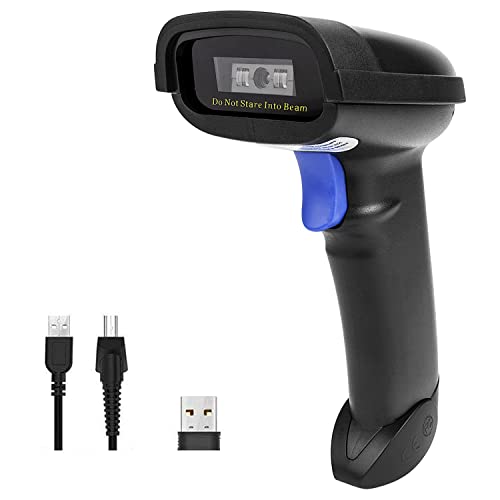
This NETUM model is designed for broad compatibility, supporting HID, SPP, and BLE modes across Windows, Mac, Android, iOS, and Linux. It decodes 1D and stacked barcodes with a high‑resolution CCD sensor, including worn or damaged codes. It supports scanning from paper or screens and can read through glass or plastic surfaces. Three modes—manual trigger, continuous, and auto‑sense—plus a storage mode enable flexible operation and capacity for up to 100,000 barcodes.
ScanAvenger Wireless 3‑in‑1 Barcode Scanner
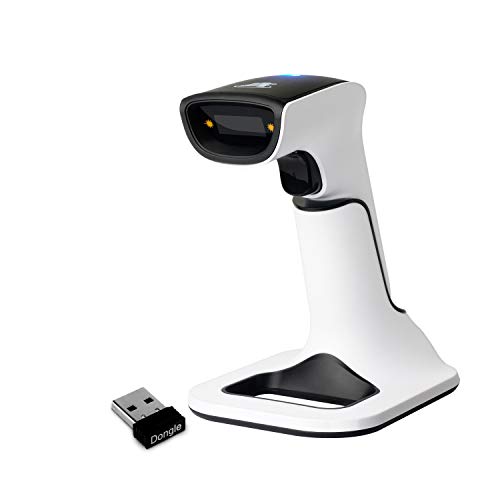
ScanAvenger introduces a 3‑in‑1 handheld solution compatible with USB, Bluetooth, and wireless stand transmission. It requires no software installation, making it ideal for environments that minimize IT overhead. The included next‑gen charging stand handles charging and wireless transmission from stand to scanner, supporting uninterrupted inventory workflows in busy stores or warehouses. The device emphasizes ease of use in noisy environments with vibration feedback to aid operators.
KUIIYER 1D/2D Scanner With LCD and AI Voice

KUIIYER’s advanced scanner combines an LCD display and AI voice feedback with a keypad for on‑device configuration. It supports 1D and 2D barcodes, as well as screen codes, and offers 360° scanning with a longer read distance. It is designed for versatile POS deployments and provides a customizable menu to simplify setup without scanning external configuration barcodes. The device is suitable for busy environments that require quick adjustments and clear status reporting.
Tera HW0009 Pro With Screen

The HW0009 Pro variant blends a built‑in screen with a charging cradle and a large 2500mAh battery. It supports Bluetooth, 2.4G wireless, and USB wired connections, enabling flexible use on the sales floor, in warehouses, or during mobile POS tasks. The on‑device display helps staff monitor stored and total barcodes, while the robust battery keeps devices running through long shifts. The package includes the scanner, cradle, charging cable, and user manual for a ready‑to‑use solution.
Buying Guide
Key purchase considerations for a pos wireless barcode scanner:
- Connectivity: Choose models offering the right mix of Bluetooth, 2.4G wireless, and USB wired options to match your hardware ecosystem and mobility needs.
- Reading capabilities: Confirm support for 1D, 2D, and QR codes; consider models that handle damaged or reflective barcodes for warehouse or retail environments.
- Battery life and charging: Look for large batteries or fast charging docks, especially for busy shifts. Battery indicators help prevent downtime.
- Durability: IP ratings and shock protection matter in busy spaces; some devices include protective covers and rugged housings.
- On‑device features: LCDs or AI voice prompts can reduce operator training time and minimize errors in noisy settings.
- Software dependencies: If no software installation is allowed, prioritize plug‑and‑play options with USB or stand‑to‑scanner wireless transmission.
- Compatibility: Ensure compatibility with your existing POS software and operating systems (Windows, Mac, Android, iOS, Linux).
- Storage capacity: Some models include storage modes for offline barcode collection, useful when scanning in-out of range.
When selecting a scanner, weigh the value of an integrated charging cradle against the need for portability. For high‑volume checkout lines, a robust, multi‑mode device with a long battery life and reliable auto‑sense scanning can improve throughput and staff accuracy. If you operate across multiple devices or operating systems, prioritize broad compatibility and clear on‑device status information. The right choice will balance cost, reliability, and ease of integration with your current POS workflow.