Consumers increasingly need flexible, wireless storage that works with phones, tablets, laptops, and smart TVs. The portable wifi external hard drive category combines local storage with built-in Wi‑Fi hotspots and remote access, enabling instant backups, easy file sharing, and cloud-like access without a constant data cable. This guide highlights five top options, comparing capacities, wireless speeds, and security features, so you can pick a model that suits travel, remote work, or family media sharing.
| Product | Brand | Capacity | Key Feature | Access |
|---|---|---|---|---|
| SSK 2TB Portable NAS External Wireless Hard Drive | SSK | 2TB | Own Wi‑Fi hotspot and remote access | PC/Mobile |
| SSK 1TB Personal Cloud External Wireless Hard Drive | SSK | 1TB | Smart app control, multi-user sharing | PC/Mobile |
| NewQ Filehub AC750 Travel Router | NEWQ | Varies by connected drive | Filehub function turns drives wireless | Web/App |
| SSK 1TB Portable External SSD with Wi‑Fi | SSK | 1TB | SSD speed with hotspot | PC/Mobile |
| Seagate Portable 2TB External Hard Drive | Seagate | 2TB | Standard USB portable drive | PC/Mac |
SSK 2TB Portable NAS External Wireless Hard Drive
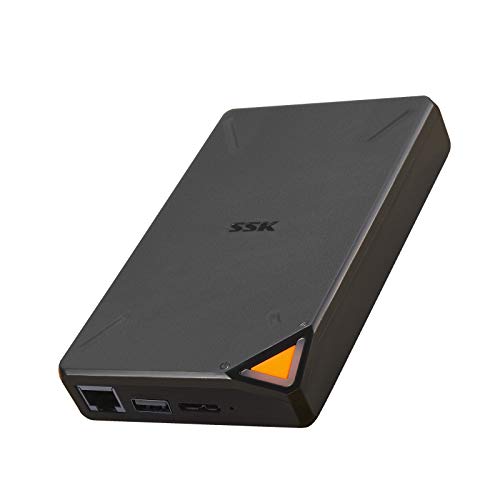
The SSK 2TB Portable NAS combines a compact external hard drive with an integrated Wi‑Fi hotspot. It supports high‑speed wireless transmission up to 300Mbps and enables remote access from PCs, phones, or tablets. Security is addressed with Point to Point (P2P) confidential transmission, helping protect data during transfer. The device is designed for portability, fitting in a pocket for on‑the‑go access. A dedicated app (iOS and Android) provides one‑click backup, easy remote management, and multi‑user sharing within a LAN or across the internet. It also supports Samba and DLNA, enabling networked devices to access stored files.
Within the drive, you can create Private and Public Areas to segregate sensitive data, enhancing privacy on shared networks. The device emphasizes convenient backups directly from mobile devices and PCs, making it suitable for travelers, freelancers, and families who want a private cloud without monthly fees. While strong on wireless features, performance depends on regional Wi‑Fi conditions and the type of USB connection used for initial data population.
SSK 1TB Personal Cloud External Wireless Hard Drive
The 1TB version provides a compact, mobile way to create a personal cloud. It delivers up to 300Mbps wireless transmission and supports remote access from multiple devices. The included smart app enables one‑click backup and easy file sharing, with multi‑user support for households or small teams. Like the larger model, it uses P2P transmission for secure transfers and allows you to partition the drive into Private and Public Areas for content protection. The device is portable enough to carry in a bag or large pocket, making it ideal for travel, conferences, or remote work setups where network access is variable.
Connections to other LAN devices (Samba, DLNA) extend compatibility with smart TVs, laptops, and phones. The emphasis on remote access and data security makes this a practical choice for personal cloud storage without monthly fees. The main trade‑offs are lower capacity and slightly slower transfer time compared with larger SSD options, but its reliability and ease of use appeal to everyday users who value convenience over raw speed.
NewQ Filehub AC750 Travel Router
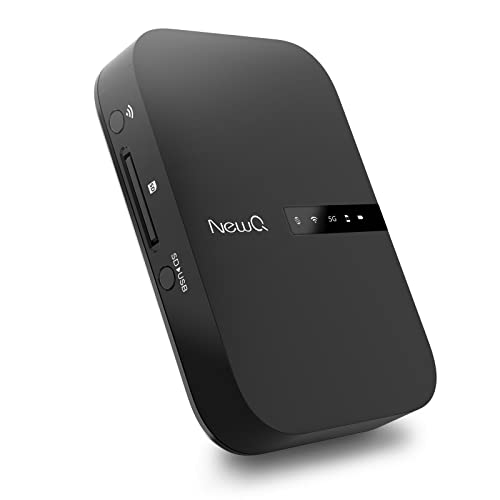
The NewQ Filehub AC750 blends a portable wireless router with a file hub function. It can turn a wired network into Wi‑Fi on the go and operate in AP, Router, or Bridge modes. The Filehub feature connects external storage devices (drives, USB flash, or SD cards) to provide wireless access to files, transforming any attached storage into a wireless back‑up source. Importantly, this model emphasizes browser‑based setup—no app installation is required for basic operation, though an accompanying app can improve usability. Its versatility makes it a strong pick for travelers who need both access to the internet and convenient data transfer to external drives.
Because it can function without an app, it appeals to users who prefer web interfaces. However, you may miss certain enhancements available in app ecosystems, depending on your device and OS. The device supports multiple device connections and standard DLNA/Samba sharing protocols, widening compatibility with media players and computers. For complete backups, you’d typically attach a larger drive via the Filehub connection rather than relying on cloud alternatives.
Seagate Portable 2TB External Hard Drive

The Seagate Portable 2TB external drive offers a straightforward USB‑driven storage experience. It’s designed for quick connectivity with Windows or Mac computers and supports drag‑and‑drop backups. This model is ideal for users who want a reliable, high‑capacity USB drive for computers, gaming consoles, and media centers. It doesn’t include built‑in Wi‑Fi or cloud features, making it less suitable for wireless access out of the box, but its simplicity, portability, and broad compatibility remain appealing for those who primarily store and transfer files via USB connections. For travelers seeking wireless options, pairing this drive with a separate wireless router or device would be necessary.
Buying Guide
Consider the following when choosing a portable wifi external hard drive:
- Storage type and capacity: HDDs offer more capacity at a lower price, while SSDs provide faster access and greater durability. Decide how much space you need for backups, media libraries, and work files.
- Wireless features and speed: Look for models that advertise up to 300Mbps or higher, and evaluate real‑world performance by checking user reviews. Consider whether you need a built‑in hotspot or just remote access to a connected drive.
- Security and privacy: Features like P2P encryption, Private/Public data areas, and access controls help protect sensitive information. Confirm how data transfers are secured and whether remote access is optional or always on.
- Apps and ecosystem: Some devices rely heavily on dedicated apps for backups and sharing, while others emphasize browser interfaces. Choose based on your comfort with apps and whether you want cross‑platform compatibility (iOS, Android, Windows, macOS).
- Device compatibility and networking: If you plan to share with smart TVs or DLNA devices, ensure the model supports Samba/DLNA or similar protocols. Consider LAN integration for home or office networks.
- Portability and durability: A pocket‑sized drive is ideal for travel, but ensure the build can withstand bumps and temperature changes. Check for ruggedized variants if you travel frequently.
- Reliability and warranty: External drives vary in reliability. Look for models with robust warranties and good customer support records, especially if you rely on them for critical backups.
Comparative perspective:
- Best for wireless on the go: Devices with built‑in hotspots and strong remote access capabilities are ideal for mobile users who need instant backups and shared access wherever they are.
- Best for travel and light use: Compact, pocket‑friendly options with easy app control offer straightforward backup and sharing without requiring a computer for setup.
- Best budget/simplicity option: Standard USB hard drives provide large capacity with minimal setup but lack wireless sharing—great for desktop backups and media libraries that don’t require wireless access.
When evaluating, align the model’s strengths with your typical use cases: travel, remote work, household media sharing, or collaboration with multiple devices. Always verify that the device supports the devices and platforms you rely on most, and review user experiences for real‑world performance and reliability.