Choosing a case with an integrated screen for Raspberry Pi Zero models can simplify builds, protect your board, and provide a compact, portable display. The following selections combine cases designed for Pi Zero or Zero W with built-in or attached screens, offering features from e-paper readers to compact LCD panels. Each option balances accessibility, power efficiency, and ease of installation for hobbyists and makers alike. The list below highlights five strong candidates suitable for various Pi Zero projects.
| Product | Display Type | Screen Size | Key Benefit |
|---|---|---|---|
| Waveshare 2.13″ Touch e-Paper Display with ABS Case | e-Paper | 2.13″ | Low power, long display memory, gesture wake |
| Retroflag GPi CASE 2W with 3″ LCD | IPS LCD | 3″ | Portable handheld styling with battery power |
| 1.44″ LCD Display HAT for Pi | LCD | 1.44″ | Compact add-on with SPI control |
| Generic Compact Pi Zero Protective Case (Black Carbon Fiber) | Protective Case | Case-only | Slim, precise cutouts for IO |
| Waveshare 2.13″ Touch E-Paper HAT with ABS Case | e-Paper | 2.13″ | Partial refresh, low power gesture wake |
Waveshare 2.13-Inch Touch E-Paper Display With ABS Case
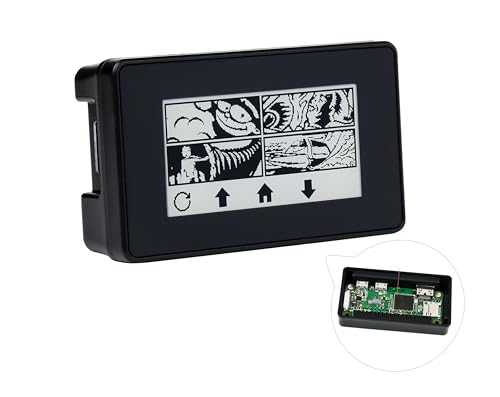
The Waveshare display uses a 2.13″ capacitive touch e-Paper panel with 5-point touch and a 250×122 pixel resolution. It is designed to align with the Raspberry Pi 40-pin GPIO header, fitting Raspberry Pi Zero, Zero W, and Zero WH boards. It supports waking via user-defined gestures and does not require a backlight, storing the last image for extended periods when powered down. Power usage is minimal, with power mainly needed for refreshing. The unit includes heat dissipation features and specific outline dimensions for both the module and the driver board, with a 3.3V (5V on V1.1) operation and an SPI interface.
- Low power display with long content retention
- Gesture wake support for convenient interaction
- Heat dissipation holes for cooling
- SPI interface and 3.3V supply (5V option in V1.1)
Retroflag GPi CASE 2W for Raspberry Pi Zero

Retroflag’s GPi CASE 2W is a handheld Raspberry Pi Zero/Zero W/Zero 2W case featuring a built-in 3.0” IPS LCD screen with 640×480 resolution and a built-in 2800mAh rechargeable battery. This design aims to emulate classic handheld consoles and provides a long play time, up to about 10 hours, for portable Pi Zero projects. It supports the Zero family and simplifies assembly with an integrated battery solution and a high-contrast display suitable for retro gaming and compact displays on the go.
- Compatible with Pi Zero, Zero W, and Zero 2W
- 3.0″ IPS LCD with 640×480 resolution
- Rechargeable 2800mAh battery for extended play
1.44-Inch LCD Display HAT For Raspberry Pi

This Waveshare 1.44-inch LCD HAT is a compact display add-on for Raspberry Pi models including Pi Zero and Zero W. It features a 128×128 pixel ST7735S driven display with 65K color, SPI communication, and direct Raspberry Pi compatibility. The HAT form factor makes it easy to stack with other Pi accessories while offering a simple, low-cost way to add a small graphical interface to Pi Zero projects.
- 128×128 pixel color display
- SPI interface with embedded controller
- Direct Pi compatibility and plug-and-play
Generic Compact Raspberry Pi Zero Protective Case
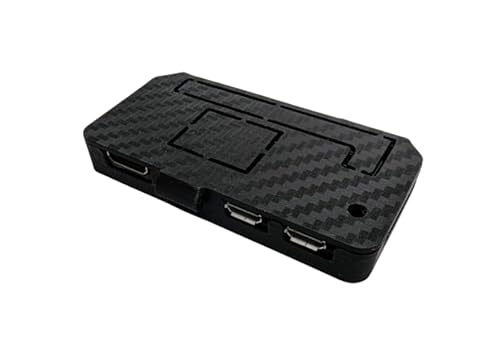
This black carbon fiber look protective case is designed to fit all Raspberry Pi Zero models. It offers precision cut-outs for HDMI, USB, and GPIO access and features tool-free snap-fit installation for quick assembly. While it does not include a built-in screen, it pairs well with external displays and makes a compact, durable enclosure for Pi Zero projects with added screen components.
- Fits all Pi Zero variants
- Precision cut-outs for IO access
- Tool-free snap-fit installation
Waveshare 2.13-Inch Touch E-Paper HAT With ABS Case

This Waveshare E-P paper HAT adds a 2.13″ capacitive touch e-Paper display with 5-point touch and 250×122 pixel resolution. It comes with an ABS protection case and supports partial refresh, making it a low-power option for Pi Zero-based projects. It includes an online user manual with examples for Raspberry Pi Zero/Zero W, and it supports waking via user-defined gestures. Ideal for compact, readable status displays and static content that doesn’t require a backlight.
- Partial refresh support and long battery-like life
- Gesture wake and 5-point touch
- ABS case for protection and portability
Buying Guide: Key Considerations For Pi Zero Case With Screen
When selecting a Pi Zero case with a screen, consider display type, power needs, and ease of installation. Here are essential criteria to help compare options:
- Display type and resolution: E-paper displays save power and are readable in bright light, while LCD/IPS screens deliver color and video. For simple status dashboards, e-paper is ideal; for menu navigation or gaming, LCDs are preferable.
- Power and battery options: Some solutions include rechargeable batteries or are designed for low power consumption. Assess whether you need a self-contained handheld unit or a compact, plug-in display.
- Physical form factor: A case with integrated screen reduces wiring and improves rigidity. Check dimensions to ensure compatibility with your Pi Zero variant and any additional components.
- Interface and expandability: SPI-based displays are common for Pi Zero, but ensure the interface matches your board (Zero, Zero W, etc.). Some kits include heat sinks or cooling features for better stability.
- Ease of assembly: Snap-fit designs and pre-assembled modules save time, especially for beginners. Look for clear manuals or online tutorials to facilitate setup.
- Durability and protection: ABS or protective cases guard against impacts. If you’ll carry the device, choose rugged enclosures with secure latching.
- Maintenance and upgrades: Consider whether the display can be easily upgraded or replaced without disassembling the entire unit.
- Display refresh rate and content requirements: Partial refresh on e-paper reduces power but may blur fast-moving content. For static dashboards, this is acceptable; for video, prefer LCD.
Across these options, evaluate how the case and display fit your project goals—whether a portable retro-gaming handheld, a compact monitoring station, or a small always-on display for a Raspberry Pi Zero project. Consider future upgrades and the availability of compatible accessories when making a choice.