In the world of photo editing, a reliable drawing tablet and pen can elevate your workflow by bringing more natural control, precise brushwork, and efficient shortcuts to your editing suite. The following selection highlights five top options that cater to beginners, students, educators, and pros who want smooth pen input, accurate pressure sensitivity, and cross-platform compatibility. Each product combines a responsive stylus with software-friendly features to streamline photo editing tasks across Windows, macOS, Chrome OS, and Android.
| Product | Brand | Key Benefit for Photo Editing |
|---|---|---|
| Wacom Intuos Small Bluetooth Graphics Drawing Tablet | Wacom | Battery-free EMR stylus with pen-to-paper feel; broad software compatibility |
| Wacom Intuos Small Graphics Drawing Tablet (Includes Training & Software) | Wacom | Professional-grade pen technology with customizable keys for fast editing shortcuts |
| XPPen Artist 13.3 Pro Drawing Tablet with Screen | XP-Pen | Full-laminated display for accurate color and detail; tilt-enabled shading |
| HUION Inspiroy H1060P Graphics Tablet | HUION | Large working area; battery-free stylus and extensive shortcut keys |
| XP-Pen Deco MW Bluetooth Wireless Drawing Tablet | XP-Pen | Wireless workflow with 8192 pressure levels and eight shortcut keys |
Note: The products listed above are evaluated for photo editing performance, including pressure sensitivity, pen accuracy, shortcut customization, cross-platform compatibility, and overall ease of use in common editing software.
Wacom Intuos Small Bluetooth Tablet

The Wacom Intuos Small Bluetooth Graphics Drawing Tablet offers an EMR battery-free stylus and precise control designed to mimic the feel of drawing on paper. It’s compatible with a wide range of software, making it suitable for photo editing tasks such as retouching, masking, and precise brushwork. The wireless Bluetooth option provides versatile placement in a workspace, while USB-A connectivity ensures a reliable fallback. Its compact size makes it a practical option for students and educators who need portability without sacrificing performance.
Key features include industry-leading pen technology, compatibility across major platforms, and the freedom to work from a desk or couch. The included software training enhances onboarding, helping users quickly capture detailed edits and complex selections with ease.
Wacom Intuos Small Graphics Drawing Tablet (Includes Training)
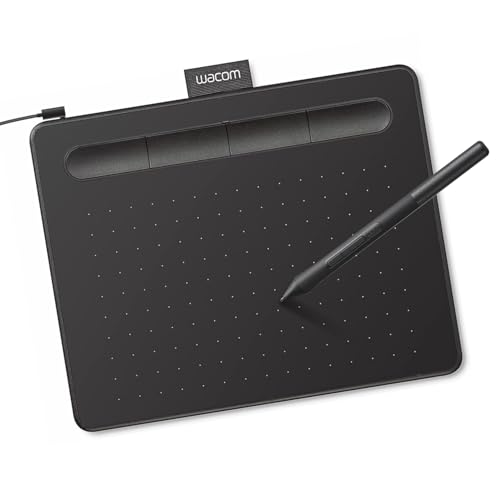
This edition emphasizes professional-grade pen performance with a familiar “pen-on-paper” sensation, aiding precise edits in photo projects. The tablet’s four ExpressKeys are customizable, enabling quick access to frequently used editing actions—ideal for workflows that involve frequent brush adjustments, masking operations, or layer navigation.
What professionals value here is the combination of consistent tablet performance and broad software compatibility. It supports multiple operating systems and editing suites, enabling streamlined workflows across a range of photo editing tasks—from color grading to detailed retouching. The emphasis on professional-grade input makes it suitable for both seasoned editors and students learning nuanced editing techniques.
XPPen Deco 01 V3 Drawing Tablet

The Deco 01 V3 from XP-Pen delivers 16,384 levels of pressure with a battery-free stylus, providing smooth brush control essential for photo editing tasks like smoothing textures, dodging, and burning. Designed with eight shortcut keys, it supports ergonomic workflows for right- or left-handed users. The device is well-suited for beginners and intermediates who want a versatile, budget-friendly option with robust input capabilities. It’s particularly effective for on- screen editing and precise line work in layered photo projects.
XPPen Artist 13.3 Pro Drawing Tablet With Screen
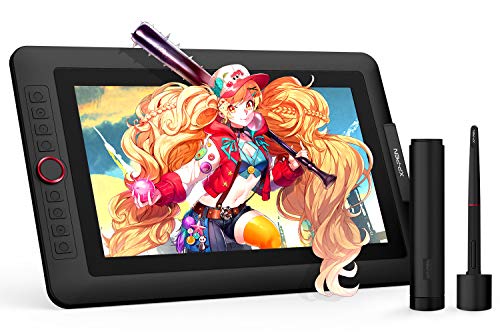
Artist 13.3 Pro is a full-featured drawing monitor that combines a high-color-full display with robust pressure sensitivity. The 13.3-inch screen provides accurate color representation and sharp detail, which is beneficial for photo editing work such as color grading, selective adjustments, and masking against a natural-looking canvas. The device supports tilt functionality and comes with a 3-in-1 cable to connect to a computer, making it a strong choice for creative editors who want direct screen editing on a Wacom-like experience but prefer XP-Pen’s color accuracy and pen performance.
HUION Inspiroy H1060P

The H1060P offers a substantial drawing area of 10 x 6.25 inches, paired with a battery-free PW100 stylus and 12 programmable keys plus 16 soft keys. This combination supports efficient photo editing workflows, allowing quick access to tools like brush size, eraser, and zoom without interrupting your painting or retouching process. The tablet’s slim profile and compatibility with Windows, macOS, and Android ensure it can slot into varied editing setups—from desktop studios to mobile-edit sessions on tablets or laptops.
XP-Pen Deco MW Bluetooth Wireless Drawing Tablet

Deco MW combines wireless convenience with a pressure-sensitive X3-Smart-Chip stylus boasting 8,192 levels of pressure and 60-degree tilt. Its Bluetooth 5.0 capability supports a cable-free workflow ideal for editing while standing or collaborating in a studio. The eight shortcut keys simplify common editing tasks, enabling faster retouching and painting processes. The Deco MW’s multi-platform compatibility makes it a versatile choice for photographers who frequently switch between devices and operating systems.
Buying Guide
- Pen pressure and tilt: Higher pressure sensitivity (e.g., 8192 levels) and tilt support yield more nuanced brushwork and masking capabilities—crucial for precise photo edits and natural-looking retouching.
- Display versus non-display: Tablets with built-in screens (like the Artist 13.3 Pro) provide on-screen editing and color accuracy benefits, while non-display tablets rely on the computer monitor. Choose based on whether you prefer direct editing on screen or external workflow flexibility.
- Shortcut customization: A robust set of express keys or shortcuts accelerates editing tasks (brush size, opacity, zoom, undo). Look for devices offering both hardware keys and software-level mapping.
- Cross-platform compatibility: For mixed ecosystems (Windows, macOS, Android, Chrome OS), confirm compatibility with your editing software suite and drivers. Battery-free styluses are common and reduce maintenance concerns.
- Portability and workspace: If you edit on the go, consider compact tablets with wireless connectivity. For in-studio workflows, larger drawing areas can improve precision on detailed edits.
- Software ecosystem and training: Some bundles include training resources and software trials, which can shorten onboarding and improve editing efficiency for beginners and students.
- Budget and future-proofing: Entry-level tablets offer essential features, while mid-range options provide more keys, larger working areas, and screen-based editing. Consider your typical projects and editing demands when budgeting.
- Warranty and support: A solid warranty and broad customer support reduce risk, especially when integrating external devices with professional editing pipelines.
Across these options, the best choice depends on whether you value a pen-on-paper feel, on-screen editing, or a balance of accessibility and control. For photo editing specifically, devices with higher pressure levels, tilt support, and customizable shortcuts typically deliver the most intuitive and precise retouching experience. This selection provides a spectrum of configurations to fit different editing styles, room setups, and device ecosystems.