Choosing the right PCIe NVMe adapter for M.2 drives can unlock faster storage performance without changing your motherboard. This guide highlights five solid options that support NVMe M.2 SSDs, provide effective heat management, and fit a range of PCIe slots. Each product section below links to its Amazon page, includes a quick image preview, and summarizes key features to help you compare at a glance.
| Product | ||
|---|---|---|
| SABRENT M.2 NVMe to PCIe Card | Aluminum heatsink for cool operation | PCIe x16/x8/x4 |
| GLOTRENDS PA09-HS | heatsinks reduce temps by 5–20°C | PCIe x4/x8/x16 |
| Bejavr M.2 NVMe to PCIe Adapter | Broad compatibility, strong cooling | PCIe X4/X8/X16 |
| MHQJRH M.2 NVMe to PCIe Adapter | Aluminum heatsink, fast PCIe X4 speed | PCIe X4/X8/X16 |
| ELUTENG Dual M.2 NVMe to PCIe | Dual M.2 support with copper heat dissipation | PCIe X1/X4/X8/X16 |
Each option supports M.2 NVMe SSDs in common sizes (2230/2242/2260/2280) and is designed to maximize data throughput while maintaining safe operating temperatures. The right choice depends on your motherboard’s PCIe slot availability, desired cooling, and whether you need to run one or two NVMe drives simultaneously.
SABRENT M.2 NVMe to PCIe Card With Heatsink

The SABRENT adapter accepts M.2 NVMe SSDs in 2230, 2242, 2260, and 2280 sizes and uses a PCIe x16/x8/x4 physical interface. It is explicitly not compatible with SATA drives or PCIe x1 slots, so compatibility with your motherboard’s slots is essential. The aluminum heatsink, along with a thermal pad, helps to maintain performance under load by improving heat dissipation. This makes it a solid choice for desktop upgrades where thermal throttling is a concern.
GLOTRENDS PA09-HS M.2 NVMe to PCIe Adapter
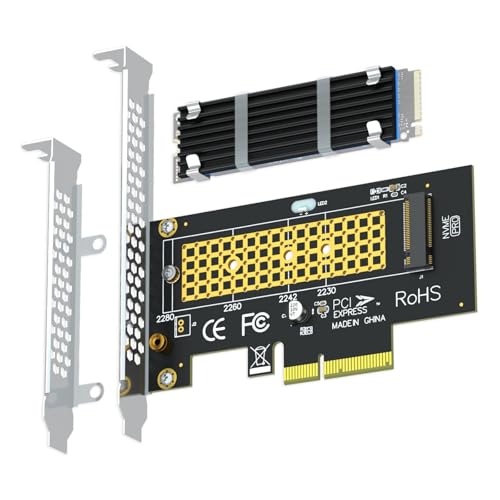
This adapter converts a motherboard PCIe X4/X8/X16 slot into an M.2 Key M slot for NVMe SSDs. It includes heatsinks that can significantly lower temperatures—by 5 to 20 degrees Celsius in typical use. It supports PCIe 4.0/3.0 NVMe SSDs, but actual speed requires CPU, motherboard slot, and SSD to all support PCIe 4.0 X4. There is no capacity limit for M.2 NVMe SSDs (2T, 4T common). Sizes 2230/2242/2260/2280 are supported. Note: M.2 SATA SSDs aren’t supported.
Bejavr M.2 NVMe to PCIe Adapter
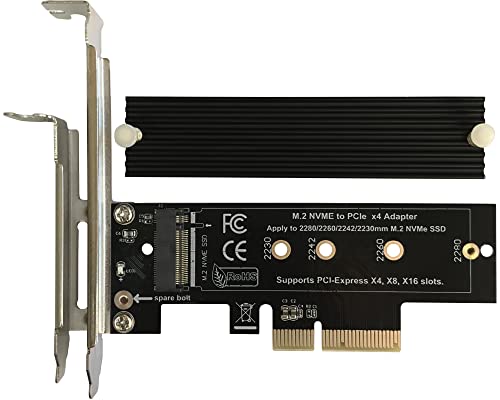
Bejavr’s adapter supports 2280/2260/2242/2230 M.2 NVMe and AHCI SSDs, and includes an aluminum heatsink for a robust cooling solution. It supports PCIe X4/X8/X16 slots, with PCIe 4.0 lanes offering up to 64Gbps bandwidth. It is backward compatible with PCIe 1.0–3.0. The package notes driver considerations for Windows and Linux environments, and indicates that newer NVMe SSDs may require initialization and formatting after installation. This option emphasizes broad OS compatibility and cooling efficiency.
MHQJRH M.2 NVMe to PCIe 3.0 X4 Adapter
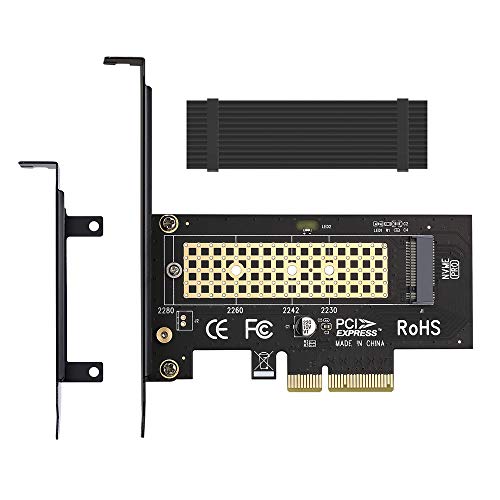
MHQJRH’s adapter handles M.2 NVMe (M Key) SSDs, supporting 2280/2260/2242/2230 formats. It includes an aluminum heatsink to achieve a cooling effect of 5–20°C. The device supports PCIe X4/X8/X16 slots and is designed to maximize throughput while maintaining stability. The product notes compatibility with various operating systems and the need to format new SSDs before use. This option is suitable for users prioritizing compact cooling and broad slot compatibility.
KONYEAD PCIe4.0 X16 to M.2 NVMe X4 Card

Note: KONYEAD’s card is designed for PCIe 4.0 systems with bifurcation. It enables four NVMe M.2 drives (M Key, 2280) with a high-speed RAID-like setup, potentially achieving up to 14000 MB/s read in optimized configurations. It requires motherboard support for PCIe bifurcation and RAID functionality. The kit emphasizes high data transfer potential for advanced builds, along with a dedicated cooling approach and driver-free operation in many configurations.
Buying Guide: Key Considerations for PCIe NVMe M.2 Adapters
- Slot compatibility: Ensure your motherboard has the PCIe x4/x8/x16 slots the adapter supports. Some adapters do not work with PCIe x1 slots or SATA interfaces.
- Number of drives: If you plan to run one NVMe drive, a single-slot adapter is enough. For dual NVMe operation, choose a dual-drive model like the ELUTENG option.
- Heat management: NVMe drives can throttle under load. Look for aluminum heatsinks or copper heat dissipation designs to maintain sustained performance.
- PCIe version and speed: PCIe 4.0-capable boards and CPUs enable higher throughput. Real-world speeds depend on the SSD, motherboard slot, and CPU compatibility.
- Operating system and drivers: Some adapters require no driver install, while others may benefit from driver updates in Windows or Linux. Check OS compatibility notes for your setup.
- Capacity and formatting: Modern NVMe SSDs often require initialization or formatting after installation. Ensure you have backups before configuring drives.
- BIOS and motherboard features: Some high-end configurations may rely on bifurcation or RAID features. Confirm that your motherboard supports these options and that settings are properly configured in the BIOS.
- Physical fit and form factor: Verify the card thickness and bracket height to ensure clearance inside your PC case. Low-profile brackets are available for compact builds.
When selecting an adapter, balance price, cooling efficiency, and slot compatibility with your build goals. For mainstream upgrades, a single-slot NVMe adapter with a solid heatsink provides robust performance. For multitask setups or systems designed for heavy I/O, a dual-slot or bifurcation-capable card can unlock maximum throughput while maintaining drive health.