The following PCIe sound cards are among the top choices for enthusiasts seeking high-fidelity audio, virtual surround sound, and practical gaming enhancements. This guide focuses on models that offer solid DAC performance, low latency, and clear connectivity for both headphones and speakers. Below is a quick summary of the selected products to help you compare at a glance.
| Product | Brand | Key Benefit | Chip/Tech Highlight |
|---|---|---|---|
| Creative Sound Blaster Z SE Internal PCI-e | Creative | Low-latency, 7.1/5.1, ASIO | 24-bit/192 kHz DAC, 116 dB SNR |
| GODSHARK 5.1 Internal PCIe | GODSHARK | 5.1 surround, compact | CMI8738 chipset |
| axGear PCI Express 5.1 | axGear | Enhanced 3D audio, EAX | PCIe audio adapter |
| Creative Audigy Fx V2 | Creative | Hi-res 5.1, built-in amp | Up to 24-bit/192 kHz |
| PUSOKEI PCIE Sound Card | PUSOKEI | 6-channel surround, S/PDIF | CMI8738 chipset |
Note: The products listed below are selected for their PCIe form factor, surround capabilities, and broad compatibility with Windows systems. Each section provides a concise, objective overview based on published features.
Creative Sound Blaster Z SE Internal PCI-e
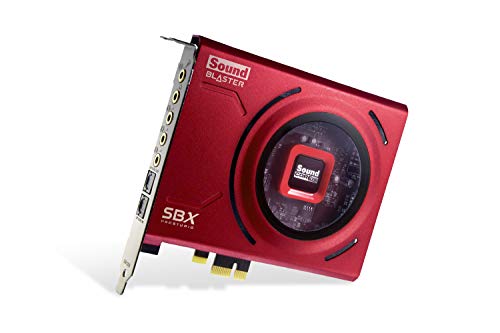
Pristine audio clarity is the hallmark of the Sound Blaster Z SE. It delivers up to 116 dB SNR with a 24-bit/192 kHz DAC, gold-plated connectors, and optimized speaker profiles. ASIO support reduces latency for recording and playback. The card also features SBX Gaming EQ Profiles designed for popular titles, ensuring ready-made improvements for fast-paced games. Immersive surround options include 7.1 virtual on headphones and 5.1 discrete for speakers. Dolby Digital Live and DTS Encoding expand digital surround options for external devices.
GODSHARK 5.1 Internal PCIe Sound Card
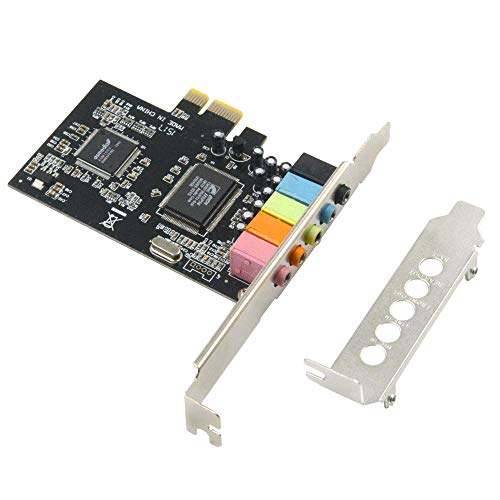
The GODSHARK 5.1 PCIe sound card is designed to turn a PC into a cinematic audio hub. It provides 5.1 stereo surround sound with a low-profile bracket suitable for compact builds. The PCIe interface ensures compatibility with modern systems, and the 5.1 configuration is aimed at improving desktop entertainment and gaming immersion through dedicated channels for key audio streams.
axGear PCI Express 5.1 Card

The axGear PCI Express 5.1 card emphasizes enhanced audio fidelity with 3D and multi-channel support. It supports EAX-style 3D audio and aims to deliver immersive experiences for gaming and media playback. It’s positioned as a straightforward upgrade for desktops requiring robust surround sound across multiple speaker setups.
Creative Audigy Fx V2

The Audigy Fx V2 upgrades PC audio with up to 24-bit/192 kHz playback and 120 dB DNR clarity. It offers 5.1 discrete channels plus virtual surround, and a built-in headphone amplifier capable of driving up to 600Ω headphones. The Creative app provides customizable EQ profiles and features like Scout Mode to highlight in-game audio cues, along with SmartComms Kit for improved online communication.
Padarsey PCIe 5.1 Internal Sound Card
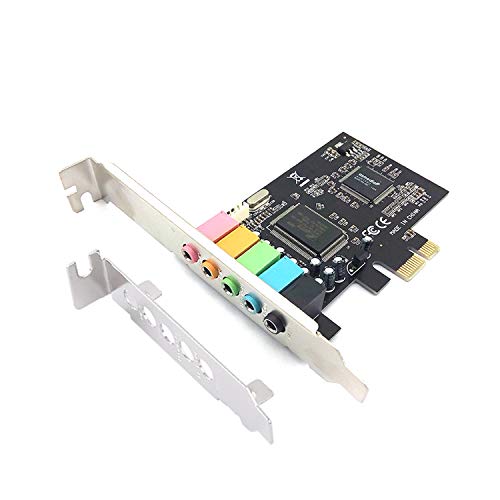
The Padarsey PCIe 5.1 card offers straightforward 5.1 surround sound over PCIe with a low-profile bracket suitable for compact builds. It is designed to enhance home entertainment and gaming audio with dedicated 5.1 channels and a compact form factor for small cases.
Optimal Shop PCIe Sound Card

The Optimal Shop PCIe sound card targets users seeking a 5.1 system with a low-profile design. It emphasizes easy setup for home theater and gaming environments, offering 3D stereo PCIe audio with standard 5.1 channel support and a compact bracket suitable for many PC desktop builds.
VBESTLIFE PCI E 5.1 Card

The VBESTLIFE PCI E 5.1 Card focuses on full duplex 5.1 channel output with a PCI Express interface and a CMI8738 multi-channel chipset. It adheres to PCIe x1 and AC’97 standards, supporting 24-bit sound sampling up to 48 kHz for both playback and recording, with front and surround channel capabilities including center/subwoofer.
PUSOKEI PCIE Sound Card

The PUSOKEI PCIE Sound Card uses a 6-channel surround setup with a CMI8738 chipset. It supports S/PDIF-Out and is designed to reduce audio noise during system transitions, aiming to deliver consistent surround sound for multimedia and gaming.
Buying Guide
- Purpose and compatibility: Confirm if you need 5.1 surround for speakers or 7.1 virtual surround for headphones, and ensure your motherboard PCIe slot is compatible.
- DAC quality and signal-to-noise: Look for higher SNR values (e.g., 116 dB) and 24-bit/192 kHz support for clearer, more dynamic sound.
- Headphone amp power: If you use high-impedance headphones (like 600Ω), choose cards with built-in amplifiers that can drive them adequately.
- Software features: Gaming EQ profiles, Scout/Voice features, and SmartComms Kit can improve in-game audio cues and communication clarity.
- Surround sound options: Decide between discrete channel configurations for speakers and virtual surround for headphones, and verify Dolby Digital Live or DTS Encoding support if you want external decoding options.
- Physical fit: Low-profile brackets are important for compact cases; verify the card’s height fits your chassis with any existing PCIe devices.
- Driver and OS support: Ensure the product lists Windows compatibility and ongoing driver support to avoid issues with updates.
- Value considerations: Compare DAC performance, latency, and software value against the price to determine the best fit for your setup.