Expanding USB connectivity is essential for creators, gamers, and power users who need multiple high-speed ports. This guide highlights top PCIe USB controller cards that add USB 3.0/3.1/3.2 and USB-C ports to desktop PCs. Each option focuses on power stability, data transfer speed, and independent port performance to prevent bottlenecks. Browse these reliable additions to improve external drives, hubs, keyboards, mice, cameras, and other peripherals with minimal effort.
| Product | Ports | Interface Type | Key Benefit |
|---|---|---|---|
| ELUTENG PCIE USB 3.2 Card 8 Ports | 8 | PCIe to USB 3.2 | Dual Type-A/Type-C with independent power modules |
| ELUTENG PCIE USB 3.0 Card 7 Ports | 7 | PCIe to USB 3.0 | Independent power per port for stable operation |
| StarTech 4-Port PCI Express USB 3.0 | 4 | PCIe to USB 3.0 | UASP support for faster transfers |
| YEELIYA PCIE USB 3.0 Expansion Card 7 Ports | 7 | PCIe to USB 3.0 | Mix of Type-A and Type-C with broad OS support |
| FebSmart FS-U4-Pro | 4 | PCIe to USB 3.0 | Self-powered design for high-draw devices |
ELUTENG PCIE USB 3.2 Card 8 Ports – Dual USB-C and USB-A

The ELUTENG 8-port USB 3.2 PCIe expansion card combines 6 USB-A ports with 2 USB-C ports to maximize modern peripheral support. Its dual-interface setup allows two devices to run simultaneously without power contention. A solid-state capacitor design enhances heat resistance, supporting stability at high temperatures. The card uses NEC NEC720210/NEC720201 controllers to push USB 3.2 Gen2 speeds up to 10 Gbps in theory, enabling rapid transfers for large files, external SSDs, and high-definition video devices. Independent port power management reduces interference between ports for more reliable operation.
Security features include automatic power cutoff if a connected device draws excessive current. The system can recover automatically after faults are resolved. Each port has its own capacitor, enabling operation without external power supplies for standard bandwidth needs. This card is well-suited for creators who need multiple fast ports with robust protection for data and hardware integrity.
ELUTENG PCIE USB 3.0 Card 7 Ports – Independent Power Per Port

ELUTENG’s 7-port USB 3.0 PCIe card provides seven external USB 3.0 ports with a two-phase independent power supply module. Each port can receive its own 5V/2A (up to 10W) power, reducing the risk of underpowered devices and preventing bandwidth piracy among ports. The card supports USB 3.0 speeds up to 5 Gbps, enabling fast file transfers for large media libraries, backups, and USB-based workstations. NEC720201/NEC720210 controllers underpin reliable performance, and the design emphasizes low impedance, stable temperatures, and safe operation for high-demand devices without requiring an external power supply in many configurations.
Note that it is not compatible with PS3/PS4 in some setups due to platform limitations, but it is generally suitable for Windows, Linux, and compatible Mac configurations. This card is a strong choice for users who need several high-speed USB connections with reliable power management inside a compact PCIe form factor.
StarTech 4-Port PCI Express USB 3.0 Controller Card

This StarTech PCIe USB 3.0 controller card adds four external USB 3.0 ports and supports data rates up to 5 Gbps. It includes UASP support, which optimizes data transfers by allowing multiple commands to be processed simultaneously, improving efficiency for external drives and high-throughput devices. The card’s stacked port layout positions ports in a compact, easy-to-access arrangement, making it ideal for workstations or compact PC builds where space is at a premium. It is backward compatible with USB 2.0/1.x devices, ensuring broad device compatibility while delivering modern USB 3.0 performance.
Users should verify system compatibility and ensure sufficient power delivery, as this card relies on the motherboard’s PCIe slot and the system’s overall power capacity. For professionals seeking a straightforward upgrade to USB 3.0 speeds with reliable data handling, this StarTech card offers a solid balance of performance and compatibility.
YEELIYA PCIE USB 3.0 Expansion Card 7 Ports
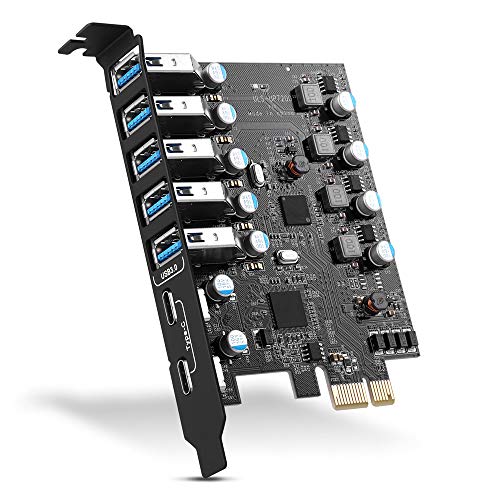
YEELIYA’s 7-port USB 3.0 PCIe expansion card provides a mix of five Type-A ports and two USB-C ports, aiming to cover a wide range of devices. It supports transfer rates up to 5 Gbps for USB 3.0 connections and maintains backward compatibility with USB 2.0/1.1 devices. The card adheres to PCIe 3.0/2.0 host specifications and works across Windows, Linux, and macOS with varying driver requirements. The design emphasizes broad compatibility and ease of integration into various PC configurations, making it a versatile option for creators and power users who need multiple USB connections without upgrading power supplies extensively.
Potential considerations include driver requirements for older Windows versions and ensuring the motherboard provides sufficient PCIe bandwidth for multiple high-speed ports. For users who need a flexible mix of USB-A and USB-C ports and broad OS support, this YEELIYA card can be a compelling fit.
FebSmart FS-U4-Pro – 4 Ports USB 3.0 PCIe Card

FebSmart FS-U4-Pro is a PCIe X1 interface card that adds four USB 3.0 ports with self-powered technology, meaning no extra external power cable from the power supply is required in many configurations. Each USB 3.0 port can deliver up to 5V/2A (10W total across four ports), enabling high-demand devices such as USB NVMe enclosures, cameras, and docking stations to function reliably. The card uses RENESAS UPD720201 controller and includes built-in safety features like fuses and capacitors to protect both devices and data. The design supports AMD, ARM, and Intel platforms and aims to offer robust performance in desktops, workstations, and small server builds.
Pros include simplified power management and a compact footprint. Potential drawbacks include total shared bandwidth across ports, which may limit peak performance when all ports are active simultaneously at full load. This card suits users requiring a compact, self-powered USB expansion with solid protection and straightforward installation.
Buying Guide: Key Considerations When Choosing a PCIe USB Card
- Port mix and type: Decide how many USB-A and USB-C ports you need, and whether you require USB 3.0 (5 Gbps), USB 3.2 (up to 10 Gbps), or higher speeds. Some cards offer dual USB-C interfaces for modern devices.
- Power delivery: Independent per-port power or self-powered designs help prevent device power shortages. Consider whether your devices require external power or if motherboard power is sufficient.
- Controller quality: Reputable controller ICs (e.g., NEC NEC720201/NEC720210, ASMedia, RENESAS) tend to offer stable performance and compatibility across OSes.
- Data transfer performance: UASP support can improve throughput for external drives, while PCIe lane allocation and total bandwidth affect simultaneous multi-port transfers.
- OS compatibility: Some cards require drivers on older Windows versions; others are plug-and-play on newer systems or macOS/Linux with varying driver needs.
- Form factor and mounting: Consider full-height vs. low-profile (especially for small form factor builds) and the available PCIe slots on the motherboard.
- Build quality and protection: Look for capacitors, fuses, and robust power management to safeguard devices during peak loads and transient events.
- Use case alignment: For media editing, gaming setups, NAS or backup servers, prioritize higher port counts, power stability, and transfer speeds accordingly.
When selecting, align the card’s capabilities with your existing hardware, expected workload, and the peripherals you plan to connect. A balanced choice will deliver sustained performance without causing conflicts or power-related issues across connected devices.