Every data center, industrial PC, or lab workstation can benefit from reliable multiport serial expansion. This article highlights top PCI Express multiport serial adapters that add multiple RS232 ports through a single PCIe slot. You’ll find options suitable for standard and low-profile builds, with attention to UART type, data rates, and compatibility across Windows and Linux environments. A quick buying guide follows to help you compare features and pick the right card for your setup.
| Product | Brand | Ports | Key Feature |
|---|---|---|---|
| StarTech.com PCI Express Serial Card – 16 DB9 RS232 Ports – PEX16S550LP | StarTech.com | 16 | Low + Full Profile, up to 921.6 Kbps per port |
| StarTech.com 4-Port PCIe RS232 Serial Card – PEX4S953 | StarTech.com | 4 | 16950 UART, configurable power, Windows & Linux |
| StarTech.com 2-Port PCIe RS232 Serial Card – PEX2S953 | StarTech.com | 2 | 16950 UART, configurable power, Windows & Linux |
| StarTech.com 1-Port PCIe RS232 Serial Card – PEX1S953LP | StarTech.com | 1 | 16950 UART, low + full profile, Windows & Linux |
| StarTech.com 8-Port PCIe RS232 Serial Card – PEX8S952 (8-Port) | StarTech.com | 8 | 16C1050 UART, Windows only, 15kV ESD |
Below is a concise overview of the five selected multiport serial adapters, focusing on practical considerations such as form factor, UART type, and operating system compatibility. The table provides a quick reference to help you compare at a glance.
StarTech.com PCI Express Serial Card — 16 Ports

This PCIe serial card adds 16 RS232 (DB9) ports via a single PCI Express slot. It supports low-profile and full-profile installations, making it suitable for compact workstations and rackmount servers. The card is designed for high-speed serial communication with data transfer rates up to 921.6 Kbps per port, enabling batch data collection, gateway devices, and automation tasks that require many simultaneous serial connections. The 16-port design consolidates PCIe expansion without occupying multiple slots.
StarTech.com 4-Port PCIe RS232 Card

The PEX4S953 adds four RS232 ports with 16950 UART, supporting up to 921.6 Kbps per port and a 256-byte FIFO. It offers configurable power options (12V, 5V, or none) via pin 9 with up to 2A total, and ports can be configured individually. Includes standard and low-profile brackets for flexible installations and supports Windows and Linux. This card is ideal for labs or facilities needing multiple immediate serial connections without sacrificing space or power management.
StarTech.com 2-Port PCIe RS232 Card

The PEX2S953 brings two RS232 ports with 16950 UART and speeds up to 921.6 Kbps per port. It includes a configurable power option (12V, 5V, or none) through pin 9 with up to 2A total and provides both standard and low-profile brackets for versatile installs. Windows and Linux compatibility ensures broad applicability in servers and workstations requiring moderate port expansion without a large footprint.
StarTech.com 1-Port PCIe RS232 Card

The PEX1S953LP provides a single RS232 port using a 16950 UART, supporting up to 921.6 Kbps bidirectional communication with a 256-byte FIFO. It offers optional power through pin 9 (12V/5V/none) up to 2A and includes both standard and low-profile brackets for flexible installation in compact builds. It is compatible with Windows and Linux, making it suitable for smaller systems needing one reliable serial channel.
StarTech.com 8-Port PCIe RS232 Card
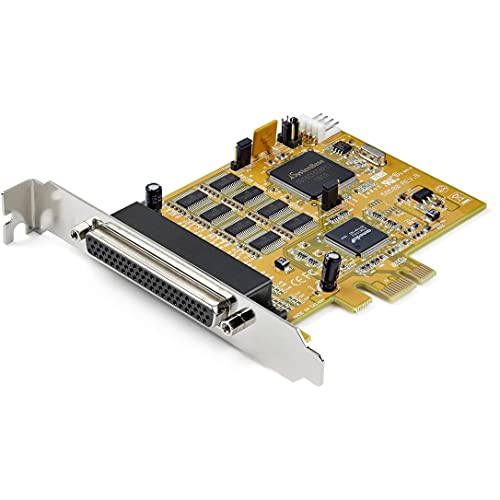
This PCIe card provides eight RS232 ports with 16C1050 UART, delivering up to 921.6 Kbps per port and a 256-byte FIFO. It includes an 18″/48cm DB62 to 8x DB9 breakout cable and supports Windows only. A robust option for Windows-centric environments needing multiple serial connections from a single PCIe slot, with ESD protection up to 15kV for added reliability in industrial settings. Optional 12V/5V power via pin 9 is supported up to 3A total shared.
Buying Guide
Port Count and Form Factor
Decide how many serial ports you need now and potentially in the near future. If space is a constraint, consider low-profile models that fit in compact workstations or microservers. For batch data collection or device farms, a high-port card (like a 16-port model) may reduce the number of PCIe slots used.
UART Type and Data Rates
Most cards use 16C550/16C650/16C750/16C950 or 16950 UARTs. Check the supported data rate per port. Commonly, speeds up to 921.6 Kbps per port are sufficient for many devices; higher-demand environments may require specific UART capabilities and buffering (FIFO) sizes.
Power and Connectivity
Power options (12V, 5V, or none via pin 9) help manage overall system power consumption. Card-specific limits on total current (e.g., up to 2A or 3A) influence how many ports can be powered simultaneously, especially in dense rack setups.
Compatibility and Drivers
Confirm OS support for Windows and Linux distributions you use. Some cards explicitly support Windows Server editions, while others are tested across consumer and server-grade Linux. Driver availability affects long-term reliability and updates.
Profile and Installation
Choose standard-profile, low-profile, or both if you anticipate needs across different chassis types. Bracket options determine how the card sits in your case and whether it aligns with PCIe slots, slots kept for GPU or NICs, or space-limited enclosures.
Reliability and Features
Consider ESD protection (like 15kV) for industrial environments, breakout cables for convenient DB9 connections, and whether the card supports separate configuration per port for advanced deployments. Feature-rich models may offer per-port BIOS-like configuration or utility software for management.
In selecting a PCIe multiport serial adapter, balance port count, form factor, and OS compatibility with your application needs. For scalable data collection, higher-port options reduce card sprawl. For modular installations, low-profile variants and configurable power options improve flexibility and deployment speed.