Turning analog video into digital files for PC editing and archiving is a common need for preserving memories. This article highlights five USB and HDMI adapters that convert component or composite signals for modern computers and displays. Each section covers key features, compatibility, and how it supports legacy devices like VHS, DVD players, and game consoles. A concise buying guide follows to help you compare options and choose the right solution for your setup.
style=”display:none;”>Summary Table of Selected Products:
| Product | Brand | Input Type | Output | Notes |
|---|---|---|---|---|
| Capture Card, USB Video Capture Card Device | VIXLW | RCA Composite | USB 720P | AV to USB converter for VHS/VCR capture; plug-and-play |
| YPbPr to HDMI Converter | Anber-Tech | YPbPr Component | HDMI | HDMI 1.4; not reversible |
| DigitConvert AV to HDMI Converter | DigitConvert | RCA Composite | HDMI 720P/1080P | Plug and play; supports PAL/NTSC |
| 1080P Component to HDMI Converter | TIXILINBI | YPbPr Component | HDMI | Maintains original resolution |
| KUJOBUY VGA to 3 RCA Cable | KUJOBUY | VGA | 3 RCA (Y/Pr/Pb) + audio | Video-only; requires compatible VGA output |
VIXLW USB Video Capture Card for VHS and VCR to PC

Capture videos and audio from VHS, VCR, Hi8, DV, or other analog formats and transfer to a PC via USB. This device functions as an AV to USB converter, allowing you to digitize memories without a dedicated sound card. It supports RCA composite input and records in HD 720P USB output. Advanced signal processing provides improved color accuracy and detail, while driver installation is automatic once connected to a PC. No external power is required, making it a straightforward plug-and-play option for casual users and archivists alike.
Key considerations
- Best for standalone capture from legacy tapes with minimal setup.
- Requires compatible PC software for video capture and editing.
- Passive hardware benefits from stable USB power; no external adapter needed.
Anber-Tech YPbPr to HDMI Converter
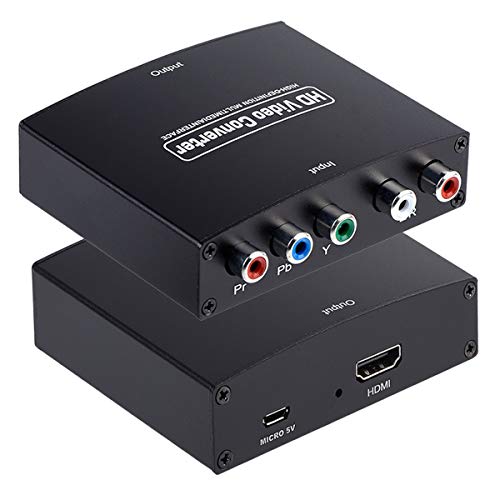
This component-to-HDMI adapter converts analog YPbPr video and stereo audio into an HDMI signal. It’s designed to bridge older DVD players, satellite boxes, and gaming consoles to modern displays. Note that this is not an HDMI-to-component converter, so reverse use isn’t supported. It supports a range of component resolutions including 480i/p up to 1080p and HDCP 1.4 compliance for compatible displays. The device is simple to use, with no external power required beyond standard HDMI connections in some setups.
Key considerations
- Ideal for upgrading legacy devices to modern monitor setups without a full AV receiver.
- Not suitable for converting HDMI sources to component displays.
- Resolution options cover most standard definition to true HD content.
DigitConvert AV to HDMI Converter

The DigitConvert AV to HDMI adapter converts RCA composite (yellow video, white and red audio) to HDMI at 720P or 1080P. It’s designed strictly for RCA-to-HDMI, not the reverse. A USB power cable is included and should be connected to a 5V power source when using the converter. This device supports multiple color standards (PAL, NTSC variants, SECAM), enabling broad compatibility with older media players. It emphasizes plug-and-play simplicity for quick digitization of home videos.
Key considerations
- Best for converting classic VHS/DVD/VCD content into digital HDMI displays or PC captures.
- Limited to RCA-to-HDMI; no HDMI-to-RCA function.
- USB power requirement can affect portability depending on power source.
TIXILINBI 1080P Component to HDMI Converter
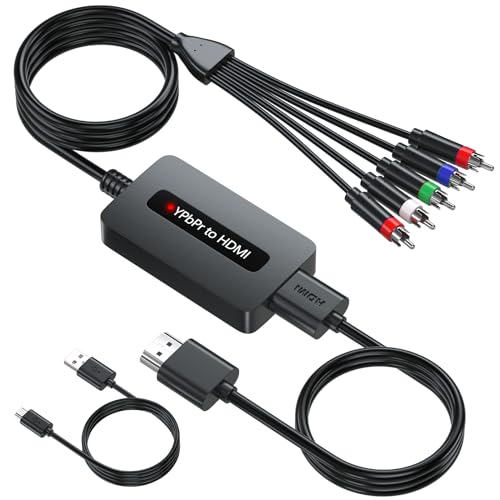
This converter accepts male YPbPr component input and outputs HDMI, preserving the video’s original resolution where possible. It’s designed to work seamlessly with devices that provide female component ports, such as some legacy DVD players and set-top boxes. It emphasizes high-definition quality with accurate color representation and clear image clarity. The adapter is intended for straightforward plug-and-play use, with a focus on maintaining detail from the source material.
Key considerations
- Good fit for older equipment lacking HDMI outputs but offering component connections.
- Be mindful of compatibility if your device uses different component signaling standards.
- Supports a range of HDMI output resolutions to fit your display.
KUJOBUY VGA to 3 RCA Cable

The KUJOBUY VGA to RCA cable is a 5-foot connector set that translates VGA video signals to three RCA outputs (Y, Pr, Pb) plus two audio lines. It’s designed for devices that provide VGA output and require analog component signals for display or capture. It’s important to note that this cable transfers video only; audio must be handled separately via an appropriate audio connection. The cable is marketed for use with satellite TV, HDTVs, components, and projectors, with a caveat that your graphics card must support a compatible TV-out feature for correct operation.
Key considerations
- Useful when you need to route VGA video into component-based displays or capture setups.
- Check your PC’s VGA output capabilities and driver settings for TV-out features.
- Demoed as a straightforward cable, not an all-in-one converter box.
Portta Component to HDMI Converter with HDMI Cable

This adapter converts analog YPbPr component video and stereo audio into an HDMI signal. It comes with an HDMI cable for a ready-to-use setup and supports 1080p at 60Hz for a clean, modern display. The device adheres to HDMI 1.3 standards and supports a broad range of resolutions for both component and HDMI sources. It is not designed for reverse conversion. The absence of a built-in scaler means the output respects the source resolution as closely as possible, preserving original image quality when connected to compatible displays.
Key considerations
- Solid option for converting legacy component sources to HDMI displays without a full AV receiver.
- Not suitable for HDMI-to-component conversion.
- HDMI output compatibility depends on the source’s native format and HDCP constraints.
Buying Guide: Key Purchase Considerations
- Input and output compatibility: Ensure the device matches your source (RCA, YPbPr, VGA) and destination (HDMI, USB, PC capture). Some units support only one-way conversion, so verify it fits your needs.
- Video quality and resolution: Look for converters that support common legacy formats (480i/p, 576i/p, 720p, 1080p) and maintain color integrity. If you plan to digitize tapes, a model with robust signal processing will help minimize artifacts.
- Power requirements: USB-powered devices are convenient, but some adapters require external power for stable operation, especially at 1080P output or when multiple inputs are used.
- Latency and real-time use: For gaming or live viewing, low latency is preferable. Some HDMI converters introduce minimal delay; check user reviews for real-world performance.
- Ease of use: Plug-and-play designs reduce setup time. Drivers, if required, should have broad OS compatibility and straightforward installation steps.
- Future-proofing: If you anticipate upgrading displays or adding more legacy inputs, choose flexible adapters with broad compatibility and clear labeling of input types.
- Preservation and archiving: For digitizing old tapes, pairing a reliable capture card with appropriate software can streamline the process and preserve audio-video synchrony.
- Warranty and support: Opt for brands with posted support channels and reasonable warranty terms to address potential compatibility issues with newer computers or operating systems.
In sum, selecting a PC-to-video component solution depends on your primary use—archiving old tapes, upgrading legacy devices to modern displays, or streaming older content to PC-based viewing. The products featured here cover a spectrum of inputs (RCA, YPbPr, VGA) and outputs (HDMI, USB) to help you digitize, display, and enjoy legacy media on contemporary systems.