Finding a reliable USB-to-disk adapter helps you resurrect old drives, clone data, or recover files without opening your computer. The following 5 adapters cover PATA/IDE and SATA options, USB 3.0 speeds, and external power needs. They support a range of drive sizes and formats, making them suitable for desktops, laptops, and legacy hardware alike.
| Product | Brand | Key Feature | Capacity Support |
|---|---|---|---|
| FIDECO USB 3.0 to SATA or IDE Adapter | FIDECO | Supports 2.5/3.5″ SATA HDD/SSD and IDE HDD; 5Gbps USB 3.0 | Up to 22TB |
| Unitek USB 3.0 to IDE and SATA Converter | Unitek | Dual-Head IDE + SATA; 3 drives simultaneously; 5Gbps | Up to 10TB (per drive spec) |
| Warmstor SATA/PATA/IDE USB Adapter | Warmstor | Wide compatibility; external power supply; USB 2.0/3.0 | Max 10TB drive |
| POSUGEAR USB 3.0 to IDE/SATA Adapter | POSUGEAR | Supports 6TB; 4-pin power for 3.5″ IDE | Up to 6TB |
| FIDECO IDE/SATA to USB 3.0 Adapter | FIDECO | Connects 3 drives simultaneously; wide OS compatibility | Up to 22TB |
The table above highlights options that emphasize compatibility, speed, and capacity. Each product is built to work with both newer USB connections and older drives, ensuring you can access data from a wide array of devices. Below you’ll find detailed overviews of five selected adapters, with practical uses and notable features.
FIDECO USB 3.0 To SATA Or IDE Adapter

FIDECO’s USB 3.0 to SATA or IDE adapter provides versatile drive connectivity for both SATA and IDE formats. It supports 2.5″ and 3.5″ HDDs, SSDs, and legacy optical drives such as DVD-ROMs and CD-RWs. The USB 3.0 interface delivers speeds up to 5Gbps, with backward compatibility to USB 2.0. This unit supports multiple drive connections simultaneously, including combinations of IDE and SATA drives, while offering a power option for power-hungry devices. It’s suitable for data transfer, drive cloning, and system recovery tasks on desktop and notebook setups.
Unitek USB 3.0 To IDE And SATA Converter Kit

Unitek’s external hard drive adapter kit provides a dual-head IDE (40pin and 44pin) plus a SATA II connector. It can operate up to three drives simultaneously and uses a 12V/2A power adapter for stable performance, especially when reading multiple drives. With data transfer rates up to 5Gbps and backward compatibility to USB 2.0/1.1, this kit suits data recovery, backups, and archival projects. It’s designed to support a range of 2.5″ and 3.5″ drives, including IDE and SATA formats.
Warmstor USB 2.0/3.0 To IDE Or SATA Adapter

Warmstor offers broad compatibility with IDE and SATA drives, supporting 2.5″ and 3.5″ HDDs and SSDs, as well as optical drives. It includes an external power supply to ensure stable operation, particularly for high-capacity drives. The adapter supports Windows, Mac OS, and Linux, with straightforward plug-and-play use. It’s a practical choice for data transfer, backups, and drive cloning across varied systems, especially when working with older hardware.
POSUGEAR USB 3.0 To IDE/SATA Adapter
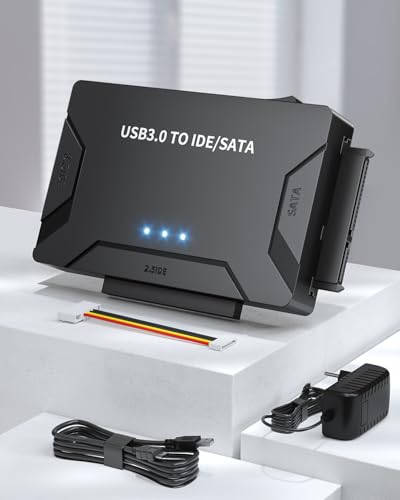
POSUGEAR’s USB 3.0 to IDE/SATA adapter emphasizes high capacity with support for up to 6TB drives. It uses a 12V/2A power adapter and includes a 4-pin power cable for 3.5″ IDE drives. The device provides a stable data path for copying, backing up, and transferring large files. It can connect 2.5″ and 3.5″ SATA and IDE drives, making it a flexible option for both older and newer storage formats, with USB 3.0 speeds and USB backward compatibility.
FIDECO IDE/SATA To USB 3.0 Adapter
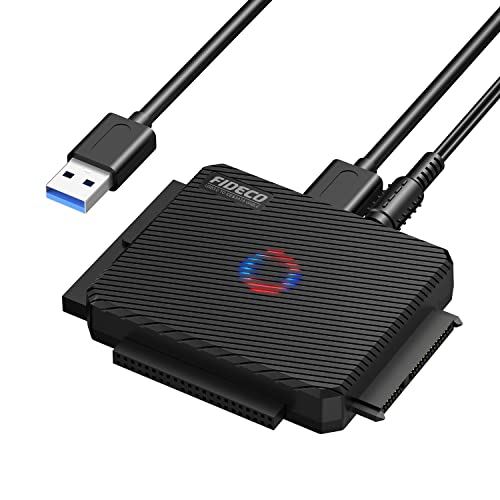
This FIDECO adapter focuses on versatility, connecting 2.5″ and 3.5″ SATA and IDE drives with support for three drives simultaneously: one 2.5″ IDE, one 3.5″ IDE, and one 2.5″/3.5″ SATA. It’s compatible with Windows, Mac OS, and Linux, enabling quick plug-and-play use without drivers. The USB 3.0 interface offers up to 5Gbps, with backward compatibility to USB 2.0/1.1. This model is suitable for multi-drive backup workflows and data recovery tasks that involve mixed drive formats.
POSUGEAR USB 3.0 To IDE And SATA Adapter
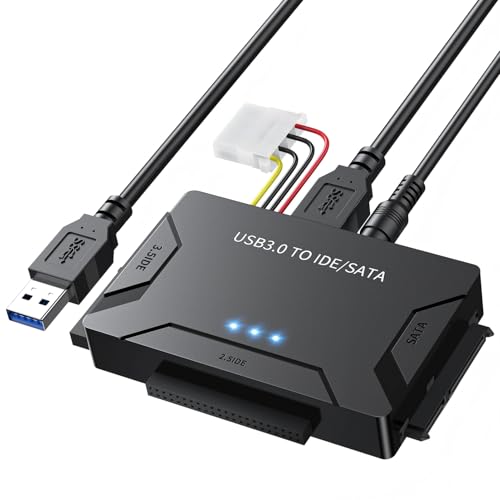
POSUGEAR’s IDE to SATA adapter is designed to connect three drives concurrently, including a 2.5″ IDE, a 3.5″ IDE, and both 2.5″ or 3.5″ SATA drives. It features a USB 3.0 interface with speeds up to 5Gbps and supports UASP for faster transfers. A 6TB capacity is supported, with a 4-pin power cord provided for 3.5″ IDE drives. It remains backward compatible with USB 2.0/1.1 for broader device compatibility, making it a robust option for mixed-drive setups.
Buying Guide: Key Considerations For PATA and SATA Drive Adapters
When selecting a USB-to-drive adapter, consider compatibility, speed, power, and drive configuration. The following points help compare options and match a model to your needs.
- Drive compatibility: Ensure the adapter supports your drive types (2.5″ vs. 3.5″, SATA vs. IDE/PATA) and optical drives if needed. Some models explicitly support multiple drive types at once.
- Interface and speed: USB 3.0/USB-C with 5Gbps speeds yields faster transfers; check for USB 2.0 compatibility if your host PC lacks USB 3.0.
- Power requirements: Many 3.5″ drives require external power. Look for adapters with dedicated power adapters or cables (4-pin IDE power, 12V/2A, etc.).
- Multi-drive support: Some units support two or three drives simultaneously. Consider your workflow—cloning or backup may benefit from multiple drives connected at once.
- Backwards compatibility: USB 3.x adapters generally support USB 2.0/1.1 host ports, but real-world speeds depend on the connected drives and system.
- Build quality and cables: Durable housings and included power cables reduce the risk of connection issues during data transfer.
- Operating system support: Most adapters advertise compatibility with Windows, macOS, and Linux. For critical work, verify any driver requirements for your system.
In practice, choose a model that aligns with your typical drive format (SATA or IDE), your need to access multiple drives at once, and whether you require portable, bus-powered operation or a powered enclosure solution. If you often work with large backups or data recovery tasks, prioritize models with strong power support and multi-drive capacity. For occasional data retrieval from older drives, a basic USB 3.0-to-SATA/IDE adapter will usually suffice.