Choosing the right overhead projector can elevate tracing, drawing, and design workflows for artists and instructors. The following selections emphasize brightness, image clarity, ease of use, and compatibility with common devices. The summary table highlights each product’s core attributes to help you compare at a glance.
| Product | Brand | Key Benefit | Notes |
|---|---|---|---|
| Apollo Overhead Projector, Horizon 2 | Apollo | Lightweight portability, open head design | 2000 lumens, 10″ x 10″ |
| MEDAMOC Art Projector | MEDAMOC | Versatile connectivity, high resolution | 1280×720, device compatibility |
| Caydo P1 Art Projector | Caydo | Exclusive drawing app, auto focus | 4K support, 100″ display |
| HI-REEKE Art Projector | HI-REEKE | Flexible input options, solid image | 1280×720, works with iOS/Android |
| VAXYOR Art Projector | VAXYOR | High resolution, wireless projection | 1080p, USB/WiFi |
Apollo Horizon 2 Overhead Projector

The Apollo Horizon 2 offers portable, open-head design with an emphasis on reliable tabletop use. At roughly 12 pounds, it is easy to transport between studios or classrooms. Its open head can be folded down or tucked away in a built-in storage compartment, helping artists keep their workspace tidy. The projector is suitable for tracing and quick sketching sessions, delivering a steady, bright image that supports line precision in detailed work. Ideal for artists who frequently move between projects or teach sessions.
MEDAMOC Art Projector for Drawing

MEDAMOC’s projector emphasizes connectivity and clarity, with a 1280×720 resolution that presents clean, vivid images for tracing and design transfer. It supports projecting content from iOS, Android, and computers, expanding workflow flexibility in studios or classrooms. Flexible connections include 2.4G WiFi, USB, or cable, enabling direct workflow from tablets, phones, or laptops. This model suits artists who need to project from multiple devices and want straightforward setup for education or personal work.
Caydo P1 Art Projector with Drawing App

The Caydo P1 combines an LED art projector with an exclusive drawing app. It supports 4K content and offers auto focus for easier setup. Features include flexible zoom, 360° rotation, and 3×3 grids to guide drawing. With multiple background colors and drawing modes such as Gridify, Sketchify, Comicize, and Monochromize, it supports a creative workflow from rough sketch to refined line work. The app-based workflow speeds image transfer via QR code or USB drive, reducing downtime between references and actual drawing.
HI-REEKE Art Projector for Tracing
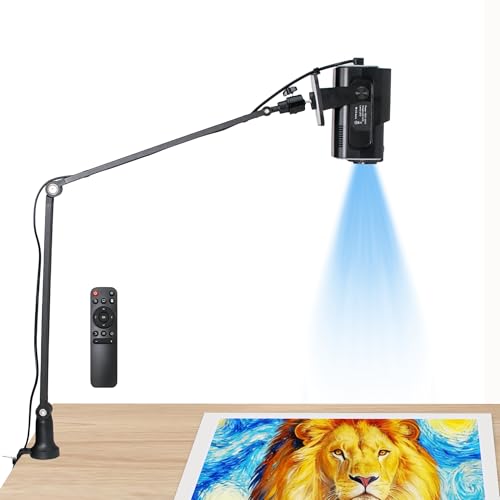
HI-REEKE offers a versatile projection solution with 1280×720 resolution and compatibility with iOS and Android devices. Flexible connectivity includes 2.4G WiFi, USB drive, and computer connections, enabling quick image import for tracing and drawing. This model is suitable for artists who want seamless device integration and easy transfer of designs from mobile to projection surface, supporting classroom demonstrations or personal studios alike.
Caydo P3 Art Projector With Drawing App

The Caydo P3 continues Caydo’s emphasis on an integrated drawing app and portability. With 1080P brightness at 400 ANSI lumens, it provides sharp, color-accurate projection suitable for artists working in well-lit environments. The exclusive drawing assistant supports flexible zoom, 360° rotation, and grid-based workflows across multiple background colors and four artistic modes—Gridify, Sketchify, Comicize, and Monochromize. Transfer images via QR code or USB drive to streamline immediate work, and enjoy screen mirroring for additional entertainment or reference use. Note that some content streaming restrictions may apply for external services.
VAXYOR Art Projector for Tracing

VAXYOR emphasizes high-contrast tracing with a Full HD 1080p display and robust connectivity options, including USB playback and Wi-Fi screen sharing. It’s well-suited for artists who want crisp lines and reliable streaming from mobile devices. The projector’s findable setup supports quick reference to digital sketches, signage, or design boards, making it a practical option for home studios, classrooms, or collaborative workshops where fast projection of references matters.
Buying Guide: Key Considerations For Choosing An Overhead Projector For Artists
- Image brightness and resolution: Higher lumens improve visibility in moderately lit spaces; 1080p and above offer crisper lines for fine detail work.
- Lighting environment: For small studios with some ambient light, choose models with higher brightness or anti-glare surfaces to preserve edge sharpness.
- Projection surface versatility: Look for units that handle walls, easels, blackboards, and whiteboards; some offer adjustable throw and keystone correction for flexible setups.
- Connectivity: Device compatibility with iOS/Android, USB, Wi-Fi, and Bluetooth expands workflow options. USB and app-enabled features can simplify transferring references.
- Portability: If you move between spaces, consider weight, folding head, and built-in storage when designing a portable kit.
- Drawing aids and software: Apps with grids, rotation, and zoom assist tracing and composition. Ensure software compatibility and ease of updating.
- Content restrictions: Some projectors may restrict streaming from subscription services; verify mirroring and licensing constraints if you plan to project non-owned content.
- Durability and materials: ABS plastics and sturdy frames reduce wear in active studio environments and teaching spaces.
- Budget versus utility: Balance feature sets (auto focus, keystone, color accuracy) with how often you project large references or fine details.
- Warranty and support: Check warranty duration and access to parts, especially for classroom deployments or multi-user studios.