As devices evolve, the need for USB compatibility between older gear and newer ports grows. The following adapters and converters help bridge USB-A, USB-C, and Thunderbolt connections, enabling data transfer, charging, and peripheral use without replacing existing equipment. This guide highlights five reliable options to convert “old USB” to modern connectors, with practical design and broad compatibility for Macs, PCs, tablets, smartphones, and peripherals.
| Product | Brand | Connector Type | Key Benefit |
|---|---|---|---|
| ienza USB-C to USB-A Adapter Converter (2-Pack) | ienza | USB-C Male to USB-A Female | Widely compatible with USB-A devices on newer USB-C hosts |
| Syntech USB C to USB Adapter 2-Pack (USB-C to USB 3.0 A) | Syntech | USB-C Male to USB 3.0 Female | Durable, high-availability for turn-key USB-A peripherals |
| QianLink USB C Female to Printer Male Adapter (2-Pack) | QianLink | USB-C Female to USB-B Male | Printer compatibility and easy data transfer |
| MOSWAG USB to USB C Adapter (2-Pack) | MOSWAG | USB-A to USB-C Male | Converts USB-A chargers and peripherals to USB-C |
| Elebase USB to USB C Adapter for iPhone/Apple Devices (4-Pack) | Elebase | USB-A to USB-C Female | Bridge USB-A ports to USB-C accessories on Apple devices |
Whether you’re connecting a USB flash drive to a MacBook with USB-C, or pairing a legacy printer with a modern computer, these adapters offer practical compatibility. When selecting, consider data transfer speeds, power delivery, and the number of devices you regularly connect.
Product Sections
ienza USB-C To USB-A Adapter Converter (2-Pack)

The ienza adapter set converts USB-C ports to USB-A female receptacles, enabling older USB-A devices to work with modern hosts such as USB-C laptops, tablets, and phones. The two-pack design provides coverage for multiple devices or spare replacements. It supports connection to wireless receivers, keyboards, mice, cameras, printers, portable drives, speakers, headsets, and more. The adapters bridge old and new devices without requiring software changes or reconfigurations.
Syntech USB C To USB Adapter Pack Of 2 (USB 3.0 A)

Syntech’s USB-C to USB 3.0 adapter pair uses a zinc alloy housing for durability and a slim profile to minimize obstruction. The connectors are designed for repeated plugging and unplugging (up to 10,000 cycles) and are compatible with a broad set of Type-C devices, including latest MacBook Pro, MacBook Air, iPhone models after 2016, and various tablets and smartphones with USB-C ports. This makes it a versatile option for transferring data and charging across ecosystems.
Syntech USB C To USB Adapter (2 Pack)
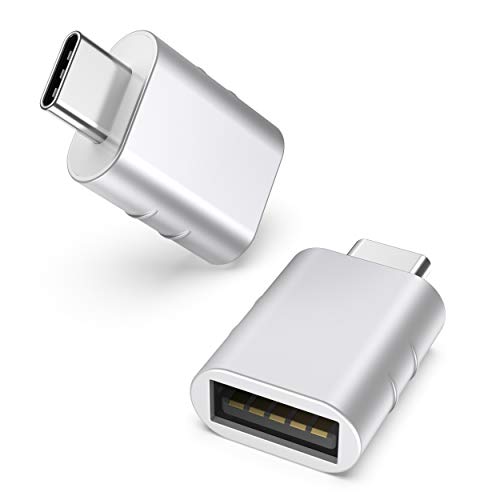
This two-pack from Syntech offers a USB-C male to USB 3.0 female adapter. It emphasizes a zinc alloy construction, anti-slip embossing, and broad compatibility with iPhone 17 series, MacBook Pro/Air post-2016, and other Type-C devices. Users can plug in a USB-A peripheral—such as a flash drive or peripheral dongle—while retaining charging capabilities. Note that certain devices with tight port spacing may require attention to fitment on crowded hubs.
QianLink USB C Female To Printer Male Adapter (2-Pack)

Designed for printer connections, this 2-pack converts USB-C to USB-B interfaces, enabling data transfer with brands such as Brother, HP, Canon, Lexmark, Epson, Dell, Xerox, and Samsung. It supports data syncing via standard USB-C cables and is suitable for office setups and home printers. The product emphasizes reliability and ease of use with a straightforward plug-and-work approach and a fast data transfer capability up to 480 Mbps. It’s a practical choice for printer connectivity without upgrading entire systems.
MOSWAG USB To USB C Adapter 2 Pack

MOSWAG’s USB-A to USB-C adapters allow older USB chargers and peripherals to power and transfer data through a USB-C port. The 5 Gbps data rate and 3A charging support speed up to contemporary standards, while the compatibility list includes iPhone models, Samsung Galaxy devices, iPad Pro, and more. The design emphasizes wide compatibility, quick connectivity, and practical use for everyday charging and file transfers on newer devices.
Elebase USB To USB C Adapter (4-Pack)

The Elebase set converts USB-A ports into USB-C inputs, enabling USB-C accessories like earphones, flash drives, card readers, and wireless adapters to work with older USB-A devices. The aluminum alloy housing adds durability and heat dissipation, helping maintain stable connections. The package is ideal for users seeking a robust and long-lasting solution for bridging classic USB-A equipment with newer USB-C hardware in daily use.
Buying Guide: Key Considerations For Choosing Old USB To New USB Adapters
When selecting adapters to bridge USB generations, buyers should balance compatibility, performance, and durability. Consider the following factors to ensure you choose the right adapters for your setup:
- Port compatibility: Confirm which side is USB-C and which is USB-A or USB-B, and verify that the adapter supports the device you need to connect (printers, drives, peripherals, charging cables, etc.).
- Data transfer speed: If you require fast file transfers, prioritize USB 3.0/3.1/SS (super speed) capable adapters. Some adapters advertise USB 2.0 rates; ensure they meet your needs.
- Power delivery: For charging and power-hungry peripherals, check the adapter’s amperage support. Not all USB-C adapters provide high-widelity charging for every device.
- Durability: Aluminum or zinc alloy housings tend to be more robust for daily use and travel. Look for well-constructed connectors and strain relief.
- Port spacing and fit: Some compact laptops have tightly spaced ports; ensure the adapter’s size won’t block adjacent sockets.
- Device compatibility: While many adapters claim broad compatibility, verify compatibility with your specific models (iPhone, MacBook, Surface, Samsung, etc.).
- Bundle value: Multi-pack sets can provide cost-effective coverage for households or teams with multiple devices.
For users transitioning from old USB-A devices to new USB-C systems, these adapters offer practical, plug-and-play solutions. Evaluate your primary use cases—data transfer, charging, or printing—and pick adapters that align with those needs to minimize dongle clutter while maximizing compatibility.