As hardware evolves, many users want to keep using cherished old keyboards with newer computers that lean on USB interfaces. This guide highlights reliable PS/2 to USB adapters that revive legacy keyboards and mice, with practical buying tips to help you choose the right model for your setup.
Summary of Selected Products
| Product | Brand | Key Feature | Link |
|---|---|---|---|
| PS/2 to USB Cable LEIHONGR USB to PS/2 Plug Active Dual PS2 Adapter | GELRHONR | Instant recognition; supports Linux and Windows | Amazon Link |
| UCEC PS/2 to USB Adapter Converter | UCEC | Two PS/2 ports; USB 1.0/1.1 compliant | Amazon Link |
| VizGiz 3 Pack USB to PS2 Adapter | VizGiz | Pack of 3; PS/2 to USB for multiple devices | Amazon Link |
| Perixx PERIPRO-401 PS2 to USB Adapter | Perixx | Built-in USB controller; works with KVM | Amazon Link |
| YORUNOHOSHI PS/2 to USB Adapter Converter | YORUNOHOSHI | Wide compatibility; dual PS/2 ports | Amazon Link |
Note: The following sections describe these products in detail, focusing on practical usage, compatibility, and performance for revive-old-keyboard setups.
GELRHONR PS/2 to USB Adapter (Dual PS/2)

This adapter is designed to extend the life of older keyboards and mice by converting a PS/2 interface to USB. It emphasizes cost-effectiveness and broad compatibility, including Linux and Windows environments. It’s marketed as instantly recognizable at boot, enabling plug-and-play use without lag. The dual PS/2 ports (keyboard and mouse) simplify setup for users with desk setups that rely on PS/2 peripherals. It is positioned as an eco-friendly way to reuse beloved keyboards and reduce e-waste.
Key points to consider: If you’re restoring a classic keyboard to work with a modern PC, this adapter can be a practical choice. It’s especially appealing for users who want to avoid extra software or driver requirements and prefer a straightforward USB connection that simply works. For KVM setups that rely on a PS/2 keyboard, this can help maintain the original workflow without investing in new devices.
UCEC PS/2 to USB Adapter Converter
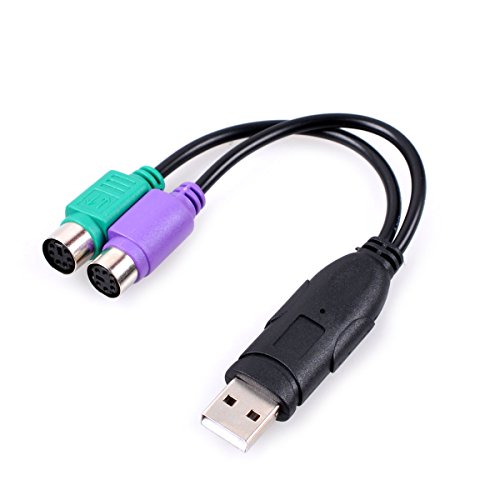
The UCEC adapter provides two PS/2 female ports and converts to a USB interface, designed for keyboards and mice. It’s described as compatible with Windows, Mac, and Linux, broadening its usefulness beyond PCs to various hardware setups. The adapter adheres to standard USB 1.0/1.1 specifications, which may influence responsiveness on newer machines but generally supports older PS/2 devices reliably. It’s a compact, budget-friendly option for users who want a simple, no-fr fuss connection between legacy peripherals and modern systems.
Important considerations: While compatibility is broad, performance can vary depending on the computer’s USB controller and OS version. If you’re connecting a high-precision device or a KVM switch, confirm that your setup doesn’t require USB 2.0 or higher for optimal response times. This model is suitable for everyday keyboard/mouse tasks and basic data entry needs.
VizGiz 3 Pack USB to PS2 Adapters

This 3-pack option is ideal for users who need to convert multiple PS/2 devices across different machines. The package emphasizes compatibility and the necessity that the connected devices must be USB-compatible on the host side. It’s a practical choice for home offices or computer labs where several legacy keyboards and mice are kept as backups. Users can easily swap adapters to run different PS/2 peripherals with USB-equipped desktops or laptops.
What to watch for: The benefits of a multi-pack include convenience and cost efficiency, but verify that each device you intend to connect aligns with the PS/2-to-USB approach. Some users may encounter variability in how well each adapter handles older keyboards versus mice, so testing is recommended before a critical task or long hours of typing.
Perixx PERIPRO-401 PS2 to USB Adapter
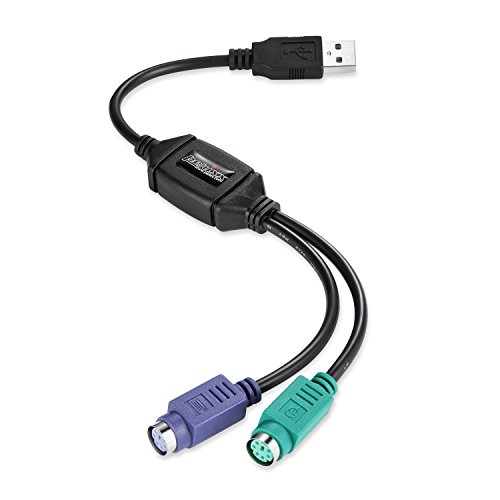
Perixx’s PERIPRO-401 includes a built-in USB controller to bridge PS/2 devices to USB 2.0, with two PS/2 ports (purple for keyboard, green for mouse) and a USB male port. It’s marketed as compatible with KVM switches, a common scenario for users who manage multiple computers with a single USB keyboard and mouse. This adapter is attractive for those who need stable performance in mixed environments, including docking stations and laptops without native PS/2 ports.
Practical notes: A built-in USB-IC model can reduce latency compared to simple passive adapters, which is beneficial for longer sessions. If you rely on a KVM, confirm the specific KVM model compatibility to avoid driver-related hiccups. This option suits users who want a straightforward PS/2-to-USB conversion with reliable, plug-and-play behavior.
YORUNOHOSHI PS/2 to USB Adapter Converter

The YORUNOHOSHI adapter highlights wide compatibility across multiple operating systems, including Windows, Mac, and Linux, and supports a variety of devices such as keyboards, mice, and even barcode scanners with PS/2 interfaces. It features dual PS/2 ports and a simple plug-and-play experience, appealing to users who want a hassle-free setup. It is positioned for versatility in mixed environments where different legacy accessories are at play.
Considerations: When relying on barcode scanners or other non-keyboard inputs, ensure the device’s drivers or OS support is compatible with the USB-to-PS/2 pathway. For typical keyboard and mouse use, this adapter delivers a straightforward path from PS/2 peripherals to USB hosts without requiring extra software.
Buying Guide: Key Factors When Choosing an Old Keyboard To USB Converter
- Compatibility and OS support: Look for adapters that explicitly list Windows, macOS, and Linux compatibility. If you use a KVM or mixed hardware, verify that the solution supports both keyboard and mouse PS/2 devices.
- Interface performance: Some adapters include internal USB controllers that reduce lag. For typing precision or gaming, latency and polling rates may matter; consider models with better performance claims or customer feedback about responsiveness.
- Power and USB standard: Most PS/2 to USB adapters operate over USB 1.0/1.1 or 2.0. If you’re on newer hardware requiring USB 3.x performance, confirm that the adapter’s USB interface meets your needs, though for keyboards and mice, 2.0 is typically sufficient.
- Number of PS/2 ports: If you want to connect both keyboard and mouse, ensure the adapter provides two PS/2 ports (purple for keyboard, green for mouse) and that the USB connector to the computer is compatible with your layout (laptop vs desktop).
- Driver-free installation: A primary appeal of these adapters is plug-and-play use. Check for user feedback about no driver installation requirements, which simplifies setup on older peripherals.
- KVM compatibility: If you use a KVM switch, verify that the adapter supports PS/2 devices through USB to ensure seamless switching between systems.
<liBuild quality and warranty: With aging peripherals, durable construction and a reliable return policy can be valuable. Look for models with positive long-term reviews and seller credibility.
<liMultiple device needs: If you own several legacy keyboards/mice, consider multi-pack options for convenience and cost efficiency, keeping in mind that performance may differ slightly between each device.
Bottom line: For users seeking to bring an old keyboard back into daily use, a PS/2 to USB adapter offers a practical bridge to modern hardware. By matching the adapter’s features to your OS, peripherals, and whether you use a KVM, you can preserve the tactile feel of classic keyboards while enjoying USB-based compatibility on contemporary machines.