If you’re looking to bridge older iPhone accessories with newer devices, these adapters and cables help connect legacy 30‑pin and older Lightning setups to modern iPhones and iPads. The following five options focus on 8‑pin to 30‑pin adapters, charging and data transfer, and compatibility across multiple iOS devices. Each product is MFi certified where applicable and designed to minimize compatibility issues while preserving charging and syncing functions. Note that some adapters do not support audio or video output, so plan usage accordingly.
| Product | Key Benefit | Brand |
|---|---|---|
| [Apple MFi Certified] 8-Pin to 30-Pin Adapter (White) | Connects older 30‑pin docks to newer devices | Belcompany |
| rosyclo 8Pin to 30Pin Adapter (Black) | Charge and sync via 30‑pin accessories | rosyclo |
| [Apple MFi Certified] Lightning to 3.5 mm Headphone Jack (2 in 1) | Headphone support with Lightning and USB‑C passthrough | CREHAO |
| INCORIC Lightning to 30-Pin Adapter | Charge, sync, and data with 30‑pin accessories | INCORIC |
| [Apple MFi Certified] 2 Pack Lightning to 3.5 mm Headphone Jack | Two adapters for iPhone 3.5 mm headphones | Seulliya |
Below are five carefully selected products that address common older‑to‑new iPhone connectivity needs, including 8‑pin to 30‑pin conversion and charging/data transfer paths. This guide emphasizes compatibility, intended use, and practical limitations to help you choose the right adapter for your setup.
Belcompany 8‑Pin to 30‑Pin Adapter for iPhone
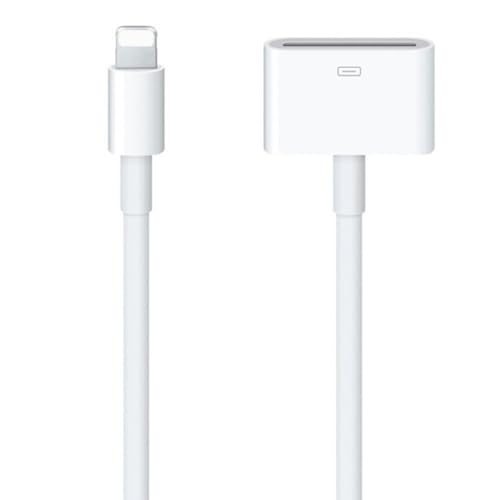
This Belcompany adapter enables 8‑pin devices to connect with 30‑pin chargers, docks, and components. It supports data transfer and charging for a broad range of iPhones and iPads, including older generations. Note that audio output is not supported by this adapter, and it cannot play music through 30‑pin docks. It is designed for charging and syncing in environments with legacy connectors.
Key considerations: broad compatibility across generations; risk of limited support for legacy accessories with newer iOS updates; no audio streaming via dock accessories.
rosyclo 8Pin to 30 Pin Adapter

rosyclo’s MFi certified converter links 8‑pin devices to 30‑pin accessories, enabling charging and data transfer. It explicitly notes that audio output is not supported, so it’s best suited for power and data docking scenarios rather than music playback. The design prioritizes straightforward plug‑and‑play use with compatible iPhone models from recent generations back to older 30‑pin era devices.
APFEN USB C to Lightning Cable 2 Pack

While primarily a modern USB‑C to Lightning cable, APFEN’s offering emphasizes Power Delivery fast charging and data transfer between newer iPhone models and laptops. It’s included to cover scenarios where you need a robust, fast charger cable for newer devices, ensuring compatibility with modern charging standards. For older 30‑pin accessories, you’d pair this with adapters that translate the older interface to Lightning or USB protocols as needed.
kigpozi USB C Multi Fast Charging Cable

This 2‑in‑1 cable combines USB‑C and Lightning functionality for charging multiple devices, including older iPhone models. It’s designed for fast charging with compatible adapters and supports a broad device range. It does not provide data transfer across all older peripherals unless used in conjunction with appropriate adapters that bridge 30‑pin or other legacy interfaces to Lightning or USB‑C. It’s ideal for travelers and households with mixed device ecosystems.
Seulliya 2 Pack Lightning to 3.5 mm Headphone Jack

Seulliya offers MFi certified Lightning to 3.5 mm adapters, with two units included per package. These adapters focus on audio output from newer iPhones to 3.5 mm headphones and headsets that lack a built‑in Lightning port. While this does not address 30‑pin to Lightning, it complements a mixed older/new device environment by enabling audio use on recent iPhones and iPads with traditional headphones. Note that some listings indicate that calls and certain features may not be supported on all models.
Buying Guide: Key Purchase Considerations
- Compatibility: Verify device generations supported by the adapter. Some products cover a wide range (iPhone 4 era to current), while others are targeted at specific models. Check iOS version compatibility and whether the adapter supports charging, data transfer, or audio only.
- Audio and Video Support: Many 8‑to‑30 pin adapters do not support audio or video output. If you plan to play music or use docking speakers, choose products that explicitly support audio or rely on dedicated audio adapters.
- Charging vs. Data: Distinguish between adapters that enable charging only and those that also provide data syncing. If you need data transfer to a computer or other device, ensure the adapter supports syncing and not just charging.
- Certifications: Look for MFi certification when buying adapters that bridge Apple connectors. MFi certification reduces the risk of connection errors and iOS prompts during use.
- Build Quality: Material durability, cable flexibility, and bend life matter for long‑term use. TPE coatings and copper cores typically indicate higher durability and better signal integrity.
- Usage Scenarios: Consider whether you need dock compatibility, car audio integration, or portable charging. Some adapters are better suited for in‑car use, others for home docks or travel kits.
- Limitations: Some adapters cannot handle audio output or video signals, and some require direct compatibility with older 30‑pin accessories. Plan accordingly to avoid frustration.
The selection above emphasizes practical bridging between old iPhone connectors and newer devices, with a focus on charging and data transfer. Always confirm your specific accessory’s compatibility with your device model and iOS version before purchasing.