When upgrading a desktop’s wired or wireless capabilities, choosing the right network card or adapter can dramatically improve speeds, reduce latency, and enhance overall reliability. This guide highlights top-rated PCIe and USB options that deliver 2.5 Gbps, 5 Gbps, and even 10 Gbps performance, while remaining compatible with Windows, Linux, and server environments. Explore our picks, their standout features, and practical buying tips to match your setup.
| Product | Brand |
|---|---|
| TP-Link TX201 2.5Gb PCIe Network Card | TP-Link |
| TP-Link TG-3468 Gigabit PCIe Network Card | TP-Link |
| BrosTrend 2.5Gb PCIe Network Card | BrosTrend |
| TP-Link TX401 10Gb PCIe Network Card | TP-Link |
| BrosTrend 5Gb PCIe Network Card | BrosTrend |
TP-Link TX201 2.5Gb PCIe Network Card

The TP-Link TX201 delivers 2.5 Gbps bandwidth via PCIe, offering speeds that are 2.5 times faster than standard Gigabit adapters. It is designed for high-speed internet access and fast local transfers, ensuring smooth data movement across networks. The card negotiates between 2.5 Gbps, 1 Gbps, and 100 Mbps, maintaining compatibility with a wide range of devices. QoS prioritizes gaming traffic to minimize latency during online play and streaming.
TP-Link TG-3468 Gigabit PCIe Network Card
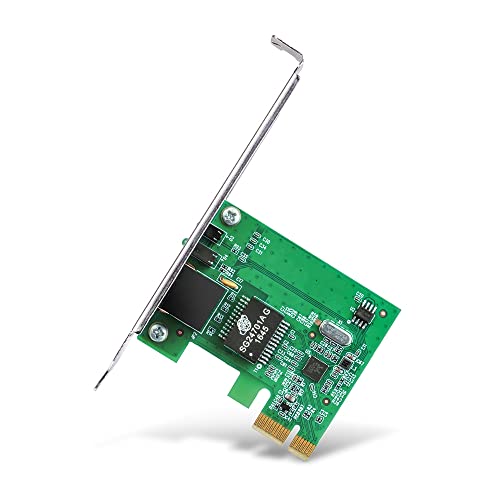
The TG-3468 upgrades Ethernet speed to Gigabit, supporting 10/100/1000 Mbps through a PCIe interface. It features Auto-Negotiation and Auto MDI/MDIX to simplify setup and use. The card supports IEEE 802.3x flow control for full-duplex operation and backpressure for half-duplex, providing reliable performance for everyday computing, gaming, and media streaming on compatible systems.
BrosTrend 2.5Gb Network Card

This BrosTrend card uses 2.5 GBASE-T technology to deliver speeds up to 2.5 Gbps, enabling significantly faster local transfers and improved online experiences. It targets desktop PCs and servers, offering ultra-fast internet access, reduced latency, and enhanced responsiveness for gaming and streaming. The device also supports seamless integration into existing networks, establishing high-speed connections with other devices on the local network.
TP-Link TX401 10Gb PCIe Network Card
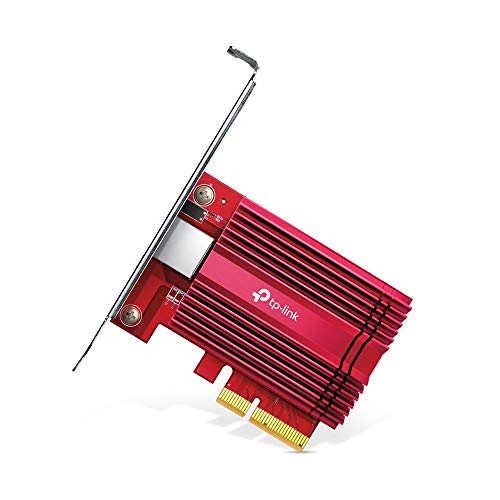
The TX401 offers 10 Gbps PCIe networking with 10GBase-T compatibility. It supports backward compatibility with 10 Gbps, 5 Gbps, 2.5 Gbps, 1 Gbps, and 100 Mbps, ensuring flexible performance across various networks. QoS optimizes gaming traffic to minimize latency while maintaining high throughput for data-intensive tasks and large file transfers in server or workstation environments.
BrosTrend 5Gb PCIe Network Card

The BrosTrend 5Gb PCIe network card focuses on high-speed performance for PC gaming and media tasks. Offering 5 Gbps speed, it surpasses traditional Gigabit cards, delivering lower latency and higher throughput. It emphasizes instant local network transfers and improved data handling within a home or small office environment, aligning with users who demand robust wired performance for demanding applications.
Buying Guide
Key purchase considerations help match the right card or adapter to your needs:
- Speed requirements: Choose 2.5 Gbps, 5 Gbps, or 10 Gbps based on your internet plan, NAS, and workstation needs. Higher speeds are most beneficial for large file transfers and gaming with low latency.
- Interface compatibility: PCIe cards are common for desktops; USB adapters are convenient for laptops or limited PCIe slots. Ensure your motherboard has the right PCIe lane configuration (x1, x4, or x8).
- Backward compatibility: Most cards auto-negotiate with connected devices. This ensures functionality with older routers, switches, and network devices.
- QoS and traffic prioritization: If you game or stream, look for QoS features to prioritize latency-sensitive traffic.
- Operating system support: Confirm Windows versions, Linux compatibility, and server support. Some cards advertise broad OS support, but drivers may vary by release.
- Form factor and installation: Consider low-profile brackets for compact cases and whether the card requires additional cooling or a free PCIe slot near the edge.
- Network environment: For home use, a 2.5 Gbps or 5 Gbps card is typically sufficient. In a data center or professional setting, 10 Gbps options may be justified for storage networks and virtualization workloads.
- Driver availability and updates: Favor brands with ongoing driver support and clear installation guides to minimize setup friction.