Discover top multi-user scheduling calendars that help families coordinate events, chores, meals, and routines. These digital displays blend calendar syncing, task management, and smart home control to keep everyone on the same page. Below are five standout options that emphasize family scheduling, multi-calendar integration, and intuitive interfaces for households with multiple users.
Summary of Selected Products
| Product | Brand | Approx. Display Size | Key Benefit |
|---|---|---|---|
| ApoloSign 21.5″ Digital Calendar (Teak Wood) | ApoloSign | 21.5 inches | Dual mode: calendar + Android dashboard; multi-calendar sync |
| ApoloSign 21.5″ Digital Calendar (Gray Wood) | ApoloSign | 21.5 inches | Dual mode with AI voice and smart home control |
| Dragon Touch 10.1″ Digital Calendar Chore Chart | Dragon Touch | 10.1 inches | All-in-one family calendar with chore chart |
| ApoloSign 15.6″ Digital Calendar (Teak) | ApoloSign | 15.6 inches | Dual mode calendar with chore chart and smart features |
| Ekasoco 10.1″ Digital Calendar | Ekasoco | 10.1 inches | Smart home hub with calendar, photos, and weather |
The picks focus on screens that support multi-user scheduling, cross-calendar syncing, family chore/meal planning, and voice or smart-home integration for hands-free control.
ApoloSign 21.5-Inch Digital Calendar — Teak Wood

The ApoloSign 21.5″ Digital Calendar in Teak Wood operates in two modes to support family-wide scheduling. In Calendar Mode, it auto-syncs with Google, Outlook, and iCloud, centralizing personal calendars into one view for quick planning. The device also functions as a planner and family organizer, helping households keep track of events, chores, and routines. In Android Mode, users can build a dashboard for a smart family hub, with features like a Reward-Based Chore Chart and meal planning, turning chores into game-like tasks to encourage participation. The system supports color-coded to-do lists for groceries, shopping, and wish lists, all accessible via the ApoloSign App. It also offers AI voice assistance and smart home control, enabling weather checks and alarms through voice commands. This model emphasizes joint family planning and smart integration on a single display.
Features: Dual-mode calendars with auto-sync across Google, Outlook, and iCloud; chore and routine planning; color-coded to-dos; AI voice assistant; Google Gemini integration; smart home control; four built-in microphones for voice tasks.
ApoloSign 21.5-Inch Digital Calendar — Gray Wood
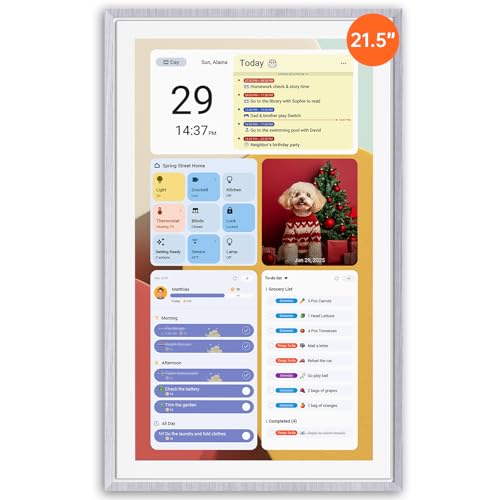
This gray-wood version mirrors the Teak model’s dual-mode design, prioritizing multi-calendar sync, family planning, and a central hub for household scheduling. The interface supports syncing multiple calendars (Google, Outlook, iCloud) and maintains a unified view for easier coordination. The Android Mode enables a dashboard experience for a smarter family hub, including a chore chart that rewards task completion, a routine planner, and a weekly meal planner to optimize dining plans. Voice assistance with four microphones adds hands-free control, while Google Gemini AI enhances task management and smart-home interactions. It’s designed for households seeking a stylish, integrated family calendar with robust syncing and voice features.
Features: Auto-sync across major calendars; chore chart and meal planner; color-coded to-dos; AI voice assistant; Gemini AI and smart home compatibility; multi-user scheduling emphasis.
Dragon Touch 10.1-Inch Digital Calendar Chore Chart

The Dragon Touch 10.1″ Digital Calendar provides an all-in-one family planning tool with an emphasis on scheduling clarity and interactive chores. The 10.1″ touchscreen makes it easy to assign tasks to individual family members by color, creating a visual, intuitive approach to multi-user planning. Quick setup is supported via Wi-Fi and a mobile app, enabling calendar sync with iOS and Google calendars. The device consolidates multiple personal calendars into a single interface for streamlined planning. A built-in interactive chores chart motivates household members to complete tasks and supports a dinner planner to keep everyone informed about meal plans, reducing daily confusion at mealtime.
Features: 10.1″ touchscreen; color-coded tasks; quick setup and auto-sync with multiple calendars; interactive chores chart; dinner planner integration.
ApoloSign 15.6-Inch Digital Calendar — Teak

The 15.6″ ApoloSign model delivers a compact, dual-mode experience with strong emphasis on family planning and chore management. It supports synchronized calendars across Google, Outlook, and iCloud, offering a centralized place for schedules. The Android-mode dashboard creates a smart family hub for tasks, routines, and meals, while the reward-based chore chart fosters responsible habits among children. The calendar app enables color-coded to-do lists for groceries, gifts, and shopping lists, along with meal planning for the week. The system is designed to work with Google Gemini AI voice assistance and integrates with smart-home devices for hands-free operation.
Features: Dual-mode calendar with multi-calendar sync; chore and meal planning; color-coded to-dos; AI voice assistance; smart home control; Gemini AI integration.
Ekasoco 10.1-Inch Digital Calendar

The Ekasoco 10.1″ Digital Calendar acts as a compact smart home hub with calendar integration and a multimedia-friendly display. Synchronization across devices ensures family members stay aligned on schedules, meals, and events. The device doubles as a photo frame, enabling automatic slideshows and categorized albums, so families can share moments alongside planning. Weather forecasts help coordinate outdoor activities, while sleep mode options conserve energy and reduce screen time at night. This option balances calendar functionality with family-centric media and smart-home capabilities for smaller spaces.
Features: 10.1″ IPS HD touchscreen; multi-device synchronization; photo frame mode with slideshows; weather forecast; sleep mode; smart home integration.
Buying Guide
Key considerations when choosing a multi-user scheduling calendar:
- Display size and layout: Larger displays support more calendar views and allow multiple users to read schedules from a distance. Smaller screens fit desks or kitchen counters but may require zoomed interfaces.
- Calendar syncing: Look for devices that sync with Google, Outlook, iCloud, and other mainstream services to consolidate all family calendars in one place.
- Chore and meal planning: Built-in chore charts and meal planners help distribute tasks and coordinate dining, especially with reward-based systems for younger users.
- Voice and smart-home integration: AI voice assistants and smart-home control enable hands-free task management and integration with doorbells, cameras, weather, and routines.
- Dual-mode flexibility: Dual-mode calendars (calendar view plus dashboard or smart hub) offer a broader range of features for different households and activities.
- User access and permissions: Consider whether the device supports multiple user profiles or guest access to prevent schedule conflicts and preserve privacy.
- Mounting and space: Wall-mount or tabletop placement can affect visibility and convenience in kitchens, living rooms, or home offices.
- Energy and reliability: Sleep modes, power consumption, and build quality influence long-term reliability in family environments.