Multi-port USB-C adapters turn a single Type-C or Thunderbolt port into a full workstation on the go. They’re ideal for remote work, classrooms, travel, and desk setups where HDMI output, speedy data transfer, and charging are all needed at once. Below are five well-rounded options that balance display quality, data speeds, and power delivery. Each product is designed to expand a single USB-C hub into a compact docking station suitable for modern laptops, Chromebooks, and select tablets.
| Product | Brand | Key Benefit | HDMI/Video | Power Delivery |
|---|---|---|---|---|
| UANTIN 7‑in‑1 | UANTIN | Robust 7-in-1 expansion | 4K HDMI | 100W |
| UGREEN 5‑in‑1 Revodok | UGREEN | Solid balance of ports | 4K HDMI | 95W |
| Anker 7‑in‑1 | Anker | Compact, reliable; broad compatibility | 4K HDMI | Up to 85W |
| ABFCRTTW 7‑port | ABFCRTTW | High port count, USB‑A emphasis | No HDMI outputs | No charging depicted |
| ACASIS 6‑in‑1 | ACASIS | Fast data with 4K HDMI and PD | 4K HDMI | 100W |
Note: All products support USB‑C devices that provide video output and PD charging, but exact video capabilities depend on your host device’s USB‑C specification. When in doubt, verify your laptop’s video output support (DP Alt Mode) before purchase.
UANTIN USB C Hub 7 in 1

UANTIN’s 7‑in‑1 hub expands a single USB‑C/Thunderbolt port to include 1 HDMI output, 3 USB‑A ports, 1 SD/TF card reader, and 1 USB‑C PD port. It supports 4K @ 30Hz video output and offers up to 100W PD pass‑through to power a MacBook Pro/Air or other USB‑C laptops while peripherals run. This configuration suits users who need reliable display, accessory connectivity, and fast charging from a compact dongle.
UGREEN USB C Hub 5 in 1

UGREEN Revodok 105 offers a balanced 5‑in‑1 design with 4K HDMI, a 100W PD pass‑through for top‑up charging, and two USB‑A data ports plus one USB‑A data port. It emphasizes safe pass‑through charging to keep laptops powered during data transfers or screen sharing. The 4K HDMI output supports up to 4K 30Hz, making it suitable for presentations and streaming on external displays when video output is supported by the host.
Anker USB C Hub 7‑in‑1

Anker’s 7‑in‑1 hub bundles HDMI, three USB ports, a USB‑C data port, and two SD/TF card readers. It supports up to 90W pass‑through charging, keeping laptops powered while expanding peripheral connectivity. The HDMI output delivers 4K at 60Hz where supported by the host, ensuring smooth video playback and crisp presentations. It’s a compact choice for MacBook Pro/Air and other Type‑C laptops.
ABFCRTTW USB C Hub 7-Port

ABFCRTTW presents a seven‑port aluminum USB‑C hub designed for data transmission across multiple devices. It emphasizes a sleek, heat‑dissipating chassis and supports up to seven devices simultaneously. Note that this model focuses on data transfers rather than charging or HDMI output, making it a strong fit for expanding USB peripherals on higher‑port laptops without HDMI/video needs.
ACASIS USB C Hub 6‑in‑1
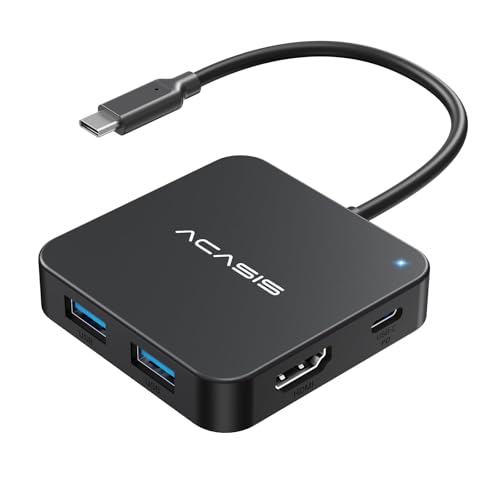
ACASIS brings a 6‑in‑1 hub with 4K 60Hz HDMI, three USB A ports, a USB C data port, and a 100W PD charging port. It highlights high‑speed data transfer with USB 3.1 and is compatible with MacBook, Dell, Lenovo, and other USB‑C devices. The PD port enables fast charging while using other ports, making it ideal for long work sessions or media streaming from a laptop dock.
Buying Guide: Key Purchase Considerations
- Video output and host compatibility: Check if your laptop supports DP Alt Mode or HDMI over USB‑C. HDMI specs like 4K@60Hz are ideal for presentations and media, but many hubs top out at 4K@30Hz.
- Power delivery: For laptops with higher battery demands, aim for 60W–100W PD input if you plan to charge while using multiple peripherals. Note real‑world PD performance can vary based on the host and wall charger capability.
- Port mix and density: Decide how many USB‑A ports you need, whether card readers are essential, and if you require both SD and microSD slots. More ports can trade off compact size.
- Data transfer speed: USB 3.0/3.1/3.2 ports offer up to 5Gbps or higher. If you work with large files, prioritize hubs with USB‑C data ports and high‑speed USB‑A ports.
- Device compatibility: Most hubs target laptops, tablets, and some desktop peripherals. Confirm compatibility with your operating system and device family (Mac, Windows, Chrome OS).
- Build and heat: Aluminum housings aid heat dissipation and durability. Consider hubs with internal cooling or vents for extended use with multiple devices.
- Dedicated video bandwidth: Some hubs support only data on the USB‑C port and require separate video output on the HDMI port. If you need simultaneous 4K video and charging, choose models explicitly advertising PD passthrough and video support.
When choosing among these options, consider your primary use case: presentational setup with a 4K display, translation between multiple USB devices, or portable workstation needs with charging. This selection aligns with common scenarios like teaching, remote work, and creative tasks requiring reliable data speeds and smooth video output.