For businesses and developers needing easy, driver-free access to magnetic stripe cards, MSR readers and writers offer fast, plug‑and‑play integration. This guide highlights five reliable USB/MSR devices designed to read, write, or encode card data across 1, 2, or 3 tracks. Whether you’re building a POS, access control system, or data capture tool, these options cover a range of interfaces, compatibility, and features to fit American workflows.
Summary Table of Chosen Products
| Product | Brand | Key Capabilities | Interface | Track Support |
|---|---|---|---|---|
| MSR90 USB Swipe Magnetic Card Reader | Deftun | Plug‑and‑play, reads up to 3 tracks, supports ISO7811/AAMVA/CA DMV | USB | 1/2/3 |
| MSRX6 USB Swipe Card Reader Writer Encoder | Deftun | Reads/writes/modes; free Windows/Mac software | USB | 1/2/3 |
| MSR X6 Bluetooth Swipe Card Reader Writer Encoder | MSR X6 | Bluetooth & USB; 1/2/3 tracks; cross‑platform software | USB/Bluetooth | 1/2/3 |
| Deftun Card Reader Writer USB Swipe Encoder MSR605X | Deftun | Read/Write/Copy/Erase/Edit; all tracks; USB powered | USB | 1/2/3 |
| Koolrok MSR X6 Swipe Card Reader Writer | Koolrok | USB interface; compatible with MSR206/MSR605X/etc. | USB | 1/2/3 |
MSR90 USB Swipe Magnetic Card Reader
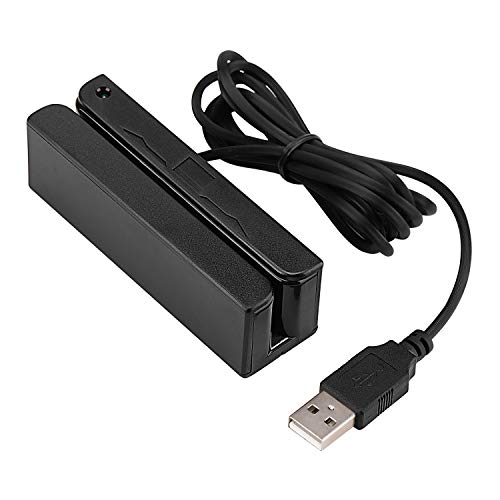
The MSR90 is a USB emulation keyboard interface that requires no driver or software installation. It is designed for quick, plug‑and‑play operation, reading up to three tracks of data. The device supports common data formats such as ISO7811, AAMVA, and CA DMV, making it suitable for access control, POS, or data capture applications. A threaded insert allows for secure mounting, and the LED indicator provides a clear connection and swipe status.
MSRX6 USB Swipe Card Reader Writer Encoder

The MSRX6 version targets computer use via USB, with bundled software available for Windows and Mac. It is described as one of the smallest readers on the market, measuring about 5.5 by 1.5 by 1.5 inches. Note that some functionality with mobile apps may require alternative tools, as it is primarily designed for USB connections with desktop or laptop environments.
MSR X6 Bluetooth Swipe Card Reader Writer Encoder

This model combines Bluetooth and USB interfaces, enabling use with computers, tablets, and mobile devices. It supports 1/2/3-track magnetic cards, with a focus on cross‑platform compatibility through provided software for Windows and macOS. The device is positioned for versatile deployments in POS, access control, and verification systems, offering flexible pairing options alongside a standard USB connection.
Deftun Card Reader Writer USB Swipe Encoder MSR605X

The MSR605X supports all 1/2/3-track operations with USB power. Its capabilities include reading, writing, copying, erasing, and editing data. This makes it a robust option for projects that require full lifecycle data handling of magnetic stripe information, especially in controlled environments like verification services or digital credential systems.
Koolrok MSR X6 Swipe Card Reader Writer

The Koolrok X6 variant emphasizes USB connectivity and compatibility with other MSR models (MSR206/MSR605X, etc.). It’s designed for straightforward computer use (no smartphone app support on some configurations) and offers a 3‑track reading/writing experience. This option suits environments where a dependable USB interface and broad track support are priorities.
Buying Guide: Key Purchase Considerations
- Interface and compatibility: Choose USB for desktop setups or USB plus Bluetooth for mobility. Confirm operating system support (Windows, macOS, Linux) and whether your devices require keyboard emulation or direct driver support.
- Track support and formats: If you need to read or encode data across 1, 2, or 3 tracks, ensure the device explicitly supports all required tracks and formats (ISO7811, AAMVA, CA DMV, etc.).
- Write and edit capabilities: If your workflow requires encoding, copying, erasing, or editing track data, prioritize models with USB power and dedicated software or firmware features for reliable data handling.
- Software availability: Some models provide Windows/Mac software to facilitate programming and data management. Verify the availability and compatibility of software with your system version.
- Physical design and mounting: For workspaces with limited desk space, consider compact devices with mounting options to reduce clutter and improve workflow.
- Security and privacy: Magnetic stripe data is sensitive. Ensure devices support secure handling, and consider whether your application includes encryption or tokenization of captured data.
- Maintenance and support: Look for brands with active updates, clear documentation, and accessible customer support to address compatibility issues or feature requests.