Looking to convert an mSATA SSD to a standard 2.5″ SATA drive? This guide highlights reliable MSATA-to-SATA 3.0 adapters and enclosures from trusted brands. Each option supports 2.5″ SATA III interfaces and helps you repurpose older drives for external storage or internal upgrades. Below is a quick summary and deeper product-by-product details to help you choose the right adapter for your hardware and use case.
| Product | Brand | Type | Key Feature |
|---|---|---|---|
| SABRENT mSATA to 2.5 Inch SATA III Aluminum Enclosure Adapter (EC-MSSA) | SABRENT | Enclosure/Adapter | Enclosed housing for protection |
| ELUTENG M.2 to SATA Adapter – 2 in 1 Converter | ELUTENG | 2-in-1 M.2 NGFF mSATA to SATA | Supports M/B key configurations; not for NVMe/PCIe |
| NFHK Slim Type Mini PCI-E mSATA to 2.5″ SATA 3.0 Adapter | NFHK | Adapter | Mini PCI-E to SATA, DOS/Win compatibility |
| NOYITO mSATA to SATA 3.0 Adapter | NOYITO | Adapter | Locking mSATA to SATA conversion |
| CERRXIAN M.2 NGFF SSD & MSATA to 2.5″ SATA III Converter | CERRXIAN | 2-in-1 Converter | Supports B-key / B&M-key; dual-slot design |
SABRENT mSATA to 2.5 Inch SATA III Aluminum Enclosure Adapter
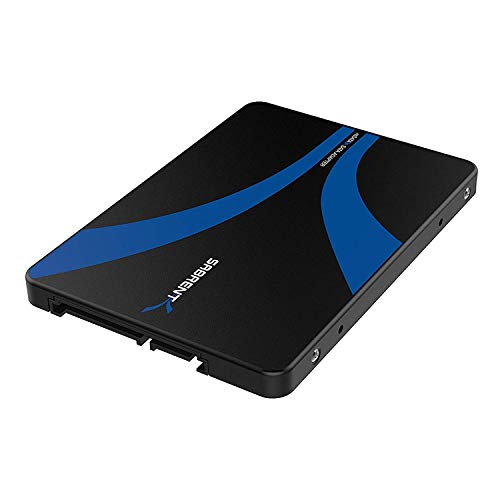
The SABRENT EC-MSSA converts an mSATA NGFF drive into a standard 2.5″ SATA III (6Gbps) SSD. It features an enclosed housing that protects the SSD from dust and impacts while providing a simple, plug-and-play solution for expanding or repurposing storage. Note that this enclosure does not support M.2 NVMe PCIe SSDs, focusing instead on mSATA formats.
ELUTENG M.2 to SATA Adapter – 2 in 1 Converter

This 2-in-1 converter handles MSATA and M.2 NGFF SSDs and turns them into a standard 2.5″ SATA III drive. It supports B and M keys but is not compatible with M-key NVMe/PCIe drives. Before purchasing, verify your SSD label shows compatible keys (B or B&M). The adapter is a practical option for users who need a versatile, compact upgrade path.
ELUTENG mSATA to USB 3.0 Adapter
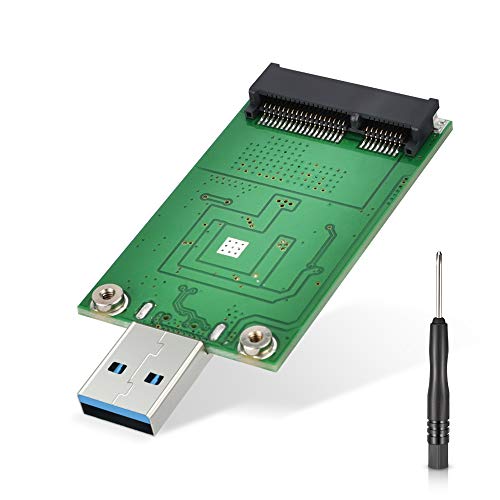
This USB 3.0 adapter is suited for transforming an mSATA SSD into an external USB flash drive. It’s ideal for portable storage when a full SATA enclosure isn’t needed. It targets mSATA drives that have already been upgraded or retired from internal use. It uses the ASM1153E chipset for broad compatibility, with power considerations to ensure stable operation across platforms.
NFHK Slim Type Mini PCI-E mSATA to 2.5″ SATA 3.0

NFHK’s slim adapter converts mini PCI-E mSATA into a 2.5″ SATA drive. It lists compatibility with various DOS and Windows/Linux operating systems, broadening its use across older hardware. The device emphasizes a compact footprint and straightforward installation, making it a practical upgrade option for compatible systems.
NOYITO mSATA to SATA 3.0 Adapter

NOYITO’s mSATA to SATA 3.0 adapter provides a straightforward conversion path with a locking feature to secure the mSATA SSD. It’s designed for compatibility with common 2.5″ SATA drives and offers a reliable, simple transfer solution within laptop or small-form-factor builds. The lock helps keep drives securely in place during operation.
CERRXIAN M.2 NGFF SSD & MSATA to 2.5″ SATA III Converter

The CERRXIAN adapter supports both M.2 NGFF (B-key/B&M-key) and mSATA SSDs, converting them to a 2.5″ SATA III enclosure. Its 2-in-1 design requires a toggle switch to operate between MSATA and NGFF modes, and it explicitly notes that M-key NVMe drives are not supported. The slim form factor suits portable setups and on-the-go storage needs.
Buying Guide: Key Considerations For MSATA To SATA 3 Adapters
- Drive compatibility: Verify whether the adapter supports mSATA, M.2 B-key/B&M-key, or M-key. NVMe/PCIe (M-key) drives are not supported on many of these adapters and will require a dedicated NVMe enclosure or adapter.
- Form factor and occupancy: Decide between a simple adapter card, a 2.5″ enclosure, or a dual-slot 2-in-1 converter. Enclosures protect drives and are ideal for portable use, while adapters without enclosures can save space in internal builds.
- Power and performance: 6Gbps SATA III is standard, but ensure the device supplies sufficient power for your SSD, particularly for larger capacity drives or external enclosures. Some USB adapters rely on the USB port for power, which may affect performance.
- Installation method: Some products require toggling switches to switch between MSATA and M.2 NGFF modes, while others automatically detect the connected drive type. Read the product instructions to avoid incorrect connections.
- Usage scenario: Choose based on whether you need internal upgrades, external portable storage, or compatibility with legacy systems running older operating systems.
- Build quality and protection: Enclosures with metal housings tend to better dissipate heat and provide physical protection, which is beneficial for long-term reliability in portable applications.
- Customer support and compatibility notes: Some adapters come with notable compatibility caveats (e.g., not compatible with certain NVMe models or specific SSD brands). Check the exact drive model before purchasing.
Across these options, users can repurpose aging mSATA drives, improve storage capacity for laptops, or build compact external drives. When selecting, prioritize the drive’s key type (B-key vs M-key), whether an enclosure is needed, and the intended environment (internal upgrade vs external portability). The listed products cover a range of compatibility profiles, from simple mSATA-to-SATA conversions to flexible 2-in-1 adapters that support multiple form factors.