Finding the right mouse remote for TV can simplify navigating menus, typing searches, and controlling media. The following selections highlight versatile air mice with gyro sensing, IR learning, and handy mini keyboards. Each model is chosen for broad compatibility with Android TV boxes, smart TVs, PCs, and projectors. This guide helps you compare features, connectivity, and usability to pick a device that streamlines your living room setup.
Summary of chosen products:
- Miritz Air Mouse (Air Mouse, 6-Axis Gyroscope, Bluetooth/IR Learning)
- EASYTONE Air Mouse Remote (2.4 GHz, Voice, IR Learning)
- WeChip W1 Universal TV Remote Air Mouse (2.4 GHz, Mini Keyboard)
- iPazzPort Mini Air Mouse Remote Keyboard (Bluetooth + 2.4 GHz, 7-Color Backlight)
- Air Mouse MX3 Pro (2.4G, IR Learning, Mini Keyboard)
Miritz Air Mouse With Voice And IR Learning

The Miritz device combines a mouse, keyboard, and remote into a single all-in-one controller. It features a high-precision 6-axis gyroscope for cursor control in air movements, mirroring a Wii Remote experience. The integrated QWERTY keyboard includes numeric keys and multimedia shortcuts, aiding quick input and navigation. Infrared learning enables control of multiple devices from one remote. It supports Bluetooth and 2.4G plug-and-play connections, expanding compatibility with Android TV boxes, smart TVs, projectors, HTPCs, and PCs. Note compatibility varies with certain major brand TVs.
EASYTONE 3-In-1 Air Mouse With Voice

The EASYTONE remote functions as an air mouse, remote control, and IR-learning input device. Its 2.4 GHz USB receiver enables easy plug-and-play with PCs, Android TV boxes, laptops, and projectors. A built-in microphone supports voice input for quick searches and commands, though some app contexts may limit cross-app voice use. The device uses a 6-axis gyro for precise on-screen navigation, improving cursor control and enabling simple motion-based input for navigation and casual gaming from the couch.
WeChip W1 Universal TV Remote Air Mouse
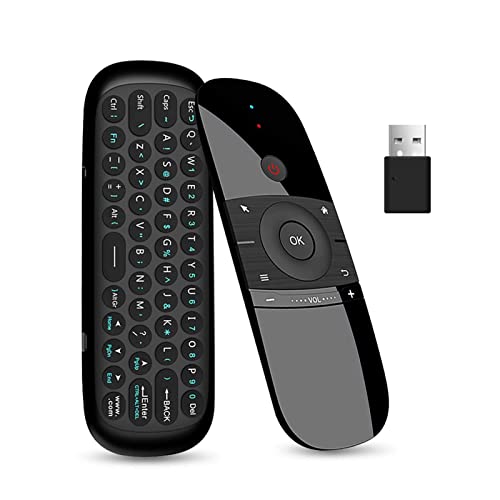
The WeChip W1 offers a plug-and-play 2.4 GHz connection via USB receiver, supporting up to 10 meters of range. It includes a mini wireless keyboard and a 4-axis motion system, enabling character input and precise cursor control in both horizontal and vertical modes. Compatibility spans Windows, Android, Mac OS, and Linux, with many Android TV boxes and smart TVs supported. Note that some brands and devices may not be compatible, so confirm HDMI/USB input requirements before purchase.
iPazzPort Mini Air Mouse With Backlight
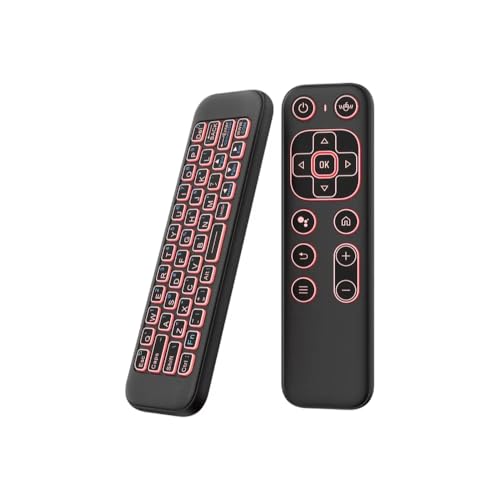
The iPazzPort model blends a universal remote approach with Bluetooth and 2.4 GHz dual modes, replacing multiple devices with a single compact air mouse keyboard. It features a 6-axis gyroscope for precise cursor navigation and a 7-color backlight for easy use in dark environments. The device is designed for Android TV boxes, smart TVs, HTPCs, and projectors, supporting multiple OS ecosystems. It is positioned as an all-in-one control device for couch browsing and media control.
Air Mouse MX3 Pro With IR Learning

The MX3 Pro uses 2.4 GHz wireless connectivity for straightforward setup and plug-and-play use. It includes a 6-axis motion sensor to control the cursor via movement and features IR learning to capture codes from existing remotes, letting you control multiple devices with one remote. This model targets Android TV boxes, smart TVs, projectors, and Raspberry Pi setups, delivering a compact combination of keyboard and air mouse in a single device.
Buying Guide: Key Considerations For Choosing A Mouse Remote For TV
- Connectivity: Decide between Bluetooth, 2.4 GHz RF, or dual modes. Bluetooth often works with fewer dongles but may add pairing steps; 2.4 GHz RF generally offers a reliable plug-and-play experience with a USB receiver.
- Input Output: Look for devices that combine air mouse, keyboard, and IR learning. A full QWERTY keyboard speeds up typing, while IR learning reduces the number of remotes you keep around.
- Motion Sensing: A strong 6-axis gyroscope improves cursor accuracy in air control and supports basic motion-based navigation in apps and games.
- Compatibility: Check operating systems and device classes (Android TV boxes, smart TVs, HTPCs, Raspberry Pi, PC). Note that some remotes don’t work with specific brands or models, so verify compatibility with your TV or box.
- Backlighting: RGB or single-color backlights aid night use, especially for keyboards. Ensure the backlight settings are easy to toggle or customize.
- IR Learning: Essential for consolidating control of multiple devices (TVs, set-top boxes). Confirm the learning capabilities and the number of programmable keys.
- Battery & Durability: Consider rechargeable lithium-ion options or replaceable batteries. A compact form factor helps with one-handed use on the couch.
- App and Voice Support: Built-in voice input can speed searches but may have limitations across apps. Assess how well voice and gesture controls align with your typical streaming routines.
- Price-to-Value: While prices aren’t listed here, compare feature sets (keyboard quality, backlight brightness, range) to determine which remote offers the best value for your setup.
- Setup Ease: Some devices require a simple USB dongle setup; others use Bluetooth pairing. If you’re not tech-savvy, prioritize plug-and-play options with robust customer support.
Choosing the right mouse remote for TV hinges on how you intend to use it. If you want to replace several remotes with a single device, IR learning and a full keyboard are highly beneficial. If you favor a clean, minimal setup for casual streaming and browsing, a robust air mouse with reliable motion control may be enough. Consider the layout, weight, and button placement to ensure long-term comfort during hours of use.