Finding a comfortable Bluetooth mouse can reduce fatigue during long workdays, travel, and multitasking sessions. This guide examines five highly ergonomic options designed for right- and left-handed users, featuring quiet clicks, multi-device connectivity, and responsive sensors. Each model is evaluated for grip comfort, switch and scroll feel, battery life, and compatibility with Windows, macOS, and ChromeOS to help you pick the best fit for your setup.
| Product | Brand | Key Comfort Feature | Connectivity |
|---|---|---|---|
| Logitech M196 Bluetooth Wireless Mouse | Logitech | Ambidextrous, travel-friendly design | Bluetooth |
| Microsoft Bluetooth Mouse | Microsoft | Compact, modern grip with sculpted feel | Bluetooth |
| TECKNET Wireless Mouse | TECKNET | 3-device switching, side scroll | Bluetooth and USB-A |
| Logitech M240 Silent Bluetooth Mouse | Logitech | Quiet clicks, long battery life | Bluetooth |
| Logitech Ergo M575S | Logitech | Ergonomic trackball with thumb control | Bluetooth |
Note: All products below are Bluetooth-enabled and suitable for laptop or desktop use. The selections emphasize comfort across different grip styles, quiet operation, and dependable battery life for extended sessions.
Logitech M196 Bluetooth Wireless Mouse
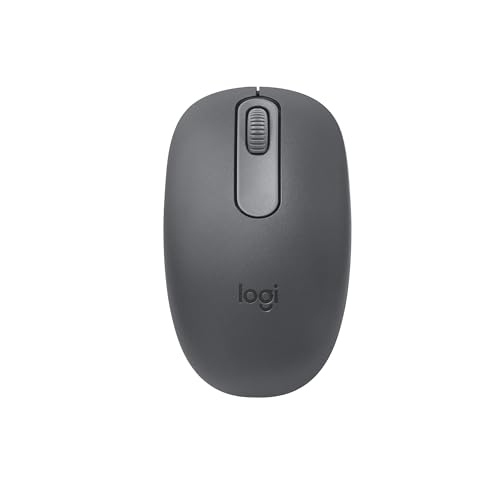
The Logitech M196 offers a compact, ambidextrous silhouette designed for travel and day-to-day laptop use. It connects quickly via Bluetooth with a pair-and-play setup, eliminating the need for a USB dongle. Its lightweight form and contoured shape provide comfort for both left- and right-handed users, making it a reliable option for portable setups. The optical tracking system supports smooth cursor control on diverse surfaces, helping reduce friction during navigation. Users seeking a reliable, budget-friendly Bluetooth mouse for on-the-go productivity will value its balance of portability and practicality.
Microsoft Bluetooth Mouse

The Microsoft Bluetooth Mouse emphasizes a compact, modern grip designed for comfortable one-handed use across multiple devices. Its slim profile makes it easy to slip into a bag or a pocket, while the matte finish offers a steady feel during extended sessions. This model supports Bluetooth 5.0 LE and features Swift Pair for quick pairing with Windows devices. While it is a straightforward option, its emphasis on a comfortable, unobtrusive silhouette makes it a strong choice for users who prefer a simple, reliable wireless experience without extra frills.
TECKNET Wireless Mouse (BT5.3/5.0 & 2.4G)

TECKNET combines versatility and precision with a three-device switching capability, allowing pairing with two Bluetooth connections plus a 2.4GHz USB-A receiver. This setup supports switching among three devices, which is ideal for users who alternate between a laptop, desktop, and tablet. The mouse offers six adjustable DPI settings (ranging from 800 to 4800) for fine-tuned accuracy, and a side scroll wheel to simplify horizontal navigation in spreadsheets or design apps. Quiet clicks and a stable ergonomic design contribute to sustained, comfortable use across long work sessions.
Logitech M240 Silent Bluetooth Mouse

The M240 Silent focuses on quiet operation without sacrificing performance. It pairs quickly via Bluetooth and boasts up to 18 months of battery life thanks to efficient power management. The 90% reduction in click noise helps minimize distractions in shared or quiet work environments while preserving the familiar click feel. The combination of a compact footprint and silent performance makes this model well-suited for late-night work, shared offices, or classrooms where noiseless input is valued as much as reliable tracking.
Logitech Ergo M575S Wireless Trackball Mouse

The Ergo M575S uses a trackball design to minimize hand movement while offering precise thumb-controlled navigation. This ergonomic setup can reduce forearm strain for users who spend long hours at the desk. The model supports Bluetooth and encrypted dongle options, providing flexible connectivity and secure operation. Ergonomically shaped for sustained comfort, it is suitable for people who need a stationary alternative to traditional mice but still require smooth, accurate cursor control and programmable features that support multi-tasking workflows.
Buying Guide: Key Purchase Considerations
- Grip style and ergonomics: Ambidextrous designs suit mixed grips, while vertical or trackball mice reduce forearm movement and wrist strain for extended use. If possible, try before you buy to ensure the grip feels natural.
- Connectivity and device switching: Bluetooth mice are convenient for slim laptops and tablets, but some models offer multitasking with additional USB receivers. If you switch devices often, look for a model that can pair with multiple devices and support quick switching.
- Scroll and precision: A reliable scroll wheel and DPI settings influence how smoothly you navigate web pages and documents. Higher DPI enables finer cursor control for detailed work, while lower DPI offers steadier movement for navigation.
- Quiet operation: Silenced clicks can be important in shared spaces. If noise is a concern, select a model marketed as “silent” or with reduced click sound while maintaining click feel.
- Battery life and charging: Long battery life reduces maintenance and downtime. For rechargeable options, confirm included charging cables and compatibility with your devices’ ports.
- Build quality and portability: Lightweight, compact mice work well for travel. Budget models can still offer durable builds, but consider the reliability needs of your daily routine.
- Compatibility: Ensure the mouse works with your computer’s OS versions (Windows, macOS, ChromeOS) and supports any required software features, such as multi-device syncing or ergonomic customizations.
- Price vs. value: While higher-priced options often offer advanced ergonomics and longer life, mid-range models frequently deliver solid comfort and reliability for most users.
The selections above present a spectrum of comfort-focused Bluetooth mice, from ultra-compact options ideal for travel to ergonomic designs intended for long work sessions. Each model emphasizes user comfort, build quality, and dependable wireless performance to support steady productivity without fatigue.