As more workspaces embrace dual or triple displays, USB-to-video adapters provide a simple way to add monitors without upgrading graphics cards. This article reviews five reliable USB-to-video adapters that help expand screen real estate, whether you’re on Windows, macOS, or mixed setups. We cover compatibility, resolution, and key use cases to help you pick the right connector for your monitor, projector, or TV.
Summary of chosen products:
| Product | Brand | Video Output | Resolution | Key Benefit |
|---|---|---|---|---|
| Mindorlen USB to VGA Adapter | Mindorlen | VGA | up to 1920×1080 | Affordable external graphics support for VGA displays |
| KUPOISHE USB to HDMI Adapter | KUPOISHE | HDMI | up to 1920×1080 | Simple USB-HDMI expansion for monitors or TVs |
| sellertree USB to VGA Adapter | sellertree | VGA | up to 1920×1080 | Dual-monitor extension or mirroring for productivity |
| Znoogrn USB to HDMI Cable | Znoogrn | HDMI | up to 1920×1080 | Flexible USB-to-HDMI cable with durable build |
| ELECABLE USB 3.0 to VGA Adapter | ELECABLE | VGA | up to 1920×1080 | Cost-effective dual-display option with USB 3.0 |
Mindorlen USB to VGA Adapter for Monitor
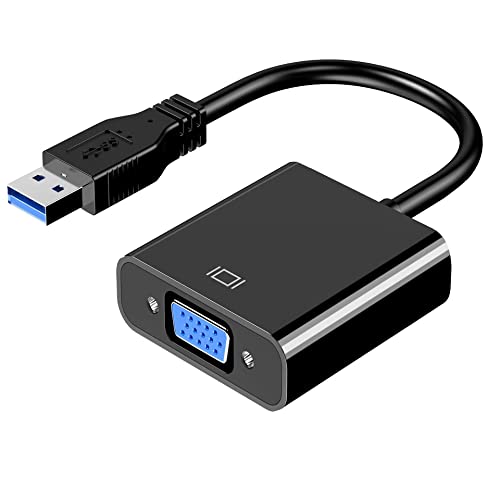
The Mindorlen USB 3.0 to VGA adapter enables connection between USB-enabled devices, such as laptops or desktops, and VGA-enabled displays like monitors, projectors, and TVs. It supports multi-monitor configurations including extension and mirroring. When paired with a USB 3.0 port, high-definition output up to 1920×1080 is supported, making it suitable for presentations or secondary displays. Compatibility is broad, though Chromebook users are not supported. The device is positioned as a cost-effective external graphics option, with backward compatibility to USB 2.0 devices for broader access, though at reduced performance.
Key considerations: Ensure your computer has a USB 3.0 port to achieve full 1080p resolution, and verify that your target display accepts VGA input. For best results, install any required driver as directed by Mindorlen and connect to a compatible VGA display with a standard VGA cable.
KUPOISHE USB to HDMI Adapter for Monitor

The KUPOISHE USB to HDMI adapter lets you connect PC images to HDMI-equipped displays, including TVs, monitors, and projectors. It supports both USB 3.0 and USB 2.0 ports and can extend or mirror your desktop to an additional display, potentially boosting productivity. Resolution reaches up to 1920×1080, and the device supports hot-plugging. After driver installation, it can be used whenever needed. The product includes a generous warranty period, offering a 12-month unconditional return window and a 36-month warranty for added peace of mind.
Important notes: HDMI output means you’ll want an HDMI input on your display. If you’re using a laptop with limited graphics, this adapter can provide a straightforward path to a larger or second screen while keeping your primary display intact.
sellertree USB to VGA Adapter for Monitor

sellertree’s USB to VGA adapter provides a versatile connection between USB-enabled devices and VGA displays such as monitors, projectors, and TVs. It supports dual-monitor setups via USB 3.0, enabling extended desktops or mirrored displays to improve workflow. The output is up to 1920×1080, making it suitable for office tasks, media playback, and presentations. Compatibility emphasizes USB 3.0 performance, with USB 2.0 compatibility for broader access. The adapter suits users who want a straightforward, plug-and-play solution without needing internal graphics card upgrades.
Practical guidance: Confirm your system can install the supplied driver, especially on older machines. A stable USB 3.0 port is recommended to ensure smooth video output and minimal lag during presentations or video playback.
Znoogrn USB to HDMI Cable

The Znoogrn USB-A to HDMI cable provides a direct USB-to-HDMI connection, enabling HDMI-equipped devices like TVs, monitors, or projectors to receive video from a USB source. It’s a flexible option for those who want to avoid dongles and adapters with multiple cables. The cable includes high-quality connectors and shielding to minimize interference and ensure stable audio/video transmission. Gold-plated HDMI connectors improve durability and signal integrity. Note that it is a USB-to-HDMI solution and does not convert USB to VGA; ensure your display supports HDMI input for best results.
Considerations include checking your device’s USB ports and ensuring driver support is available. This option is especially useful for laptops or mini PCs that lack HDMI outputs but still require a reliable HDMI display connection.
ELECABLE USB 3.0 to VGA Adapter

The ELECABLE USB 3.0 to VGA adapter is presented as a cost-effective dual-monitor option. It enables USB-enabled devices to connect to VGA displays, allowing extended desktops or mirrored displays. It supports USB 3.0 for higher bandwidth and up to 1920×1080 resolution. Compatibility notes indicate Windows 11/10/8.x/7 support, with limitations for macOS Monterey or later and other USB 3.0 devices that require specific driver installations. It’s a practical solution for users seeking an affordable upgrade to a multi-monitor setup without internal graphics changes.
Buying considerations include verifying driver availability for your operating system, ensuring a USB 3.0 port is used for full HD capabilities, and confirming that your VGA monitor supports native 1920×1080 input for best results. For mixed environments, consider adapters that offer both HDMI and VGA options to maximize compatibility with various displays.
Buying Guide: Key Purchase Considerations And Comparisons
Video output type: Depending on your display, you may need VGA or HDMI. USB-to-VGA adapters are common for older monitors and projectors, while USB-to-HDMI offers broader compatibility with newer screens and TVs. If you plan to drive multiple screens, confirm whether the adapter supports extended desktops or simple mirroring, and ensure your computer’s hardware and drivers can handle several displays.
Port speed and standard: USB 3.0/3.1 ports provide higher bandwidth and more stable high-definition output than USB 2.0. For 1080p displays, USB 3.0 is typically sufficient, but USB 2.0 may work for basic mirroring at lower resolutions. If you regularly work with high-resolution content, prioritize USB 3.0 adapters and test under your specific workload.
Driver requirements and compatibility: Some adapters require driver installation, which may affect plug-and-play usability on certain operating systems. Windows generally offers robust driver support, while macOS compatibility can vary by model. Always check the manufacturer’s site for the latest drivers and supported OS versions before purchasing.
HDMI vs. VGA quality: HDMI generally provides superior digital signal quality and support for audio, whereas VGA is an older analog standard that may require more attention to cable quality and interference. If audio output is needed, HDMI-equipped adapters are preferable due to integrated audio support.
Use case and display goals: For presentations, mirroring may suffice. For productivity, extended desktops across multiple monitors improve workflow. Consider whether you’ll be using a TV, projector, or high-refresh-rate display, and choose an adapter that supports your target resolution and refresh rate at the intended distance and cabling.
Build quality and warranty: Look for robust build and shielding in cables and connectors, as well as a reasonable warranty period. A longer warranty reduces risk if you encounter compatibility or durability issues over time.
Price-to-performance balance: The most affordable option may meet your needs, but for high-demand environments, investing in a USB 3.0 adapter with solid driver support and reliable HDMI/VGA output can yield better long-term performance and fewer troubleshooting sessions.
In sum, selecting the right monitor-to-USB connector depends on display inputs, desired resolution, operating system compatibility, and whether you need extended desktops or simple mirroring. The five reviewed adapters span VGA and HDMI outputs, with a mix of USB 3.0 performance and practical warranties to support diverse workspace configurations.