Finding a reliable monitor-to-TV converter cable helps extend or mirror your computer, laptop, or media device onto a larger screen. The products below cover a range of simple, plug-and-play options that convert HDMI or VGA signals to compatible outputs for TVs, monitors, projectors, and more. Each option focuses on straightforward setup, supported resolutions, and durable design to fit common American home and office setups.
| Product | Brand | Key Feature | Resolution Support |
|---|---|---|---|
| BENFEI HDMI to VGA 3 Feet Cable | BENFEI | HDMI (Source) to VGA (Display), uni-directional | up to 1920×1080@60Hz |
| BENFEI VGA to HDMI Adapter | BENFEI | VGA (Source) to HDMI (Display), uni-directional, with USB audio | up to 1080p |
| BENFEI HDMI to VGA 6 Feet Cable | BENFEI | HDMI (Source) to VGA (Display), longer reach | up to 1920×1080@60Hz |
| Moread HDMI to VGA | Moread | HDMI (Source) to VGA (Display), compact | up to 1920×1080@60Hz |
| NewBEP HDMI to VGA Adapter Cable | NewBEP | HDMI to VGA with active conversion | up to 1080p |
BENFEI HDMI to VGA 3 Feet Cable
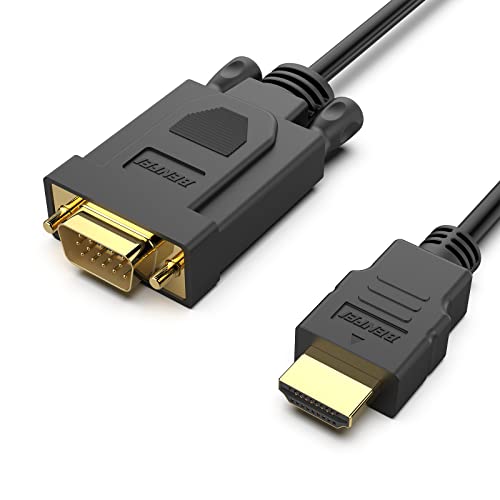
The BENFEI HDMI to VGA 3 Feet Cable provides a compact, uni-directional connection from HDMI sources to VGA displays. It enables rapid setup for presentations or extra screen space without needing an external power adaptor. The device features an integrated IC chip that converts HDMI digital signals to VGA analog signals, supporting up to 1920×1080 at 60Hz. The HDMI connector is gold-plated to resist corrosion and improve signal transmission, while molded strain relief helps durability during travel or frequent plugging and unplugging. This cable is ideal for laptops, Raspberry Pi projects, or compact media players destined for VGA monitors or projectors.
BENFEI VGA to HDMI Adapter

This VGA to HDMI adapter converts a VGA source to an HDMI display, enabling you to pair older laptops or desktops with newer TVs or monitors. It includes a USB audio channel so audio can accompany video over HDMI. Note that this is a unidirectional converter (VGA to HDMI) and requires an HDMI display. It’s compact for travel and presentations, and the integrated IC chip supports stable VGA-to-HDMI conversion while delivering up to 1080p output. A standard HDMI cable is required for use.
BENFEI HDMI to VGA 6 Feet Cable

The 6 Feet HDMI to VGA cable from BENFEI repeats the same HDMI-to-VGA conversion concept with a longer reach. It supports HD resolutions up to 1080p at 60Hz, making it suitable for classrooms, small conference rooms, or home theater setups where the display is farther away. The cable design emphasizes durability with gold-plated connectors and molded strain relief to resist wear from daily use and bending.
Moread HDMI to VGA

Moread’s HDMI to VGA adapter emphasizes compact portability with a simple plug-and-play approach. It supports HDMI sources to VGA displays up to 1080p at 60Hz. A VGA cable is required but not included, encouraging users to source their preferred length. This adapter is designed for quick in-office demonstrations or travel use, offering durable construction and reliable signal conversion for social media setups, classrooms, or meeting spaces.
NewBEP HDMI to VGA Adapter Cable
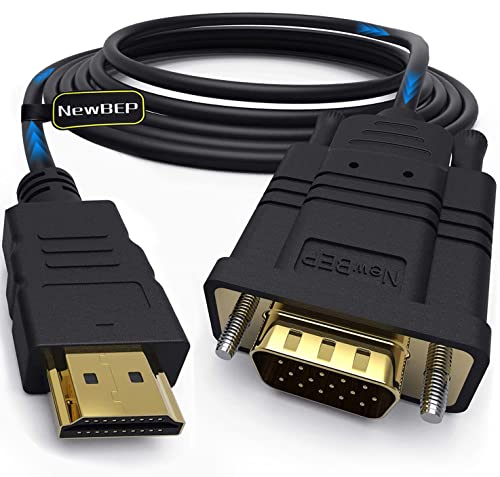
The NewBEP HDMI to VGA Adapter Cable provides a 6-foot active conversion solution, designed to output VGA signals from HDMI sources like notebooks, PCs, DVD players, or game consoles to VGA-compatible displays. It claims full 1080p support and a straightforward, driver-free setup. Active conversion is integrated into the cable, reducing the need for external adapters. This makes it suitable for home entertainment setups, educational environments, or small offices seeking a simple VGA display option from HDMI devices.
Buying Guide
- Directionality: Confirm whether the adapter is Uni-Directional (HDMI to VGA or VGA to HDMI) or bi-directional. Using a unidirectional adapter in the wrong direction will not work.
- Resolution and refresh rate: Ensure the device supports your target display’s resolution (commonly 1080p at 60Hz). Some older adapters may cap at 720p.
- Signal type: HDMI to VGA adapters convert digital to analog signals. If you need audio over HDMI, check for models that include an integrated audio solution or require a separate audio connection.
- Power requirements: Many HDMI-to-VGA adapters are passive and draw power from the HDMI port, but some require a USB power input. Verify power needs to avoid blackouts or display issues.
- Cable length: Choose a length that fits your setup. Longer cables may introduce slight signal degradation; consider active conversion for longer runs.
- Build quality: Look for gold-plated connectors, molded strain relief, and sturdy housings to minimize wear and signal loss over time.
- Audio considerations: If you rely on embedded audio through HDMI, ensure the adapter and display support synchronized audio or plan for external audio routing when necessary.
- Compatibility: Some devices (Raspberry Pi, certain laptops, game consoles) may require power or specific EDID handling. Read product notes to confirm compatibility with your devices.
- Port availability: If you already use HDMI for other devices, ensure your source has spare HDMI output or consider a compact adapter for travel or presentations.