Discover the top monitor mount copy holders that help you keep documents, notes, and recipes at eye level while you work. These accessories attach to laptops, monitors, or desktops, reducing neck strain and improving typing accuracy. This guide highlights five reliable options, with practical features for home offices, classrooms, and professional setups. Each pick supports easy one-handed loading, adjustable angles, and stable bases to keep your materials steady during tasks.
| Product | Brand | Key Benefit |
|---|---|---|
| Note Tower Monitor Document Paper Holder (Black) | Note Tower | Eye-level viewing, versatile mounting |
| HAUTOCO Monitor Mount Document Clip | HAUTOCO | 180° swing arm, removable base |
| Mount-It! Monitor Document Holder Clip | Mount-It! | 360° swivel arm, 3M adhesive |
| Note Tower Monitor Document Paper Holder (Pink) | Note Tower | Same features, color variation |
| Kensington Document Holder for Typing | Kensington | Gooseneck adjustability |
Choosing the right copy holder depends on mounting versatility, load capacity, and portability. The items below focus on clip-on and adhesive mount options ideal for desks, laptops, and monitors, with emphasis on ergonomic benefits and ease of use.
Note Tower Monitor Document Holder — Black
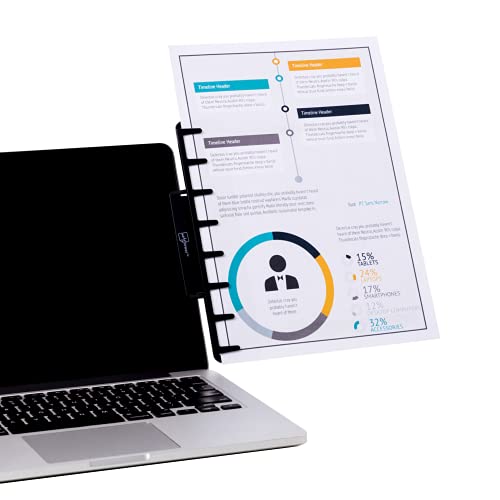
This monitor document holder clips to desktops, laptops, and thin monitors, with adapters for larger screens. It can mount to the top or sides of a monitor and also serves as a desk paper stand. The design supports loading up to four sheets of copy paper at eye level, aiming to reduce neck strain and improve typing comfort. Angle adjustment enhances viewing for better posture and faster reading.
HAUTOCO Monitor Mount Document Clip

HAUTOCO’s flexible document holder is designed for wide usage, from teleprompter cues to kitchen recipe displays. It features a 180° swing arm for precise angle control, and a stable, removable base that can be attached to various flat surfaces. The stand supportsholding multiple pages and can be used with tablets or books, making it adaptable for study, office tasks, or content creation.
Mount-It! Monitor Document Holder Clip
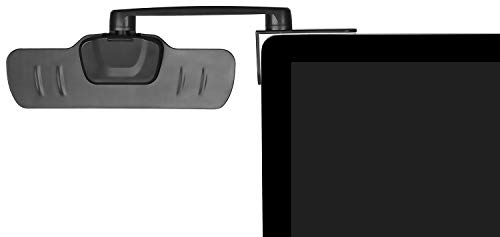
Mount-It! offers a clip-on document holder with a 3M adhesive attachment and a 360-degree swivel arm. The design supports left or right mounting options and positions documents at eye level for comfortable viewing while typing. The adhesive option helps secure the holder on top of flat screens or CRT monitors, making it suitable for a range of monitor types and desk layouts.
Note Tower Monitor Document Paper Holder — Pink

This pink variant mirrors the black model’s functionality, clipping to laptops, tablets, and monitors with adapters for larger screens. It supports quick one-hand paper loading and provides angle adjustment for ergonomic viewing. It is designed to hold up to four sheets and helps reduce neck movement during typing tasks, with a compact footprint suitable for shared workspaces or home offices.
Lewtemi Pack of 4 Flexible Document Holders
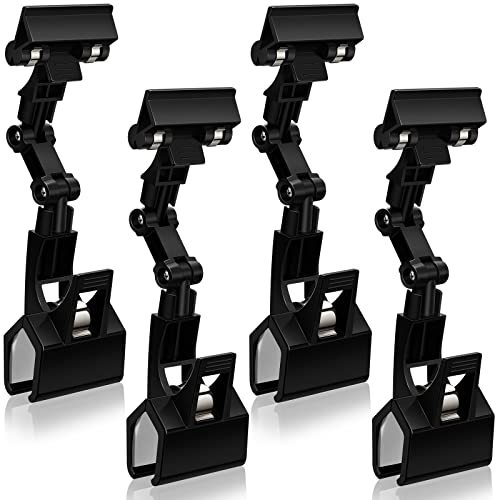
This set provides multiple hinges and adjustable arms to view reference material comfortably. Made from durable PP plastic, the holders are designed to be sturdy yet lightweight, suitable for drawings, paintings, or office use. The double-head design allows portrait or landscape document orientation, offering flexible placement for various workflows and desk configurations.
Kensington Document Holder for Typing
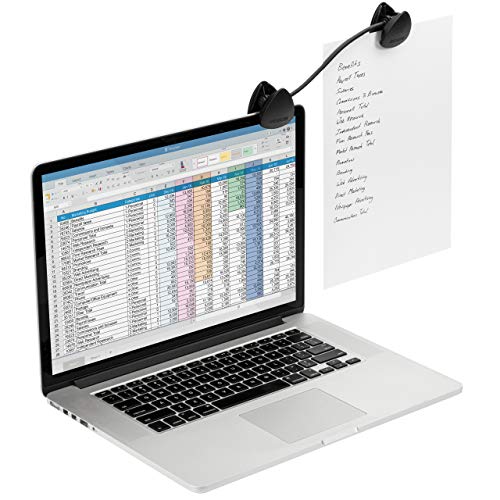
Kensington’s clip-on document holder attaches to laptops, CRT, or flat-panel monitors, featuring a flexible gooseneck for positioning at the most comfortable reading angle. It provides a portable solution for on-the-go work or fixed desk setups, helping users keep reference materials at eye level and maintain ergonomic posture during typing tasks.
Buying Guide: Key Purchase Considerations
- Mounting compatibility: Ensure the holder clips or adheres to your monitor, laptop, or desktop setup without obstructing the screen or ports.
- Load capacity and orientation: Look for options rated for multiple pages and support both portrait and landscape orientations for flexible use.
- Adjustability: Favor models with adjustable angles, arms, and swivel capabilities to achieve the best reading distance and posture.
- Portability and storage: If you move between spaces, choose lightweight, detachable bases or foldable designs to simplify transport.
- Durability: Choose sturdy materials (PP plastic, metal variants) that resist wear from daily use and resist warping under load.
- Surface compatibility: Consider whether adhesive options or clip mechanisms suit your monitor type (LCD, LED, CRT, or ultrabook displays).
- Ergonomic impact: Prefer devices that place documents at eye level to minimize neck flexion and reduce strain during extended work sessions.
- Multi-purpose use: Some models double as recipe stands, memo boards, or study aids, offering added value beyond document holding.
When evaluating options, compare mounting methods, load capacity, and adjustability. For shared workspaces or family desks, color variants or interchangeable bases can help integrate the accessory with your current setup. Consider future needs, such as moving from a laptop to a larger monitor, to select a holder with adaptable attachment capabilities. The right copy holder can complement an ergonomic workstation by keeping essential references within a natural, relaxed viewing range.