Finding a reliable mobile receipt printer that pairs with Android or Windows devices can streamline checkout, service, and on‑the‑spot invoicing. The following selections highlight compact, Bluetooth or USB options that deliver clear 203 dpi prints, quick speeds, and broad compatibility. Read on to compare top models, their connectivity, paper size, and practical uses for retail, hospitality, and fieldwork. This guide includes a concise product summary to help you decide quickly.
| Product | Brand | Key Benefit | Paper Width |
|---|---|---|---|
| Sunydog Thermal Printer | Sunydog | BT/USB versatility, Android ready, 203dpi | 58mm |
| Rongta Portable 80mm Printer | Rongta | Bluetooth + USB, clear app guidance | 80mm |
| ETprin 80mm Portable Printer | ETprin | Long standby, rechargeable battery | 80mm |
| MUNBYN 58mm Bluetooth Printer | MUNBYN | Android specific apps, compact design | 58mm |
| TATTMUSE Portable Inkless Printer | TATTMUSE | Travel‑friendly, lightweight, includes paper | Varies (thermal paper) |
Sunydog Thermal Printer For Android And Win

The Sunydog Thermal Printer is a portable, 58mm receipt printer designed to work with Android devices and Windows computers. It supports both Bluetooth and USB connections and prints at up to 70 mm/s with a 203 dpi resolution. It’s compatible with several popular retail apps such as Loyverse, iREAP, CasierStock, and Kyte, making it suitable for small shops, cafés, and pop‑ups. Notable notes include limitations for Mac OS and certain Square POS implementations, so users should verify app compatibility before purchasing. The device uses standard 58mm paper and ships with a USB option for computer use and a Bluetooth pairing setup for mobile devices.
Key considerations:
- Connectivity: BT and USB provide flexible setup for both mobile and desk use.
- Paper and print quality: 203 dpi yields legible receipts at standard 58mm width.
- App ecosystem: Works with Loyverse, Kyte, iREAP, and similar apps, expanding its compatibility with various business workflows.
- Limitations: Not supported on Mac OS; users should confirm POS integrations in advance.
Rongta Portable 80mm POS Printer

The Rongta RPP300 model offers an 80mm wide receipt printing experience with Bluetooth and USB connections. It’s marketed specifically for Android phones and is designed to integrate with the RTPrinter System app. The user guidance includes a step‑by‑step font size adjustment via a long press on the power button, plus a driver CD for PC use. The device highlights a dedicated power indicator and straightforward connectivity, making it appropriate for mobile vendors who need quick, legible receipts on the go.
Key considerations:
- Compatibility: Android devices with compatible printing apps, plus USB PC connection.
- User guidance: Clear steps for font sizing and setup, with tech support available.
- Portability: Compact enough for mobile checkout while offering robust paper width for receipts.
- Limitations: Some users may require the driver CD for PC use; ensure your system supports the included software.
GZGYNADAST 58mm Bluetooth Printer

This 58mm Bluetooth printer from GZGYNADAST emphasizes Android and Windows compatibility, while explicitly noting incompatibilities with iOS devices and several major POS platforms. The product listing details Android‑focused apps such as Loyverse, iREAP, CasierStock, Kyte, and Pozool, among others, to handle receipt and inventory tasks. Battery care tips and a strong emphasis on correct Bluetooth setup help users maximize uptime in busy environments like restaurants and retail counters.
Key considerations:
- Platform compatibility: Android and Windows; not suitable for iOS/macOS ecosystems.
- App support: Loyverse, iREAP, CasierStock, Kyte, and more for receipt generation and inventory tasks.
- Setup tips: Follow app pairing and battery preparation steps to avoid connectivity issues.
- Limitations: Compatibility exclusions may require alternative options for Apple device users.
ETprin 80mm Portable Receipt Printer

The ETprin 80mm portable printer is designed for Android and Windows and supports 80mm (and 58mm equivalent) paper formats. It features a rechargeable 2600mAh battery and a long standby time, with automatic sleep and wake functions to preserve power. The printer is positioned as suitable for bookstores, restaurants, and warehouses, offering a compact footprint with broad compatibility. Its wide application notes emphasize IR and POS printing workflows, making it a viable option for hospitality and small business printing needs.
Key considerations:
- Battery life: Large 2600mAh battery supports extended use between charges.
- Standby features: Auto-sleep/wake help conserve power in busy environments.
- Paper compatibility: Primarily 80mm width, with flexibility for smaller receipts in practical use.
- Limitations: Not all Square or iOS configurations are supported; verify required app integration.
MUNBYN 58mm Bluetooth Receipt Printer

The MUNBYN 58mm Bluetooth receipt printer is a compact, Android‑friendly device designed for quick restaurant or retail checkouts. It emphasizes Bluetooth connectivity for Android devices and lists Loyverse, CashSale POS, and other POS apps as supported options. A Windows USB connection is available for desktop use. The section notes that iOS devices are not compatible, and it recommends keeping receipts clear with proper spacing and readability to ensure legibility in busy settings.
Key considerations:
- Android focus: Bluetooth pairing with popular POS apps supports mobile workflows.
- Desktop option: USB connection for Windows computers allows flexible setup.
- Distance: Bluetooth usage is noted within a typical short range; plan for line‑of‑sight usage.
- Limitations: iOS compatibility is not supported; ensure your devices are on the recommended platform.
TATTMUSE Portable Wireless Printer For Travel
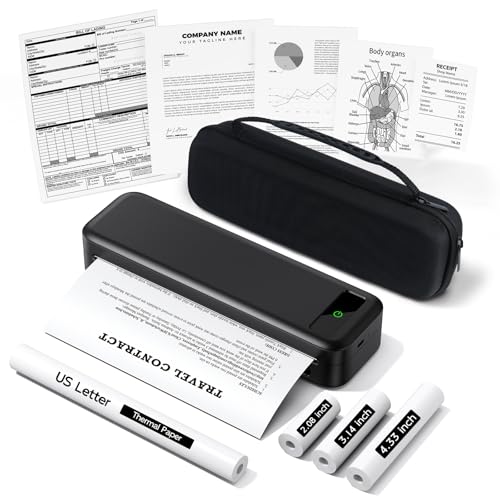
The A285M from TATTMUSE positions itself as a travel‑friendly inkless thermal printer with a case and four rolls of paper included. It claims compatibility with iPhone, Android, and iPad via Bluetooth, and supports USB‑C for laptop printing. The package includes multiple rolls to reduce the need for immediate replenishment while on the move. This model is suitable for mobile offices, fieldwork, and home use where light, instant receipts or documents are needed without ink.
Key considerations:
- Inkless printing: Uses thermal paper for on‑the‑go receipts without ink or toner.
- Portability: Lightweight with an included carrying case—well suited for travel or field service.
- Connectivity: Bluetooth for mobile devices and USB‑C for laptop printing.
- Limitations: Thermal paper is required; color printing is not available.
Buying Guide: Key Purchase Considerations And Comparisons
When selecting a mobile receipt printer for use with a phone or tablet, consider the following dimensions to align with your business needs:
- Connectivity: Decide between Bluetooth, USB, or dual BT/USB for the most flexible setup. Bluetooth is ideal for mobile point‑of‑sale environments, while USB suits desk‑based or hybrid setups.
- Paper size and print quality: 58mm vs 80mm paper is a major factor. If you need longer receipts or larger forms, 80mm may be preferable. Ensure the printer supports the paper type you plan to use (thermal is common and inkless).
- Platform compatibility: Check if the printer supports your device ecosystem (Android vs iOS, Windows vs Mac). Some models explicitly exclude iOS/macOS compatibility or certain POS platforms.
- App ecosystem and drivers: Look for printers with well‑supported apps (Loyverse, iREAP, CasierStock, Kyte, CashSale, etc.). Also confirm driver availability for desktop use if you plan to print from a computer.
- Battery life and standby performance: For fieldwork or busy shifts, a large battery and auto sleep/wake features reduce downtime and maintenance.
- Setup and support: Consider printers with straightforward pairing steps and clear setup instructions, plus available technical support if needed.
- Durability and portability: Lightweight, compact devices with protective cases are ideal for travel and dense retail environments.
- Cost of ownership: Factor in paper costs, compatibility with your existing apps, and the need for driver software or accessories when budgeting.
By evaluating these factors against the included product summaries, you can select a mobile receipt printer that delivers reliable receipts, quick printing, and smooth integration with your daily operations. The right choice reduces wait times for customers and improves overall checkout efficiency across retail, hospitality, and mobile service scenarios.