Mining rigs rely on motherboard robustness and CPU compatibility to maintain stable operation under continuous workloads. This article highlights five mining-focused motherboards that pair well with select CPUs, emphasizing expansion slots, PCIe layouts, memory support, and overall reliability for cryptocurrency mining. Each option comes with key features to help you compare performance, power, and expandability for a practical mining build.
| Product | CPU/Chipset Support | PCIe/Expansion | Memory |
|---|---|---|---|
| ASRock H110 Pro BTC+ 13GPU | Supports 6th/7th Gen Intel Core | 13 PCIe slots for GPUs | DDR4 2400/2133 |
| Biostar TB360-BTC D+ | Intel 300 Series Chipset | Multiple GPU slots | DDR4 memory (compatibility varies) |
| TB360-BTC PRO 2.0 | 8th/9th Gen Intel Core | 12 GPU slots | DDR4 |
| B250 BTC 12P | 6th/7th Gen Intel (LGA1151) | 12 PCIe slots | DDR4 up to 16G |
| Biostar TB560-BTC PRO | 10th/11th Gen Intel Core | 12 GPU slots | DDR4 up to 64G |
ASRock H110 Pro BTC+ 13GPU Mining Board

The ASRock H110 Pro BTC+ is designed to power large-scale mining operations. Built around the H110 chipset, it supports 6th and 7th generation Intel Core processors, enabling a cost-effective CPU pairing for a mining rig. The board emphasizes expandability with extensive PCIe slots, allowing up to 13 GPUs to operate concurrently. It also supports DDR4 memory at 2400/2133 MT/s, providing adequate bandwidth for mining tasks and basic system stability. This board is commonly chosen for its straightforward setup and proven track record in mining farms that require multiple GPU slots and reliable operation.
Biostar TB360-BTC D+ Mining Motherboard
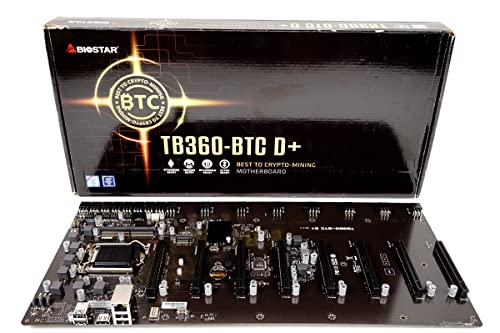
The Biostar TB360-BTC D+ leverages Intel’s 300 Series chipset to support modern CPUs while offering a robust platform for GPU mining. While it’s optimized for mining, it preserves standard PC interfaces to maintain compatibility with common mining components. The motherboard’s design emphasizes stability across multiple PCIe slots, making it a practical option for rigs that require a reliable backbone with adequate slots and memory support for extended runs. It’s particularly suitable for builders who want modern chipset features without sacrificing GPU density.
Biostar TB360-BTC PRO 2.0
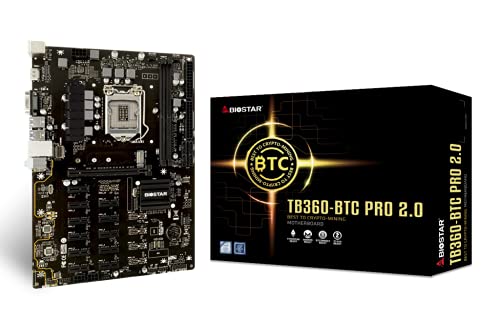
TB360-BTC PRO 2.0 is tailored for mid-to-large mining setups that demand substantial GPU capacity. It supports 8th and 9th generation Intel Core processors with an LGA1151 socket and a single-chip B360 architecture. A notable feature is its compatibility with M.2 SATA III interfaces, which can help with fast storage options for operating systems or mining software. The 12 GPU slots offer a pragmatic balance between expansion and power consumption, making it a common choice for multi-GPU rigs that require dependable throughput and straightforward maintenance.
Estink B250 BTC 12P Mining Mainboard

The Estink B250 BTC 12P mining mainboard is built to support a dense GPU array with 12 PCIe ports, allowing up to 12 GPUs to operate simultaneously. It’s designed for LGA 1151 processors in the 6th and 7th generation family and features DDR4 memory support. The design emphasizes multiple expansion interfaces and broad device compatibility, which helps miners customize their rigs with additional storage and I/O options. This board is suitable for budget-conscious builds that still require reliable multi-GPU performance.
Biostar TB560-BTC PRO Mining Motherboard

Biostar TB560-BTC PRO supports 10th and 11th generation Intel Core processors on the LGA 1200 socket, paired with the B560 chipset. It provides 12 PCIe slots for GPUs and supports substantial DDR4 memory configurations up to 64GB, which can improve system responsiveness when running mining software alongside operating systems and monitoring tools. The board’s architecture targets mid-to-large mining farms, offering stable power delivery and expandability with modern CPU compatibility and ample RAM capacity for parallel tasks.
Biostar TZ590-BTC Duo Mining Motherboard

The Biostar TZ590-BTC Duo targets enthusiasts who are expanding into newer generation CPUs. It supports 10th and 11th generation LGA1200 Intel Core processors and offers 9 PCIe slots for GPUs, alongside 4.0 x16 capabilities in certain configurations for faster expansion. The board emphasizes high memory capacity, supporting up to 128GB of DDR4, which is beneficial for running mining operating systems, monitoring software, and data logging without compromising performance. It’s well-suited for growing mining farms that require reliable multi-GPU performance with modern CPUs.
Buying Guide: Key Purchase Considerations
- GPU slot density: Higher GPU counts increase hash rate but demand careful power planning and cooling. Ensure the motherboard provides enough PCIe lanes and slots for your planned GPUs.
- CPU compatibility: If you plan to reuse existing CPUs, verify socket type and generation support. For new builds, select CPUs with stable performance and availability in your region.
- Power delivery and reliability: Look for solid VRMs and ample fan headers or thermal management options. Mining rigs run continuously, so board durability and heat management matter.
- Memory and I/O: DDR4 support, available RAM capacity, and enough USB/ Ethernet/BIOS options help with mining OS installation and monitoring tools.
- Expansion flexibility: M.2, SATA, and USB interfaces can support system drives, storage for logs, and monitoring utilities. Consider boards with optional modular expansion.
- Cooling efficiency: GPUs generate significant heat; boards with good spacing, airflow, and PCIe slot arrangement aid thermal management.
- Build scale: For large deployments, consider boards proven in mining farms, supplier availability, and ease of maintenance across multiple rigs.
- Operating system compatibility: Check whether the mining software you plan to use (for example, HiveOS or Linux-based systems) is well-supported on the chosen motherboard.
- Budget vs. future-proofing: Balance upfront cost with long-term expansion needs. While older boards can save money, newer chipsets may offer better efficiency and support.
- Warranty and support: Choose suppliers with clear warranty terms and accessible customer support to minimize downtime in production environments.
These boards provide a range of choices for aspiring or expanding mining operations. When selecting, align your CPU, GPU count, and power strategy to your project goals—whether you’re building a compact, energy-efficient rig or a large-scale mining farm.