The market for mini SATA to SATA converters helps turn compact laptop drives and slimline interfaces into standard 2.5″ SATA connections. This guide highlights five reliable adapters that expand storage options, support testing, and enable quick data transfers. Each pick is evaluated on compatibility, ease of use, and build quality to help American readers choose confidently.
Summary of chosen products:
| Product | Brand | Key Benefit | Ideal For |
|---|---|---|---|
| chenyang SATA 22Pin Male to Slimline SATA 13 Female Laptop CD-ROM Convertor Adapter | chenyang | Slimline to 2.5″ SATA testing | Testing slimline optical drives |
| Acxico 2Pcs Mini PCIE MSATA to 2.5″ SATA Converter | Acxico | mSATA two-in-one to SATA | Upgrading MSATA SSDs |
| ELUTENG mSATA to USB 3.0 Adapter | ELUTENG | USB external mSATA enclosure | Portable external storage |
| CRJ Slimline SATA Power Adapter Cable | CRJ Electronics | Power slimline drives from ATX PSU | Powering slimline disks |
| Cablecc mSATA SSD to 2.5″ SATA Enclosure | cablecc | MSATA to standard SATA enclosure | All-in-one testing and use |
These selections cover a range of use cases—from direct adapter connections for testing and data transfer to external USB enclosures for portable storage. Each product section below explains how it can fit into typical DIY or repair workflows.
chenyang Slimline to 2.5 Inch SATA Adapter

The chenyang adapter converts a 13-pin slimline SATA (often used by laptop CD/DVD drives) to a standard 2.5″ SATA interface. This enables testing or data transfer with a regular SATA host controller. Compatibility covers slimline optical drives commonly found in laptops and some mini PCs. The 7+6 pin Slimline connection is designed to simplify integration without requiring extra power sources for simple testing scenarios.
Key features include: 13Pin to 2.5″ SATA compatibility, multi-function use for Slimline / Mini SATA drives, and straightforward connection to a SATA host for quick data transfer. This adapter is best for lightweight testing tasks rather than continuous high-power operations.
Acxico Mini PCIe MSATA to 2.5″ SATA Converter

Acxico’s adapter supports converting an mSATA (30 mm by 50 mm) SSD to a standard 2.5″ SATA interface. It is designed for laptop or desktop use and does not require drivers. Note that it only supports mSATA Mini PCIe SSDs and not other PCIe form factors. This converter is ideal for expanding storage in thin laptops or small form factor PCs where a full-size SATA option isn’t available.
Highlights include plug-and-play operation, broad compatibility with operating systems, and a simple pathway to convert mSATA drives into usable 2.5″ SATA storage. It’s best for upgrading legacy devices or repurposing recovered mSATA drives.
ELUTENG mSATA to USB 3.0 External Adapter
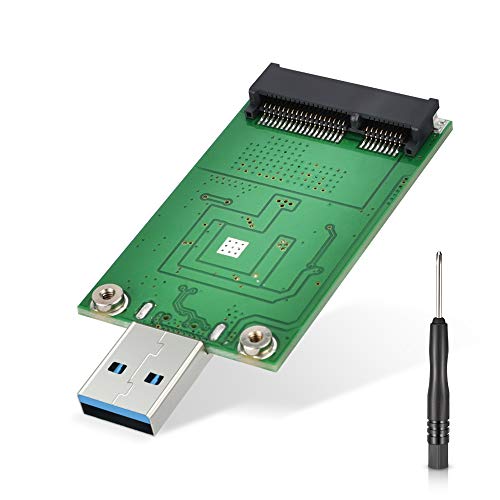
This portable adapter converts an mSATA SSD into a USB 3.0 external drive. It’s designed for quick, cable-free setups and enables external storage expansion for laptops or desktops. The device is compatible with mSATA SSDs with current draw under 1.5A and provides a straightforward way to reuse older drives as external storage. Note that it supports only mSATA SSDs and is not suitable for other mini PCIe formats.
Features include a compact, cable-free design and an ASM1153E controller for broad OS compatibility and stable power delivery. It’s a practical choice for emergency data access or mobile data backup from mSATA devices.
CRJ Slimline SATA Power Adapter Cable

This 12-inch black-sleeved cable powers a slimline disk drive via a 15-pin SATA power connector from an ATX power supply. It features premium construction with hidden wire paths for a clean install. The device uses the standard 15-pin SATA power interface and is traditionally used for slimline HDD/SSD drives that require external power. It’s a simple, robust solution for powering slimline media devices in compact builds or test rigs.
Use this adapter when you need reliable power delivery for slimline drives without introducing extra adapters or clutter in a compact chassis. It complements host-side adapters by ensuring consistent power along with data paths.
Cablecc mSATA to 2.5″ SATA Enclosure

The Cablecc enclosure converts a 50×30mm MSATA SSD into a standard 2.5″ SATA drive. It supports Windows, Linux, and Mac systems, offering a straightforward standard input for MSATA. The enclosure accepts 22P (15+7) MSATA and is suitable for creating portable, functional storage from MSATA SSDs. No driver is required, and the setup is ideal for data transfer tasks or testing in a self-contained unit.
Design emphasizes compatibility and ease of use, making it a solid option for repurposing recovered MSATA drives into fully functional portable storage or a test environment for OS deployments and data backups.
Cablecc IDE To SATA Desktop Converter
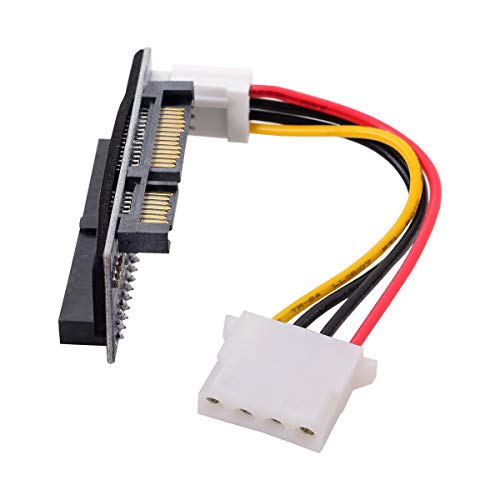
This adapter handles 3.5″ IDE HDDs and converts them to SATA connections. It supports IDE drives up to 1000GB without requiring an external power supply, and it is plug-and-play with no driver needed. It is not hot-swappable, but it offers a simple bridge from legacy IDE interfaces to modern SATA. This is particularly useful for data recovery from older drives or integrating older hardware into a SATA-only environment.
For users dealing with legacy storage, this converter provides a practical link between IDE legacy interfaces and current SATA-enabled systems, enabling continued access to older data without extensive equipment upgrades.
OIKWAN Mini SAS to SATA Breakout Cable

The OIKWAN breakout cable connects a 12 Gbps host bus adapter or RAID controller with an SFF-8643 connector to four SATA drives. It supports 3 Gbps and 6 Gbps SATA interfaces and provides a pathway toward a 12 Gbps storage environment. The cable features a woven sheath, easy-grip SATA connectors, and clear labeling to simplify installation in high-density storage setups. It is designed for internal connections in custom RAID or server builds.
With hot swap and power management considerations, this option is best for users building or maintaining more complex storage arrays where modular, high-speed SATA connections are required.
Xiwai Mini PCIe to SATA Dual Ports Adapter

The Xiwai adapter converts a Mini PCIe PCI Express slot into two SATA 3.0 interfaces. This enables using up to two SATA drives as system disks with data transfer rates up to 6.0 Gbps. It supports various power states and hot swap capabilities, making it suitable for compact builds that require multiple SATA connections from a single PCIe slot. This is ideal for expanding capacity in small form factor PCs or embedded systems where space is at a premium.
It combines PCIe compatibility with straightforward SATA growth, enabling efficient testing, cloning, or OS deployment across dual drives in tight spaces.
Buying Guide: Key Considerations When Selecting a Mini SATA To SATA Converter
- Interface compatibility: Confirm whether your device uses Slimline SATA, mSATA, mini PCIe, or full-size SATA connectors, and ensure the converter matches the form factor.
- Power requirements: Some slimline drives require additional power; check whether the adapter provides power through the host or requires a separate supply.
- Data transfer speed: Look for SATA 6.0 Gbps support for modern SSDs; some adapters target legacy speeds suitable only for testing.
- Driver and OS support: Most adapters are plug-and-play, but verify compatibility with your operating system and any required drivers.
- Use case: Determine whether you need a portable USB enclosure, an internal breakout, or a direct drive adapter for testing and cloning tasks.
- Build quality and cabling: Assess connector stability, strain relief, and cable management features for long-term reliability in different setups.
- Physical footprint: Consider the size of the enclosure or cable assembly to ensure it fits your device chassis or workspace.
- Maintenance and upgrade path: If you plan to upgrade drives frequently, choose a durable, reusable adapter or enclosure with simple drive swap.
- Cost vs. value: Balance price against features like hot-plug support, multiple ports, and included accessories.
In selecting a mini SATA to SATA converter, weigh whether you prioritize portability, external access, or internal expansion. For testing and data transfer, USB-enclosed options offer convenience, while internal breakout cables and adapters suit server-like environments. By matching form factor and speed to your specific use case, you can optimize storage upgrades and data workflows with confidence.