Small, portable NAS enclosures let you share and back up data from a 2.5-inch drive without a full desktop setup. The following picks focus on compact 2.5-inch drive enclosures that support USB connectivity, RAID options, and easy installation. This guide highlights five models that balance performance, ease of use, and versatility for personal backups, media libraries, and on-the-go storage.
| Product | Brand | Key Feature | Link |
|---|---|---|---|
| MAIWO Dual Bay RAID Enclosure | MAIWO | RAID 0/1/JBOD, USB 3.0, 6Gbps, aluminum | Amazon |
| MAIWO Dual Bay RAID Enclosure (USB 3.1 Gen 2) | MAIWO | RAID 0/1/JBOD, 10Gbps, UASP, aluminum | Amazon |
| BENFEI 2.5″ Tool-Free Enclosure (Type-C/Type-A) | BENFEI | Tool-free, 5–6Gbps, UASP, hot-swappable | Amazon |
| UGREEN USB-C 2.5″ Enclosure | UGREEN | USB-C Gen 2, 6Gbps, UASP, aluminum, heat-dissipating | Amazon |
| ELUTENG 2.5″ SSD Enclosure | ELUTENG | USB 3.1, USB-C, UASP, up to 6Tb, dual LEDs | Amazon |
MAIWO Dual Bay RAID Enclosure With USB 3.0
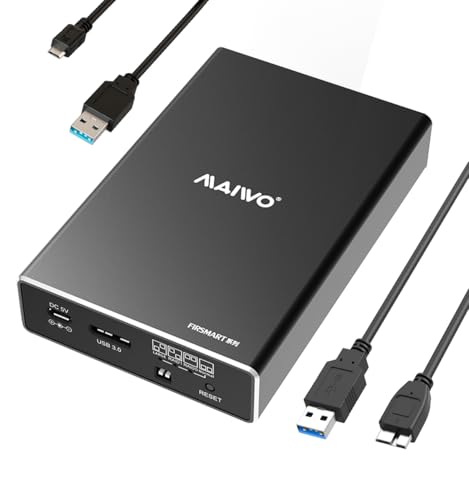
Compatibility covers 2.5-inch SATA HDDs and SSDs with 7mm or 9.5mm thickness. Includes a Micro USB to USB 3.0 power cable for additional power as needed. The enclosure uses a JMS561 bridge and USB 3.0 with UASP support, delivering up to 6Gbps when paired with Windows 8.1 or later. It offers four RAID modes: NORMAL (PM), RAID 0, RAID 1, and JBOD, enabling flexible storage configurations for speed or redundancy. Ideal for users seeking a compact, RAID-capable external drive solution.
MAIWO Dual Bay RAID Enclosure With USB 3.1 Gen 2
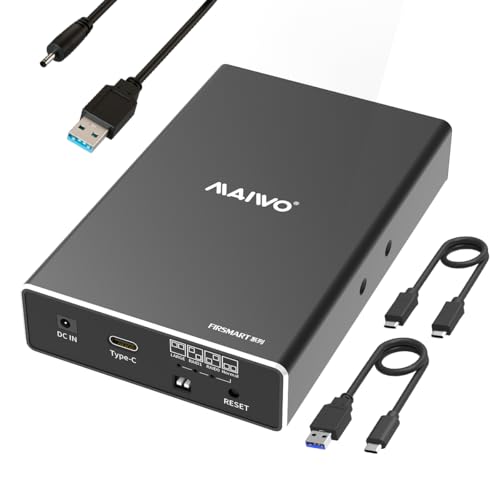
This upgrade offers USB 3.1 Gen 2 and 10Gbps transfer speeds using the ASM1352 controller. Like the 3.0 model, it supports four RAID modes (NORMAL, RAID 0, RAID 1, and JBOD) and provides a robust aluminum build with 16TB capacity commonly supported in RAID configurations. It is designed for users who need higher sustained transfer speeds for large media libraries or frequent backups, with RAID options to balance performance and data safety.
BENFEI 2.5-Inch Tool-Free Enclosure

Designed for quick setups, this enclosure is tool-free and supports USB Type-C and Type-A connections with up to 5Gbps transfer rates and UASP support. It advertises straightforward Plug & Play operation and hot-swappability, making it a practical option for quick data transfers between PCs, laptops, or consoles. Backward compatibility with USB 2.0/1.1 ports helps ensure broader device compatibility, though peak speeds require USB 3.x ports.
UGREEN USB-C 2.5″ Enclosure

The UGREEN enclosure uses USB-C Gen 2 with 6Gbps SATA III support and UASP acceleration. It comes with an included USB-C to USB-C cable and an aluminum shell for heat dissipation. The enclosure is compatible with most 2.5″ SATA SSDs and HDDs and is positioned for users who prioritize high transfer speeds and portable design without compromising durability.
ELUTENG 2.5-Inch SSD Enclosure

This enclosure converts 2.5″ SATA drives to USB 3.1 with a USB-C interface and supports UASP. Its tool-free, plug-and-play design makes installation quick, and it tolerates drives up to 6TB. The dual LED indicators help monitor activity, and the aluminum shell aids in heat management during sustained transfers. Suitable for users needing straightforward expansion with strong performance in a compact form factor.
Buying Guide
Key considerations when selecting a mini NAS enclosure for a 2.5-inch drive include:
- Drive compatibility: Check that the enclosure supports 2.5″ SATA drives and the drive thickness (7mm vs. 9.5mm) to ensure a proper fit.
- Interface and speed: USB 3.0/3.1 Gen 2 or USB-C with UASP improves throughput. Consider 10Gbps or RAID-enabled models if you need higher speeds or redundancy.
- RAID capabilities: Dual-bay enclosures with RAID 0, RAID 1, JBOD, or PM offer a balance of performance and data safety. Decide if you want striping, mirroring, or simple concatenation.
- Power requirements: Some 2.5″ enclosures require external power for operation, especially when using high-capacity drives or RAID modes. Ensure you have the right power setup.
- Build and cooling: Aluminum enclosures often dissipate heat better, which helps long-term reliability during heavy I/O.
- Portability and form factor: If you need a compact, portable solution, prioritize tool-free installation and lightweight materials.
- Future-proofing: Look for higher transfer speeds (Gen 2/Gen 3 USB, UASP support) and compatibility with larger drive capacities to extend the enclosure’s usefulness.
- Driver and OS support: Most USB-based enclosures are plug-and-play on modern Windows/macOS systems; verify any driver requirements for your setup.
When evaluating options, align the enclosure’s capabilities with your intended use—backup storage, media streaming, or quick data transfer. For a mixed environment with heavy data movement, prioritize higher speed interfaces, robust RAID options, and solid thermal design. For simple backups and portable storage, a tool-free, USB-C enclosure with good build quality and quiet operation may suffice.