For professionals who need a mobile workspace, a compact laptop car mount can transform a vehicle into a productive space. The following five picks represent a range of no-drill, adjustable, and cooling-enabled solutions designed to fit cars, trucks, and SUVs while supporting laptops up to 17 inches. Each option emphasizes stability, ergonomic adjustability, and quick setup for work on the road.
| Product | Brand | Key Benefit |
|---|---|---|
| VIVO Single Laptop Car Mount | VIVO | Full articulation with tall adjustable pole for ergonomic positioning |
| MELIPRON Truck Laptop Mount | MELIPRON | No-drill installation preserves vehicle integrity |
| SPIRRELAB Car Laptop Mount | SPIRRELAB | Built-in USB cooling fans for heat management |
| Mount-It! Car Laptop Mount (No-Drill, 12–15.4”) | Mount-It! | No-drill, full-motion, passenger-seat setup |
| Mount-It! Car Laptop Mount (No-Drill, 17”) | Mount-It! | Universal fit for up to 17” laptops with cooling tray |
VIVO Single Laptop Car Mount
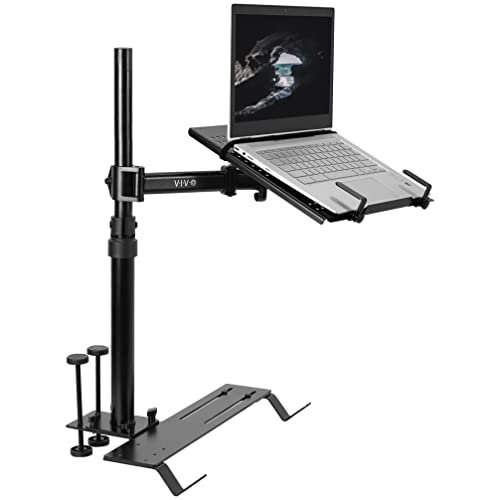
The VIVO MOUNT-CAR01 provides full articulation with a telescoping pole and multiple mounting feet for compatibility with trucks, vans, cars, and SUVs. The 14.2” x 11.9” tray accommodates laptops, notebooks, and tablets up to 17” and 11 lbs. Ventilated surface improves airflow for cooling, while flexible tray clips secure devices and allow quick removal. The pole extends from 18.5” to 26.3” with an arm that offers up to 9” of adjustment along the pole, enabling ergonomic tilting, swiveling, rotation, and height control.
MELIPRON Truck Laptop Mount

The MELIPRON laptop mount offers ergonomic height, tilt, and 360° swivel adjustments to optimize viewing angles and reduce strain. It installs without drilling, using passenger seat rail bolts to preserve the vehicle’s structure. A quick-release telescopic pole enables easy removal when not in use, keeping passenger space flexible for shared or occasional use.
DICMKY Car Laptop Mount

The DICMKY model features a 5-position height adjustment and dual-mode usage: a steering-wheel desk setup or a desktop stand. It emphasizes a quick, tool-free installation and easy storage when not in use, including compact transport and space-saving storage within the car interior. It provides flexibility for temporary or occasional office needs on the road.
SPIRRELAB Car Laptop Mount with 2 Cooling Fans

The SPIRRELAB mount emphasizes stability with two base mounting points and riser bases forming a triangular support system. It fits laptops from 9” to 17” and includes two built-in USB cooling fans to manage heat. The base is made of sturdy steel, with aluminum components and a high-strength plastic tray able to support up to 5 kg, keeping devices secure on rough roads.
Mount-It! No-Drill Car Laptop Mount (12–15.4”)

This Mount-It! model turns a parked vehicle into a mobile workspace, designed for laptops 12” to 15.4” up to 9 lbs. It installs without drilling to the passenger seat and provides a reliable, removable solution for drivers who need a portable workstation on the go. It emphasizes stability and ease of use for everyday mobile tasks.
Mount-It! Car Laptop Mount (No-Drill 17”)

This Mount-It! option supports laptops up to 17” with a cooling tray and full-motion adjustability. It provides a stable base for accidents-free usage, with universal compatibility across cars, trucks, vans, and SUVs. The height range and multiple joints enable optimal positioning for typing, viewing, and navigation while parked.
Buying Guide: Key Purchase Considerations
- Vehicle compatibility: No-drill mounts suit many vehicles, but some mounts require bolt patterns or seat rail access. Check your car’s seat configuration and floor/seat bolts before choosing.
- Device size and weight: Most mounts support 9–17” devices. Confirm both screen size and weight capacity to avoid overloading the tray.
- Adjustability: Look for multi-axis tilt, rotation, swivel, and a telescoping arm. Look for ergonomic ranges that align with typical driving posture and passenger visibility.
- Cooling and heat management: Laptops can overheat on long drives. Mounts with built-in cooling trays or USB fans help maintain performance and longevity.
- Stability and build quality: Steel bases and reinforced trays reduce wobble on uneven roads. Check clamps and attachment points for secure holding without scratching devices.
- Portability and storage: Quick-release mechanisms and removable poles improve transition between vehicle and workspace usage. Consider compact designs for shared vehicles.
- Installation effort: No-drill options are convenient but ensure the mounting points won’t damage interior features. Read installation instructions for bolt compatibility and required tools.
- Compatibility with accessories: If you use tablets, 2-in-1 devices, or docking accessories, verify tray dimensions and clip security.
These options offer a balance of portability, stability, and ergonomic flexibility. When comparing, prioritize how often you’ll move between vehicles, the type of work you perform, and whether heat management is a priority for your devices. The right choice will keep you productive on the road without compromising vehicle integrity or interior space.