Whether you’re editing tracks, layering synths, or syncing with software, a reliable MIDI adapter is essential for Mac setups. The following selections focus on USB-C and USB MIDI interfaces that work smoothly with macOS, offering low latency, plug-and-play operation, and solid compatibility with popular DAWs. This guide highlights five top options to streamline your studio workflow.
| Product | Brand | Key Benefit | Connection |
|---|---|---|---|
| LEKATO MIDI Cable, USB-C | LEKATO | Low latency, 1 in/1 out, 16 channels | USB-C |
| FORE MIDI to USB Interface (Type-A) | FORE | Plug & Play, built-in driver, LED indicators | USB-A |
| FORE MIDI to USB Interface (Type-C) | FORE | Plug & Play, fast data transmission, USB-C | USB-C |
| TENINYU USB to MIDI Cable | TENINYU | 16 channels, PC to music studio setup | USB |
| NUOSIYA USB to MIDI Cable | NUOSIYA | High fidelity transfer, compatible with Mac/Windows | USB |
Note: All products listed are designed to connect MIDI instruments to a Mac for recording, editing, and playback. Each option supports typical DAW workflows and MIDI-capable devices.
LEKATO USB-C MIDI Interface

LEKATO’s USB-C MIDI interface provides a straightforward path from keyboard or synthesizer to a Mac. It features 1 input and 1 output with indicators that simplify troubleshooting, and supports up to 16 MIDI channels. The device emphasizes true signal integrity with a robust construction and copper wiring designed to resist electromagnetic interference. Its plug-and-play design means minimal setup, and it is compatible with Windows, Mac OS, and common DAWs. The product’s low-latency performance is suitable for both recording sessions and live playing, reducing timing discrepancies during data transfer.
FORE MIDI to USB Interface (Type-A)

FORE’s Type-A MIDI interface offers a 1-in/1-out configuration with 16 MIDI channels. It emphasizes plug-and-play usability, with a built-in driver and intelligent LED indicators to show power and data activity. This model is positioned for quick setup across macOS and Windows environments and supports popular DAWs for recording and editing. The device is designed for low-latency MIDI transfer, making it practical for studio work and performance setups that require fast, stable MIDI data streams.
FORE MIDI to USB Interface (Type-C)

This FORE model mirrors the Type-A variant but uses USB-C connectivity, aligning with newer Mac laptops and devices. It supports 16 MIDI input/output channels and features a built-in driver for seamless setup. LED indicators provide feedback on power and data status, while the device emphasizes no-delay MIDI input and output via a high-performance FTP processing chip. It’s compatible with major DAWs and operating systems, ensuring straightforward integration for Mac-based recording and editing workflows.
TENINYU USB to MIDI Cable Converter
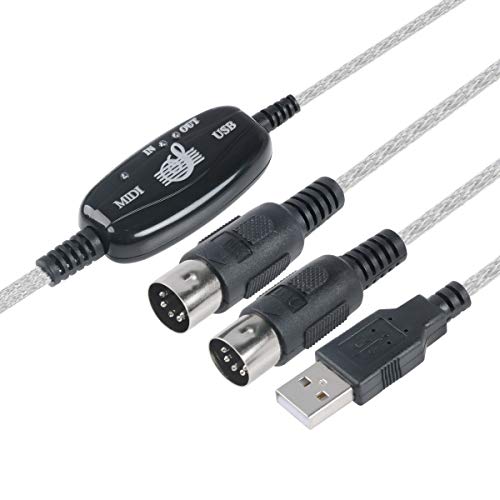
TENINYU provides a USB-to-MIDI cable solution designed to turn a PC into a music studio, with 16-channel input and output support. It emphasizes easy installation and a straightforward plug-and-play experience, though some setups may require both MIDI plugs to be used. LED indicators help monitor power and signal status, aiding troubleshooting during recording sessions. This option suits Mac users who want a simple, cost-effective path to connect MIDI instruments for editing and playback through their preferred software.
NUOSIYA USB to MIDI Cable

NUOSIYA offers a USB-to-MIDI interface with 1 input and 1 output and up to 16 MIDI channels. It highlights wide compatibility across Windows and macOS, with a high-fidelity FTP processing chip intended to preserve audio integrity during MIDI transmission. The design targets a straightforward connection for keyboards and other MIDI devices to your Mac, with a focus on stable data transfer and easy setup, including optional USB-to-Type-C adapters for newer devices.
FORE S1 Wireless MIDI Interface

FORE S1 offers a wireless MIDI interface option designed to reduce cable clutter while maintaining compatibility with iOS, Android, Windows, and macOS. It supports three modes: wireless input, wireless output, and a MIDI-to-USB/Type-C adapter mode for computers. It emphasizes easy pairing, driver-free operation, and quick setup, aiming to provide a flexible solution for modern studios seeking to minimize wired connections without sacrificing timing or reliability. This model is particularly useful for mobile setups or compact workspaces where cable management matters.
Buying Guide: Key Purchase Considerations
- Compatibility: Verify macOS version support and whether the device is compatible with your DAW (Logic Pro X, Ableton Live, FL Studio, etc.). Look for devices listed as plug-and-play with macOS.
- Connection Type: Choose between USB-C for modern Macs or USB-A if you have legacy hardware. Some options also offer wireless capabilities for reduced cable clutter.
- Latency And Throughput: Low-latency MIDI transfer is essential for timing-sensitive recording. Consider chips and design that minimize delay between your keyboard and DAW.
- Channels: Ensure the interface supports enough MIDI in/out channels for your setup (many devices offer 16 channels total).
- Indicators And Diagnostics: LED indicators or status lights help diagnose power and signal status during sessions.
- Ease Of Setup: Look for devices with built-in drivers and clear, simple installation steps to avoid complicated configuration.
- Build Quality: A sturdy cable with reliable shielding reduces susceptibility to interference, especially in busy studio environments.
- Future-Proofing: If you plan to upgrade to newer Mac hardware, consider USB-C options or adapters to ensure long-term compatibility.
- Price vs. Features: Balance essential features such as latency, 16-channel support, and ease of use with your budget.
These considerations help compare options for Mac users across different workflows—whether you rely on extensive MIDI routing for studio production or simple instrument-to-computer setups for practice and composition.