Finding the right USB-C microphone adapter can simplify audio setup for Mac users, whether you’re streaming, recording, or attending online meetings. This guide highlights five top adapters that pair well with Mac mini, MacBook, and other USB-C devices. Each pick supports easy plug-and-play use, clear audio, and broad compatibility with popular apps and hardware.
style=”display:none”>Summary Table
| Product | Brand | Key Benefit |
|---|---|---|
| Sanjyut USB C to Microphone Adapter | Sanjyut | TRRS and separate mic input with charging pass-through |
| SABRENT USB External Stereo Sound Adapter | SABRENT | Driverless, simple USB audio for Mac and PC |
| DUNGZDUZ USB C Mini Microphone | DUNGZDUZ | Compact, plug-and-play condenser mic for Mac mini and MacBook |
| UGREEN USB to 3.5mm Audio Adapter | UGREEN | Hi-Res 24bit/96kHz audio, USB sound card for mic and headphones |
| Runpower External Mic Adapter | Runpower | Type-C to 3.5mm mic for Go Pro and cameras, compact design |
Sanjyut USB C To Microphone Adapter For Live-Streaming

The Sanjyut adapter provides three practical ports in one compact unit: a 3.5mm headphone jack, a 3.5mm microphone jack for professional use with a preamplifier, and a USB-C charging port. It supports charging while in use and is compatible with a wide range of devices, including iPhone, iPad, Galaxy, Google Pixel, Surface Pro, and MacBook Pro/Air. It’s a plug-and-play solution that requires no apps or network setup, simplifying live streams and recording sessions for Mac users.
SABRENT USB External Stereo Sound Adapter

The SABRENT AU-MMSA provides a simple driverless experience for Windows, Mac, and Linux systems. It features USB Type-A, a stereo output jack, and a mono microphone input jack. This bus-powered adapter requires no external power, making it a convenient option for Mac setups without adding clutter or software dependencies. It’s suitable for basic audio input and output needs in everyday computing and media tasks.
DUNGZDUZ USB C Mini Microphone For Mac Mini M4/M4 Pro

Designed for Mac mini M4/M4 Pro and MacBook, this compact USB-C microphone offers plug-and-play setup with hands-free control via Siri when used with MacOS. The device uses a high-sensitivity condenser capsule and premium audio chipset to deliver clear audio for recordings, video calls, and online classes, while minimizing background noise for a steadier sound profile on Mac systems.
UGREEN USB To 3.5mm Jack Audio Adapter

The UGREEN 2-in-1 USB audio adapter supports both listening and talking, with a mic input for line-level devices. It uses a built-in 24bit/96kHz capable DAC for higher-quality sound, though the microphone path is typically 16bit/48kHz. The aluminum shell and nylon braided cable add durability, making it a robust choice for Mac users who need portable, simple USB audio. Note that some microphone specifications depend on the connected device.
Runpower External Mic Adapter For Go Pro And More

This Type-C to 3.5mm microphone adapter is designed for Go Pro Hero models, with a built-in 160dB stereo ADC and a 90° angled connector for compact setups. It provides a reliable plug-and-play workflow with cameras and mobile devices, delivering clearer sound for vlogging and on-the-go recording when paired with compatible Macs or MacBooks used for editing or streaming projects.
LecLooc USB C Microphone Adapter
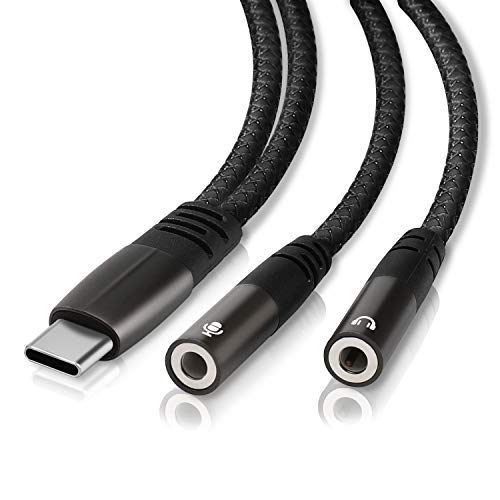
The LecLooc USB C Microphone Adapter offers dual 3.5mm ports for audio and mic, enabling simultaneous listening and recording on USB-C devices. It supports a wide range of devices including iPhone, iPad, MacBook, and various Android phones. Built-in DAC technology aims to deliver Hi-Res audio up to 24bit/96kHz for enhanced music and voice calls, with broad compatibility across Apple and Android ecosystems.
Buying Guide: key considerations for choosing a Mac-friendly USB-C microphone adapter
- Compatibility: Confirm it supports your Mac model (MacBook, Mac mini, MacBook Pro) and the USB-C port version. Check whether the adapter works with MacOS versions you use and with your intended peripherals (headphones, microphones, mixers).
- Input/Output options: Decide if you need a single mic input, a combo mic/headphone, or dual 3.5mm ports. Some models include a USB-C pass-through for charging, which is helpful for laptops with limited ports.
- Audio quality: Look for DAC quality and sampling rates (24bit/96kHz is common for higher fidelity). Note that microphone path quality can vary if the device relies on TRRS vs separate mic input.
- Power and performance: Consider bus-powered devices for portability; ensure your Mac can supply enough power if the adapter includes a charging passthrough or multiple devices.
- Plug-and-play vs software: Many options are driverless, which simplifies setup. Some may require additional apps or drivers for advanced features or better compatibility with certain microphones.
- Durability and build: Aluminum housings and braided cables tend to offer better durability for travel and daily use with Mac gear.
- Use case: Choose based on primary use—live streaming, video conferencing, or field recording. For Go Pro or camera work, ensure the adapter supports the camera’s mic input and works with your Mac editing workflow.
- Price-to-feature balance: Consider how much you need multi-port options versus a simple mic-to-USB-C adapter to avoid overpaying for features you won’t use.
- Warranty and support: Check seller warranties, return policies, and whether there’s reliable customer support for troubleshooting on Mac systems.
These devices offer a range of configurations to support Mac users—from minimal, plug-and-play solutions to multi-port adapters that support both mic and audio output. When selecting, align the features with your recording, streaming, or conferencing needs, and consider future expansion as you upgrade other peripherals.