Discover top-performing mesh Wi-Fi routers that deliver seamless coverage, fast speeds, and reliable connections throughout your home. This guide highlights five strong options from trusted brands, focusing on coverage area, device capacity, and backhaul options to help you choose the right system for your space.
style=”display:none;”>Summary Table of Selected Products
| Product | Brand | Type | Approx. Coverage | Backhaul |
|---|---|---|---|---|
| Deco X55 AX3000 3-Pack | TP-Link | Wi-Fi 6 Mesh System | Up to 6500 sq. ft. | Ethernet Backhaul |
| Deco S4 3-Pack | TP-Link | Wi-Fi Mesh System | Up to 5500 sq. ft. | Ethernet Backhaul |
| Deco XE75 AXE5400 3-Pack | TP-Link | Wi-Fi 6E Mesh System | Up to 7200 sq. ft. | Yes (6 GHz band backhaul) |
| eero 6 3-Pack | eero | Wi-Fi 6 Mesh System | Up to 4500 sq. ft. | Mesh backhaul |
| Orbi 370 Series (RBE373) | NETGEAR | Wi-Fi 7 Mesh System | Up to 6000 sq. ft. | Mesh backhaul |
TP-Link Deco X55 AX3000 3-Pack Review

TP-Link Deco X55 AX3000 3-Pack provides a robust Wi‑Fi 6 mesh solution designed to eliminate dead zones across large homes. Each unit supports AX3000 performance with 2×2 HE160 speeds, and the system can cover up to 6500 square feet with seamless roaming. The trio is capable of connecting many devices—up to around 150—without noticeable slowdowns, making it suitable for busy households with multiple smart devices, streaming devices, and gaming consoles. Ethernet backhaul can be used to maximize speed between nodes, which helps when the internet plan is already fast and wired backhauls are available in the home.
Features to note include Whole Home Wi‑Fi coverage and a mesh architecture that reduces the need for separate extenders. The Deco X55 is marketed as a simpler, more reliable alternative to traditional range extenders, replacing multiple network names with a single network for easy roaming. Setup is designed to be straightforward, often via a mobile app, and the system is scalable by adding more Deco units if needed.
TP-Link Deco S4 Mesh AC1900 Review

The Deco S4 mesh system uses TP-Link’s mesh technology to deliver reliable Wi‑Fi across a home up to about 5500 square feet. The three-unit setup creates a seamless network with a single SSID, eliminating the need to switch networks as you move from room to room. It is designed to outperform traditional routers and range extenders by reducing dead zones and maintaining stable connections for multiple devices. The system also supports Alexa for integrated smart home control, making it convenient for voice-activated tasks and routines in a connected home.
Key considerations include whether your space benefits from a straightforward, value-focused mesh solution and if you prefer a system that works well with smart home ecosystems. While it may not offer Wi‑Fi 6E or ultra-high-end backhaul options, it provides dependable performance for typical households with many connected devices and streaming needs.
TP-Link Deco 7 BE25 Wi-Fi 7 Mesh 3-Pack Review

TP-Link Deco 7 BE25 introduces Wi‑Fi 7 performance in a three-unit mesh system designed to maximize coverage—up to 6,600 square feet—with strong signal propagation. This model emphasizes a multi-link operation (MLO), higher speed capabilities, and the potential for wired backhaul using two 2.5 Gbps WAN/LAN ports per unit. It’s aimed at households with high device counts, including gaming consoles and ultra-fast internet plans, while offering AI‑Roaming and VPN features for enhanced privacy and security. The Deco 7 BE25 supports robust mesh capacity, making it a compelling option for larger homes or tech-forward users.
TP-Link Deco XE75 AXE5400 3-Pack Review

Deco XE75 AXE5400 is a Wi‑Fi 6E mesh system that adds a dedicated 6 GHz band for backhaul, helping reduce interference and improve performance in crowded environments. The tri-band setup presents a combined speed potential around 5400 Mbps and covers up to 7200 square feet, supporting many devices simultaneously. A notable feature is the inclusion of 6 GHz as an optional backhaul and the ability to adapt to network demands with AI‑Driven Mesh capabilities. The system suits homes with many smart devices and newer Wi‑Fi 6E devices seeking less congestion and more stable connections.
eero 6 Mesh Wi-Fi System Review
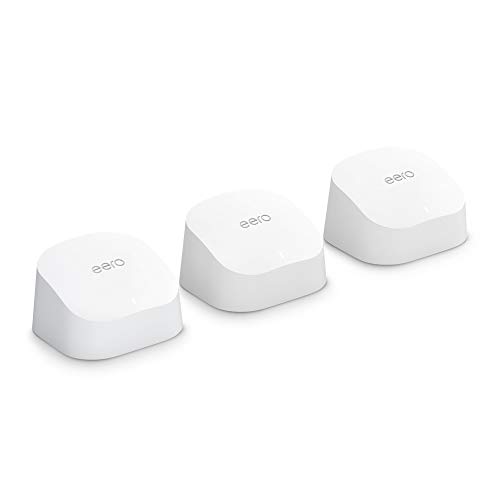
eero 6 is a user-friendly mesh system designed for whole-home coverage up to about 4500 square feet with Wi‑Fi 6 speeds. It focuses on reliability and simple setup, supporting 75+ connected devices. The system is designed to optimize Wi‑Fi coverage in typical homes and can be integrated with Alexa for voice control. It is well-suited for households that prioritize straightforward performance and compatibility with a broad ecosystem of smart devices, rather than pushing the extremes of speed or future-proofing features beyond Wi‑Fi 6.
NETGEAR Orbi 370 Series WiFi 7 Mesh Review

The NETGEAR Orbi 370 Series combines WiFi 7 speeds with broad coverage, delivering up to 6000 square feet for a system that includes a router and two extenders. It emphasizes faster speeds and improved capacity to handle many devices without slowing down. The Orbi line focuses on security features, automatic firmware updates, and built‑in protections to guard against online threats. For households with multiple devices and a desire for robust security, Orbi 370 offers a scalable solution with strong performance and broad compatibility.
Buying Guide: Key Purchase Considerations
- Coverage vs. home size: Match the system’s recommended area to your living space. Larger homes may need 3-pack systems or models with strong backhaul support.
- Wi‑Fi standard and speed: Wi‑Fi 6 offers solid performance for most households; Wi‑Fi 6E adds a 6 GHz band for less interference if your devices support it, while Wi‑Fi 7 promises future-ready performance for busy networks.
- Backhaul options: Ethernet backhaul can boost performance in multi-unit setups, especially in larger homes or where walls are thick.
- Device capacity: Consider the number of connected devices (phones, laptops, smart TVs, IoT devices). Mesh systems with higher capacity provide more stable performance with many devices.
- Ease of setup and management: Mobile app interfaces, roaming behavior, and guest network features can influence daily use and security.
- Security and updates: Look for automatic firmware updates and built‑in security features to protect your network.
- Smart home integration: If you use voice assistants or smart hubs, ensure compatibility with your preferred ecosystem (Alexa, Google Assistant, etc.).
- Wired vs. wireless backhaul: If you have Ethernet wiring, choose models that support wired backhaul to maximize performance.
- Aesthetic and placement: Consider the design and size of nodes, and plan optimal placements to minimize signal loss in hallways and thick walls.
These considerations help compare systems not just by marketed speeds, but by how well they perform in real homes with real devices. When selecting, map your household’s internet plan, number of devices, and layout to the mesh capabilities you prioritize, whether it’s raw speed, ease of use, or advanced security features.