Finding a reliable magnetic stripe reader and writer can streamline access control, transaction processing, and data capture. The following selected products cover a range of capabilities—from full encoding to simple reading—while offering USB or Bluetooth connectivity and compatibility across Windows, macOS, and other platforms. This guide highlights the most relevant options for American buyers seeking durable, plug-and-play solutions.
| Product | Brand | Type | Key Features |
|---|---|---|---|
| MSRX6 MSR X6 USB Swipe Magstripe Credit Card Reader Writer Smallest | Deftun | Reader & Writer | USB connection; encoder; Windows & Mac software; compact size 5.5 x 1.5 x 1.5 inches |
| MSR605X USB Card Reader Writer Mag Swipe 3-Track | Koolrok | Reader & Writer | USB interface; reads/writes 3 tracks; ISO formats; Windows & Mac software |
| Smallest X6BT Bluetooth USB-Powered Card Reader Writer | TNAIVE | Reader & Writer | Bluetooth & USB; 3 tracks; Windows/macOS/Linux compatibility; file-to-write and copy features |
| MSR90 USB Swipe Magnetic Credit Card Reader | Deftun | Reader | Plug-and-play USB keyboard emulation; reads 3 tracks; supports ISO data formats |
| ETEKJOY USB 3-Track Magnetic Stripe Card Reader | ETEKJOY | Reader | USB interface; no software install required to read; supports 3 tracks; Windows, Mac |
MSRX6 MSR X6 USB Swipe Magstripe Reader Writer

The Deftun MSRX6 is a compact magnetic stripe encoder and reader designed for USB connections to computers and laptops. It supports writing and encoding features, and ships with free software for Windows and Mac. Typical use cases include credential creation, membership cards, and basic access control. The device measures about 5.5 by 1.5 by 1.5 inches, making it one of the smallest encoder-capable options on the market. Keep in mind that it does not work with mobile apps like EasyMSR and requires a computer interface for operation.
What to know about this model
- Encoder-enabled for magnetic stripe writing
- USB connection to PC or Mac; no mobile app compatibility
- Free Windows and Mac software provided
- Compact footprint for limited desk space
MSR90 USB Swipe Magnetic Card Reader
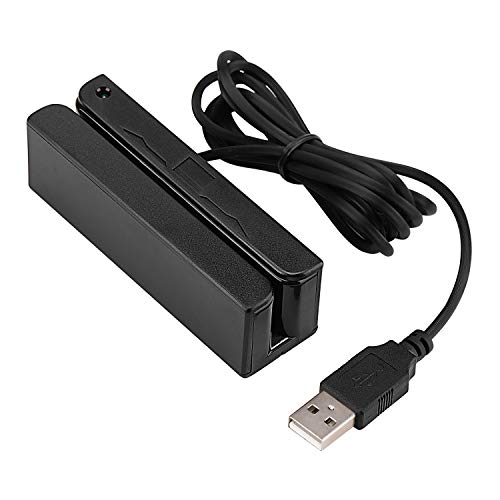
The Deftun MSR90 operates as a USB emulation keyboard, enabling plug-and-play use without drivers. It reads up to three tracks and supports common formats like ISO7811 and AAMVA. It’s designed for straightforward data capture and is often used in point-of-sale systems, loyalty programs, and basic access setups. A built-in LED indicates activity, with a steady green when connected and blinking when a card is swiped. While primarily a reader, its simplicity makes it a reliable option for many environments.
Key considerations
- USB plug-and-play with no driver installation
- Reads all three tracks; supports common card formats
- LED indicator provides swipe status
Symcode Multi-Function Card Reader
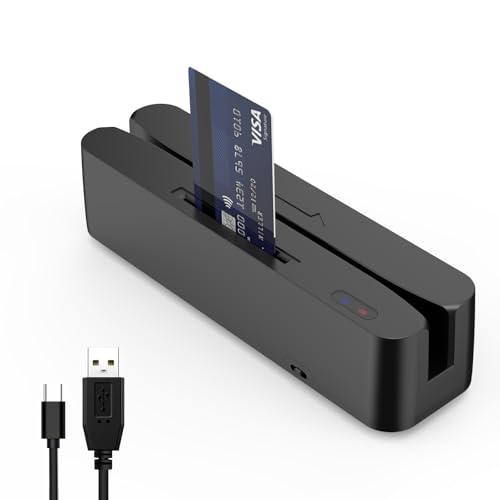
The Symcode reader is described as a magnetic card reader with read-only magnetic stripe capability, not a writer. It can read all three tracks and supports SLE4442 chip cards, with a CPU card command set needed for deeper development. The device includes two status lights and a toggle to control NFC sensing mode. While it does not encode cards, it can be a strong companion for environments prioritizing quick read operations and straightforward integration with cashier systems or kiosks.
Notes on usage
- Read-only magnetic stripe support; not an encoder
- Supports SLE4442 chip cards with optional APDU commands for advanced use
- LED indicators for connection and swipe status
Smallest X6BT Bluetooth USB-Powered Card Writer

The Smallest X6BT combines Bluetooth and USB interfaces in a compact design, enabling write, copy, erase, and file-based operations across tracks 1–3 and both Hi-Co and Lo-Co magnetic cards. It supports multiple operating systems including Windows, macOS, Linux, and Unix, and can save data to files for later use. This model is suitable for mobile or desk-based setups where wireless flexibility is needed without sacrificing encode/write features.
Operational highlights
- Read/write capabilities across all three tracks
- Hi-Co & Lo-Co compatibility
- Cross-platform support and file management features
MSR605X USB Card Reader Writer
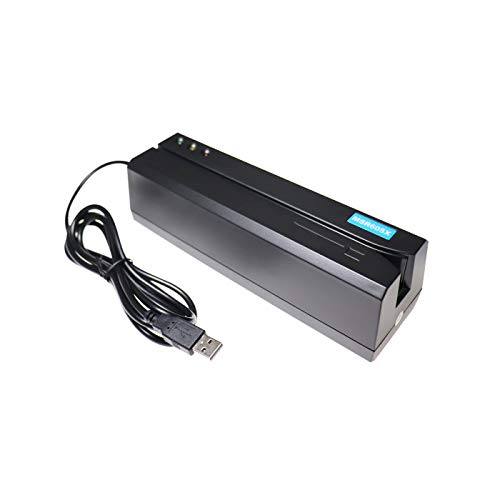
The Koolrok MSR605X offers a USB interface for driving a 3-track reader/writer, compatible with MSR206 and MSR606 devices. It supports all three tracks and ISO data formats, with software packages available for Windows and Mac. This model is widely used for encoding cards in membership systems, access control, and loyalty programs, making it a versatile option for developers and administrators requiring robust card data management.
What to consider
- 3-track writer/reader with USB interface
- ISO-compliant formatting and multi-card compatibility
- Provided software for common desktop platforms
ETEKJOY USB 3-Track Magnetic Stripe Card Reader
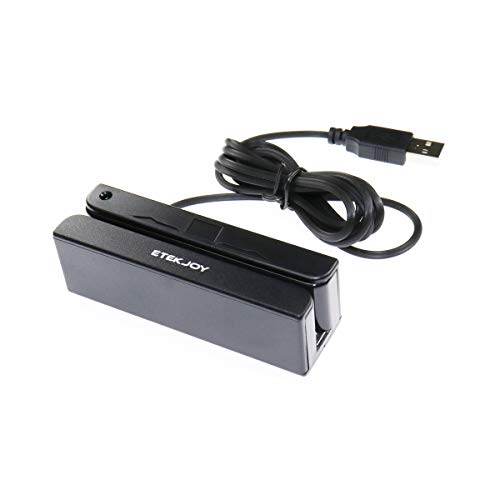
The ETekJOY USB 3-Track Magnetic Stripe Card Reader provides straightforward, driver-free data capture via USB, with additional configuration software for settings adjustments. It reads data from all three tracks and supports ISO7811, AAMVA, and CA DMV card formats. It is designed for Windows, Mac, and other USB-capable systems, and is commonly used with POS systems and data-entry workflows that rely on rapid swiping of magnetic cards.
Key considerations
- Driver-free operation; simple plug-and-play
- Reads all three tracks; broad format support
- Software for advanced configuration available
Buying Guide: Key Purchase Considerations And Comparisons
What to look for in a magnetic stripe reader and writer
- Track support: Most cards use 1–3 tracks. Ensure the device supports the tracks you need.
- Write/encode capability: If you need to create or modify cards, choose a writer/encoder model; otherwise a read-only device suffices for data capture.
- Interface: USB is standard for desktops; Bluetooth or USB-C may be preferable for mobile workflows or modern setups.
- Software compatibility: Look for devices with Windows and macOS support, plus any necessary software for encoding or data management.
- Form factor and durability: Compact devices save desk space; rugged models suit field use.
- Power and portability: USB-powered devices are convenient, especially for laptop users without external power.
Comparing the five highlighted options
- Best for encoding: MSRX6 MSR X6 offers encoding features in a compact USB package, ideal for organizations building or updating magnetic IDs.
- Best for USB plug-and-play reading: MSR90 provides straightforward read-only functionality with a clean LED status indicator, suitable for POS or quick data capture.
- All-around versatility: Smallest X6BT combines Bluetooth and USB write capability with cross-platform support, ideal for mobile or shared workspaces.
- Widely compatible writer: MSR605X offers robust 3-track write capabilities and cross-platform software, widely used in credentialing and access control.
- Budget-friendly read-only option: ETekJOY provides reliable three-track reading with driver-free operation and broad compatibility, suitable for simple data capture tasks.
Practical tips for deployment
- Verify card formats used in your environment (ISO formats, AAMVA, etc.) and confirm compatibility with the device you select.
- Test with sample cards to confirm encoding quality, track integrity, and data reliability before full deployment.
- Consider software licensing and updates for encoding devices to ensure ongoing compatibility with your systems.
- For mobile or field use, prioritize Bluetooth-enabled models and battery independence where possible.